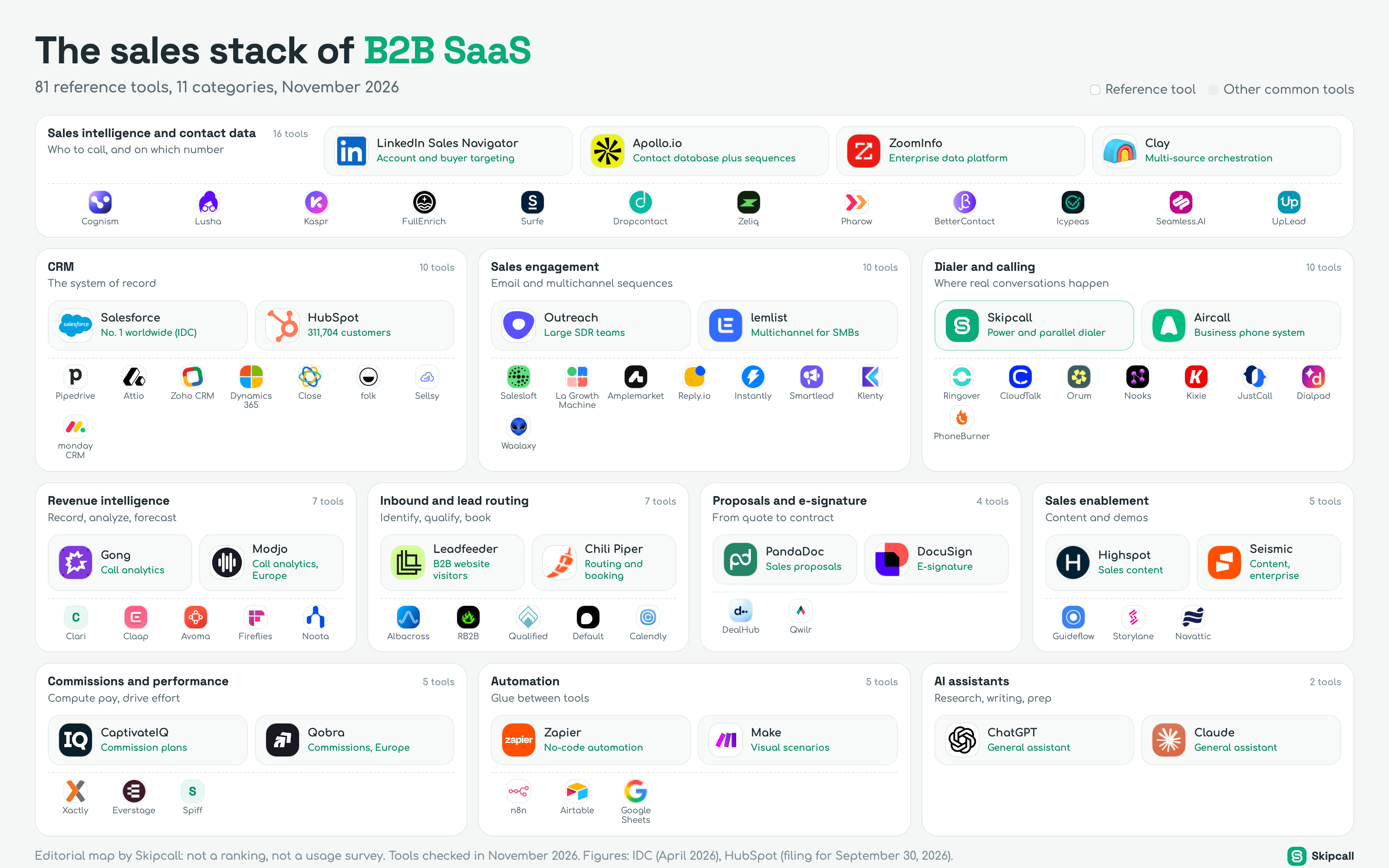
A B2B SaaS sales team no longer runs on one piece of software, it runs on ten. Each one answers a specific question: who to call, on which number, when to follow up, what was said, how much to pay the rep. Here is the map of those tools, sorted into eleven categories, with the reference names in each, wherever your team sells.
The map is the starting point. Below it, each category gets its own section: what the tool does in a rep’s day, when a team actually needs it, how to choose, what it costs when the vendor publishes a price, and the traps buyers fall into. The last part of the article puts it all back together: the stack by team size, a budget per seat, the data flows between tools and a method to audit your own stack in an afternoon.
The sales stack of B2B SaaS
81 reference tools, 11 categories, November 2026
Sales intelligence and contact data
16 toolsWho to call, and on which number
 LinkedIn Sales NavigatorAccount and buyer targeting
 Apollo.ioContact database plus sequences
 ZoomInfoEnterprise data platform
 ClayMulti-source orchestration
Cognism
 Lusha
 Kaspr
 FullEnrich
 Surfe
 Dropcontact
 Zeliq
 Pharow
 BetterContact
 Icypeas
 Seamless.AI
 UpLead
CRM
10 toolsThe system of record
 SalesforceNo. 1 worldwide (IDC)
 HubSpot311,704 customers
 Pipedrive
 Attio
 Zoho CRM
 Dynamics 365
 Close
 folk
 Sellsy
 monday CRM
Sales engagement
10 toolsEmail and multichannel sequences
 OutreachLarge SDR teams
 lemlistMultichannel for SMBs
 Salesloft
 La Growth Machine
 Amplemarket
 Reply.io
 Instantly
 Smartlead
 Klenty
 Waalaxy
Dialer and calling
10 toolsWhere real conversations happen
 SkipcallPower and parallel dialer
 AircallBusiness phone system
 Ringover
 CloudTalk
 Orum
 Nooks
 Kixie
 JustCall
 Dialpad
 PhoneBurner
Revenue intelligence
7 toolsRecord, analyze, forecast
 GongCall analytics
 ModjoCall analytics, Europe
- CClari
 Claap
 Avoma
 Fireflies
 Noota
Inbound and lead routing
7 toolsIdentify, qualify, book
 LeadfeederB2B website visitors
 Chili PiperRouting and booking
 Albacross
 RB2B
 Qualified
 Default
Calendly
Proposals and e-signature
4 toolsFrom quote to contract
 PandaDocSales proposals
 DocuSignE-signature
 DealHub
 Qwilr
Sales enablement
5 toolsContent and demos
 HighspotSales content
 SeismicContent, enterprise
 Guideflow
 Storylane
 Navattic
Commissions and performance
5 toolsCompute pay, drive effort
 CaptivateIQCommission plans
 QobraCommissions, Europe
 Xactly
 Everstage
- SSpiff
Automation
5 toolsGlue between tools
 ZapierNo-code automation
MakeVisual scenarios
 n8n
 Airtable
 Google Sheets
AI assistants
2 toolsResearch, writing, prep
 ChatGPTGeneral assistant
 ClaudeGeneral assistant
How to read this map
The map follows the path of a prospect through your pipeline. Read it from top to bottom, in three layers.
- 01
Find:
Sales intelligence and contact data sit at the top. Their job is to tell the rep which accounts to work, who the buyers are and which numbers and emails reach them.
- 02
Engage:
In the middle are the three tools a rep lives in every day: the CRM, the sequencing tool and the dialer. This is where conversations are created and recorded.
- 03
Measure and reward:
Around them sit the tools that analyze, speed up or pay for the work: conversation intelligence, inbound routing, proposals and e-signature, enablement content, commissions, then automation and AI assistants that tie the rest together.
In each category, the large tiles mark the reference tools: the ones a buyer will almost certainly run into when comparing. The small tiles list other common tools. This is not a ranking: we do not have usage data per tool, and we do not make it up.
Sales intelligence and contact data: who to call, on which number
This is the first tool a rep opens in the morning and the most crowded category on the map. It answers two questions in turn. First, targeting: which companies match your ideal customer profile, and who inside them signs, uses or blocks the purchase. Second, contact data: the direct email and, above all for a calling team, the mobile number or direct line of that person.
LinkedIn Sales Navigator is how most teams handle targeting. Apollo.io and ZoomInfo supply contact details at scale, the first for small and mid-size teams, the second for enterprise accounts with a data contract sold on quote. Cognism, Lusha and Kaspr are strong in Europe; Cognism acquired Kaspr in 2022. Clay, FullEnrich and BetterContact query several databases in a row, which is what people call waterfall enrichment.
When to add it. From day one. Even a founder selling alone needs a reliable source of numbers, and buying a single source before testing several is the most common early mistake.
LinkedIn Sales Navigator
- Best for
- Account and buyer targeting, job change alerts
- Contact data
- None: it finds people, not their phone numbers
- Watch out
- Exporting lists is restricted; pair it with an enrichment tool
Apollo.io
- Best for
- Small and mid-size teams that want data plus sequences
- Published price
- Basic from $49 per seat a month, annual billing
- Watch out
- Credits are pooled and do not roll over to the next cycle
ZoomInfo
- Best for
- Enterprise teams, North American coverage
- Published price
- On quote
- Watch out
- Annual contracts; negotiate credits and seats separately
Clay
- Best for
- RevOps teams that build their own enrichment waterfalls
- Pricing model
- Credits per action, no charge when a lookup returns nothing
- Watch out
- Powerful but technical; someone has to own the tables
How to choose. Coverage is local. A provider can find mobiles for most of your contacts in one country and a fraction in the next. The only reliable test is your own list: take 100 contacts from your real target, run them through two or three providers and count the numbers that actually connect to the right person.
Those per-number costs look close. What separates them is the share of numbers that are right, the refund policy on wrong ones and whether you pay when nothing is found. Our phone enrichment pricing comparison turns each provider’s price into a cost per conversation and per meeting, and the coverage map by country shows where each one has published or observed results. If you are unsure where to start, the which data provider quiz suggests two or three names based on your market and budget. To go further on chaining several sources, read our waterfall enrichment tools comparison.
CRM: the system of record
Everything else plugs into the CRM. It holds the accounts, the contacts, the deals and the history of every touch. For a rep, it is the to-do list and the memory of every past conversation; for a manager, it is the pipeline and the forecast; for finance, it is the source of commissions.
Salesforce is still the largest CRM vendor in the world according to IDC’s ranking published in April 2026, and dominates enterprise accounts. HubSpot reported 311,704 customers as of September 30, 2026, up 12% year over year according to its quarterly filing, driven by its entry-level plans. Pipedrive and Attio appeal to teams that want a simple or highly customizable CRM; Zoho CRM and Microsoft Dynamics 365 follow companies already invested in those vendors’ other products; Close is built around calling and email for small inside sales teams.
| CRM | Best for | Entry price reported (Nov. 2026) | Watch out |
|---|---|---|---|
| Salesforce Sales Cloud Enterprise standard | Complex processes, large teams, heavy customization | Starter at $25 per user a month; Enterprise listed between $165 and $175 depending on the source | Implementation and admin often cost more than the licenses |
| HubSpot Sales Hub SMB and mid-market | Teams that want marketing and sales in one place | Professional at $90 per seat a month on annual billing, per HubSpot | Onboarding fees on higher tiers |
| Pipedrive Pipeline first | Small teams that want a visual pipeline fast | Lite at $14, Growth at $39 per seat a month, annual billing | Add-ons (campaigns, web visitors) billed on top |
| Attio Data model first | Startups that want to shape objects and views | Free plan, paid plans per seat | Younger ecosystem of integrations |
How to choose. Do not compare feature lists, compare what reaches the record without anyone typing it. Every call should log itself with its outcome, recording and summary; every email and meeting should attach to the right contact; every deal stage change should be dated. Skipcall integrates with HubSpot, Pipedrive, Salesforce and Attio: calls are placed from Skipcall and the CRM record is updated after each one. For a side-by-side view from the SDR’s chair, read our CRM comparison for SDRs.
A CRM is only as good as what reaches it without anyone typing.
The trap. Over-customizing too early. A team of five that builds forty custom fields and twelve pipeline stages ends up with a CRM nobody updates. Start with the stages your buyers actually go through, and add fields only when a report needs them.
Sales engagement: sequences
Sequencing tools orchestrate follow-ups. A rep enrolls a contact, and the tool schedules the steps: a first email, a LinkedIn visit, a call task on day three, a second email on day five. The rep’s day becomes a queue of due tasks rather than a memory exercise. Three families share this category.
Apollo.io and Amplemarket combine a database with sequences, which often makes them the first tool a small team buys. Reply.io and Klenty sit in between, with sequences across email, calls and LinkedIn.
- Each rep follows up with more than a few dozen prospects a week.
- Managers need to see which steps produce replies and meetings.
- Several reps work the same accounts and must not collide.
- Deliverability: sending volume without warm-up and domain hygiene burns your domain.
- Call steps that create a task but leave the rep dialing by hand.
- Sequences so long that the prospect hears from you for two months without a real conversation.
How to choose. Start from the channel that books your meetings. If calls do, the sequencing tool must hand call steps to a dialer without friction, or the dialer must carry its own sequences. Skipcall includes sequences for that reason: call, voicemail drop, SMS and email steps run from the same place the rep dials from. To design the cadence itself before automating it, start with the sales cadence generator.
Dialer and calling: where real conversations happen
This is the category many teams skip. They buy data and sequences, then dial from a softphone or a cell phone, one number after another, typing each one or clicking it in the CRM. The rep spends most of the hour listening to ring tones and voicemail greetings. Three families of tools live here, and they are not interchangeable.
| Family | What it does | Lines dialed at once | Built for |
|---|---|---|---|
| Business phone system Aircall, Ringover, CloudTalk, Dialpad, JustCall | Phone lines, softphone, call routing, history | One, manually | The whole company, inbound and outbound |
| Power dialer PhoneBurner, Kixie, Skipcall | Calls the next number automatically when the previous call ends | One, automatically | Reps working a list at volume |
| Parallel dialer Skipcall, Orum, Nooks | Calls several numbers at once and connects the rep to whoever picks up | Several (up to four with Skipcall) | SDR teams whose job is to create conversations |
Skipcall, our product
Best for: B2B teams whose meetings come from the phone and who want power and parallel dialing, call recording and CRM sync in one tool.
Skipcall belongs to the last two families: a parallel dialer on up to four lines, a power dialer, AI voicemail detection with prerecorded voicemail drop, recording and transcription, AI call summaries, sequences, SMS, a web and mobile app and integrations with HubSpot, Pipedrive, Salesforce and Attio. It is our product. Plans with the dialers start from $70 per user per month (pricing). Skipcall is an outbound tool: it does not include an IVR, inbound call queues or a voice agent, so a company that needs a full inbound switchboard keeps a business phone system next to it.
How to choose. Ask three questions. How many conversations do your reps need per day, and how many numbers does that take at your connect rate? Do your prospects answer mobiles or switchboards? And what happens after the call: are the outcome, the recording and the summary on the CRM record without a click? To find out which type of dialer fits your team, take the which dialer quiz, compare options in our sales dialer software guide and our parallel dialer comparison, then estimate the effect on your numbers with the cost per meeting calculator.
Revenue intelligence: record, analyze, forecast
Conversation intelligence tools record calls and video meetings, transcribe them, spot topics, objections and competitor mentions, and give managers a way to coach without sitting next to each rep. Forecasting tools read the CRM and the activity data to estimate what will close this quarter.
Gong is the reference for sales conversation intelligence. Modjo and Claap are well established in Europe; Avoma, Fireflies and Noota cover meeting notes and summaries for smaller budgets. Clari started as a forecasting tool and now sits with Salesloft after their merger closed on December 3, 2025.
When to add it. When a manager can no longer listen to enough calls to coach, or when the forecast becomes a weekly argument. Before that, start with what you already have.
- 01
Record every call:
If your dialer records and transcribes, the raw material for coaching already exists. Skipcall stores recordings, transcripts and AI summaries on each call.
- 02
Pick five calls a week:
One booked meeting, one lost opportunity, one objection the rep could not handle, two random calls. Listen together for thirty minutes, with a call scorecard to keep the feedback concrete.
- 03
Add a dedicated tool when the volume outgrows you:
When you need trends across hundreds of calls, deal risk alerts or a forecast model, a revenue intelligence platform earns its place.
For a comparison of transcription options at every budget, read our call transcription software comparison and our guide to AI call transcription and summaries.
Inbound and lead routing
Outbound teams often forget that some of their best prospects arrive on their own: a demo request, a pricing page visit, a webinar sign-up. This category turns those signals into booked meetings before the prospect cools down.
Calendly’s Teams plan is listed at $16 per seat a month on annual billing. Chili Piper changed its pricing model in 2026, moving towards bundled annual tiers, so compare on a written quote rather than on older per-user figures found online.
What matters more than the tool. Response time. A lead who asked for a demo and hears back the next morning has often booked with a competitor. Measure what a late callback costs you with our speed to lead calculator, then decide whether you need routing software or simply a rule that the on-duty rep calls back within minutes.
Proposals and e-signature
Once the buyer says yes in principle, the deal moves to paper. Proposal tools build branded quotes with pricing tables, track when the buyer opens them and collect the signature. CPQ tools (configure, price, quote) add product rules and approval workflows for complex catalogs.
PandaDoc
- Best for
- Sales proposals with pricing tables and signature
- Published price
- Starter $19, Business $49 per seat a month, annual billing
- Watch out
- Check document limits and overage terms on lower plans
DocuSign
- Best for
- E-signature that legal and procurement already accept
- Pricing model
- Self-serve plans with an envelope allowance per user
- Watch out
- Envelope caps on self-serve plans
DealHub
- Best for
- CPQ for multi-product offers with discount approvals
- Pricing model
- On quote
- Watch out
- Only worth it once the catalog is genuinely complex
Qwilr
- Best for
- Web-page proposals with interactive pricing
- Pricing model
- Per user
- Watch out
- Buyers in regulated sectors may still ask for a PDF
When to add it. For a SaaS with simple pricing, a proposal template and an e-signature tool go a long way, and many CRMs include basic quotes. Add a CPQ only when discounting rules, bundles or approval chains start to slow deals down. To see what a discount really costs your margin before you send the quote, use the discount and margin calculator.
Sales enablement: content and demos
Enablement tools make sure the rep has the right deck, case study or battle card at the right moment, and that marketing knows which content actually helps close. A newer family builds interactive product demos that a prospect can click through before or after a call.
- Highspot and Seismic organize sales content for large teams, with search, analytics and guided selling.
- Worth it when you have dozens of assets, several segments and reps who cannot find the right version.
- Guideflow, Storylane and Navattic capture your product into clickable demos.
- Used by SaaS teams to show the product in an email, after a cold call, without booking a video meeting.
The best enablement content is the answer to the objection your reps heard yesterday.
When to add it. A small team does fine with a shared folder and a one-page battle card per competitor. The trigger for a platform is chaos: outdated decks in circulation, reps rewriting the same email, no idea which case study helped. For objection practice, our free objection handling trainer is a good warm-up before calling sessions.
Commissions and performance
Commission software reads closed deals from the CRM, applies the compensation plan (rates, accelerators, splits, clawbacks) and shows each rep what they have earned in real time. It replaces the spreadsheet that finance rebuilds every month and that reps do not trust.
CaptivateIQ, Xactly and Everstage are common in North America; Qobra is widespread among European SaaS companies; Spiff has belonged to Salesforce since February 2024.
Add it when: your plan has more than two components, more than ten people are paid on variable, or commission disputes take more than a day a month.
The trap. Buying software to fix a plan that is too complex. If reps cannot explain their own plan in one sentence, simplify the plan first. Test it with our SDR variable pay simulator and check that quotas are realistic with the sales quota calculator.
Automation and AI assistants
These last two categories do not belong to one step of the funnel: they connect and accelerate the others. Zapier, Make and n8n move data between tools when no direct integration exists: a form submission creates a CRM contact, a booked meeting posts to Slack, a closed deal triggers an onboarding email. Airtable and Google Sheets often serve as the scratch pad in between.
ChatGPT and Claude have become the rep’s research assistant: summarize an account before a call, draft a follow-up from call notes, prepare objection answers for a new segment. Skipcall also connects to Claude through MCP, so you can query your calls and contacts in plain language, for example to list the prospects who asked for a callback this week.
The stack by team size
The map shows everything a sales organization can buy. No team needs all of it at once. Here is how stacks typically grow, from the founder-led team to the sales floor.
1 to 3 reps
- Data
- One provider tested on your list, plus Sales Navigator
- CRM
- HubSpot, Pipedrive or Attio on an entry plan
- Engagement and calling
- A dialer with built-in sequences, or Apollo plus a dialer
- Add next
- A scheduling link and a proposal template
5 to 15 reps
- Data
- Two providers or a waterfall, refreshed every quarter
- CRM
- Same CRM, with clean stages and required fields
- Engagement and calling
- Dedicated sequencing tool plus a parallel or power dialer
- Add next
- Call recording reviews, lead routing, commission tracking
50 reps and more
- Data
- Enterprise data contract plus a waterfall for gaps
- CRM
- Salesforce or HubSpot Enterprise with an admin
- Engagement and calling
- Engagement platform, dialers per team, governance
- Add next
- Revenue intelligence, enablement, CPQ, commission software
The order matters more than the brands. A team of three with a sequencing platform, a conversation intelligence tool and no reliable data source has its stack upside down. For a step-by-step method to build each layer, read our sales tech stack guide; for the outbound-only view of an SDR agency, our outbound sales stack. To size the team itself, the sales team size calculator works from your targets.
What a stack costs per rep
Most vendors publish an entry price; enterprise editions are sold on quote. The table below gathers list prices as published by vendors or reported by buyer guides, checked in November 2026, on annual billing unless stated. They are a starting point for a budget, not a quote.
| Category | Example | List price per seat | Note |
|---|---|---|---|
| Contact data Apollo.io Basic | $49 a month | Credits pooled, no rollover | |
| CRM Pipedrive Growth | $39 a month | HubSpot Sales Hub Professional: $90 | |
| Dialer and sequences Skipcall | From $70 a month | Power and parallel dialer, recording, CRM sync | |
| Scheduling Calendly Teams | $16 a month | Routing tools sold separately | |
| Proposals PandaDoc Starter | $19 a month | Business plan: $49 | |
| Revenue intelligence Gong | Not published | Estimates around $1,300 to $1,900 a year plus platform fee |
Two costs never appear on pricing pages. The first is time: every tool needs an owner, an onboarding and a monthly check that data still flows. The second is wasted seats: licenses bought for reps who left or never adopted the tool. In most audits, the cheapest saving is not a cheaper vendor but the seats nobody uses. To compare the stack’s cost with what a meeting is worth, run the numbers in the cost per meeting calculator and the sales rep ROI calculator.
How data flows between the tools
A stack is not a list of subscriptions, it is a set of pipes. When one pipe leaks, reps start copying data by hand and the CRM stops reflecting reality. Map the flows before you add a tool.
- 01
Data into the CRM:
Enriched contacts enter the CRM with their source and enrichment date, so you know later which provider supplied which number.
- 02
CRM into sequences and the dialer:
Lists are built from CRM views, not from spreadsheets, so a contact who became a customer yesterday does not receive a cold call today.
- 03
Calls and emails back into the CRM:
Every call logs its outcome, duration, recording and summary on the contact and the deal. Every wrong number is flagged so it is not called again.
- 04
CRM into the downstream tools:
Closed deals feed commission software, meetings feed conversation intelligence, deal stages feed the forecast.
Common mistakes when building a sales stack
How to audit your stack in an afternoon
Once a year, and before any multi-year renewal, take an afternoon to look at the whole stack with fresh eyes. The method below needs a spreadsheet, your billing exports and the admin panels of your main tools.
- 01
List every tool and its owner:
Include the small ones paid by card. A tool without an owner is the first candidate for removal.
- 02
Compute the cost per active seat:
Divide the annual cost by the number of people who logged in during the last 30 days, not by the number of licenses.
- 03
Draw the data flows:
For each tool, note what it reads from the CRM and what it writes back. Look for fields written by two tools and data copied by hand.
- 04
Tie each tool to a number:
Data to connect rate, dialer to conversations per hour, sequences to reply rate, routing to response time. A tool you cannot tie to a number is a habit, not an investment.
- 05
Decide: keep, merge or cut:
Merge overlapping tools, cut unused seats, and only then consider what is missing.
To see how much selling time your reps lose to admin work and tool switching, the selling time calculator gives a quick estimate.
The map, sector by sector
A sales stack changes with what you sell. We built this map for five sectors where outbound calling still matters, each with its own categories and tools:
- Construction: project leads, estimating, specification and bids;
- Logistics and freight: load boards, transport management and quoting;
- Staffing agencies: staffing software, hiring signals and selling to client accounts;
- Manufacturing: configure-price-quote, distributor networks and technical selling;
- Wholesale distribution: repeat orders, B2B ecommerce and win-back calls to dormant accounts.
What the map says about the market
Categories are consolidating. Clari and Salesloft merged, Cognism bought Kaspr, Salesforce bought Spiff, Leadfeeder and Echobot became Dealfront. Suites promise to do everything; specialist tools usually stay deeper in their own category. Expect more of these deals, and read the integration roadmap of any tool that has just been acquired.
Data is fragmenting. No provider covers every country well. Hence the rise of tools that query several databases in a row, and the value of merging your own exports before paying twice for the same contact.
Calling is still the most underused lever. Teams keep adding tools around email, while the number of conversations per hour depends first on the dialer and on the quality of the numbers it calls.