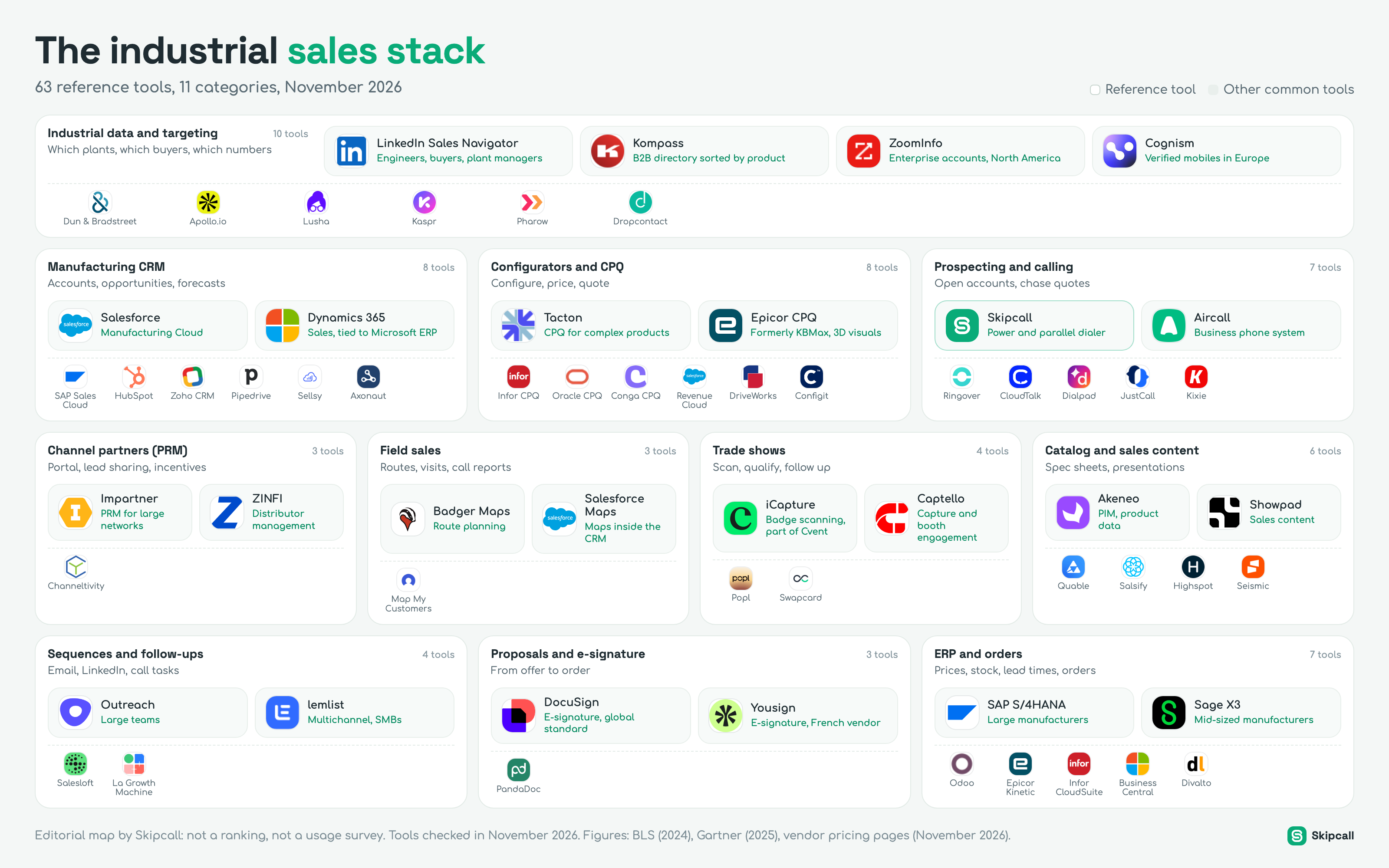
A manufacturer does not sell like a software company. Its offers have to be configured, its prices are calculated, part of its revenue flows through distributors, its best contacts are made at trade shows, and its reps spend part of the week on the road. The sales stack follows those realities: next to the CRM and the phone, you find configurators, partner portals, badge scanning apps and the ERP, which holds the prices and lead times a rep has to promise.
Here is the map of those tools, sorted into eleven categories, with the reference names in each. Below the map, every category gets its own section: what the tool does in an industrial rep’s week, when a team actually needs it, how to choose, what it costs when the vendor publishes a price, and the traps buyers fall into. The last part puts it all in order: the stack by team size, a budget per rep, how data flows between the CRM and the ERP, and an audit method.
The industrial sales stack
63 reference tools, 11 categories, November 2026
Industrial data and targeting
10 toolsWhich plants, which buyers, which numbers
 LinkedIn Sales NavigatorEngineers, buyers, plant managers
 KompassB2B directory sorted by product
 ZoomInfoEnterprise accounts, North America
CognismVerified mobiles in Europe
 Dun & Bradstreet
 Apollo.io
 Lusha
 Kaspr
 Pharow
 Dropcontact
Manufacturing CRM
8 toolsAccounts, opportunities, forecasts
 SalesforceManufacturing Cloud
 Dynamics 365Sales, tied to Microsoft ERP
 SAP Sales Cloud
 HubSpot
 Zoho CRM
 Pipedrive
 Sellsy
 Axonaut
Configurators and CPQ
8 toolsConfigure, price, quote
 TactonCPQ for complex products
 Epicor CPQFormerly KBMax, 3D visuals
 Infor CPQ
 Oracle CPQ
 Conga CPQ
- Revenue Cloud
 DriveWorks
 Configit
Prospecting and calling
7 toolsOpen accounts, chase quotes
 SkipcallPower and parallel dialer
 AircallBusiness phone system
 Ringover
 CloudTalk
 Dialpad
 JustCall
 Kixie
Channel partners (PRM)
3 toolsPortal, lead sharing, incentives
 ImpartnerPRM for large networks
 ZINFIDistributor management
 Channeltivity
Field sales
3 toolsRoutes, visits, call reports
 Badger MapsRoute planning
- Salesforce MapsMaps inside the CRM
 Map My Customers
Trade shows
4 toolsScan, qualify, follow up
 iCaptureBadge scanning, part of Cvent
 CaptelloCapture and booth engagement
 Popl
 Swapcard
Catalog and sales content
6 toolsSpec sheets, presentations
 AkeneoPIM, product data
 ShowpadSales content
 Quable
 Salsify
 Highspot
 Seismic
Sequences and follow-ups
4 toolsEmail, LinkedIn, call tasks
 OutreachLarge teams
 lemlistMultichannel, SMBs
 Salesloft
 La Growth Machine
Proposals and e-signature
3 toolsFrom offer to order
 DocuSignE-signature, global standard
 YousignE-signature, French vendor
 PandaDoc
ERP and orders
7 toolsPrices, stock, lead times, orders
- SAP S/4HANALarge manufacturers
 Sage X3Mid-sized manufacturers
 Odoo
- Epicor Kinetic
- Infor CloudSuite
- Business Central
 Divalto
How to read this map
The map follows the path of an industrial deal, from the first time you spot a plant to the order entered in the ERP. It reads in four layers.
- 01
Spot:
At the top, targeting data: which plants make, buy or install what you sell, who decides there (buyer, plant manager, engineering) and how to reach them.
- 02
Open and follow up:
In the middle, the CRM, the configurator and calling: this is where the deal is created, the offer is priced and the rep follows up.
- 03
Extend your reach:
Around them, the tools that extend the sales force beyond salaried reps: the partner portal, field sales, trade shows, the catalog and sales content.
- 04
Close:
At the bottom, follow-up sequences, proposals and e-signature, then the ERP, which turns the offer into an order and feeds the CRM in return.
In each category, the large tiles mark the reference tools: the ones a manufacturer will almost certainly run into when comparing. The small tiles list other common tools. This is not a ranking: we do not have usage data per tool, and we do not make it up.
Industrial selling in numbers
Before getting into the tools, three data points set the scale of the topic and the place of the rep in an industrial purchase in 2026.
The US Bureau of Labor Statistics counted 1,613,600 wholesale and manufacturing sales representative jobs in 2024, including about 303,200 in technical and scientific products. Median pay for those technical reps reached $100,070 in May 2024, against $66,780 for the others: technical selling is expensive, and every rep hour lost hunting for a phone number or a price eats into margin.
Gartner’s two surveys tell the same story. Buyers want to move through discovery on their own, compare online, configure by themselves when they can. But when it is time to decide on a product that commits a production line, they want an expert. For the stack, that has two consequences: you need tools that let the buyer move forward alone (catalog, configurator, portal), and tools that let the rep step in quickly and at the right time (an up-to-date CRM, the phone, quote follow-up).
The industrial rep is no longer the only way in. They are still the expert buyers call to decide.
Industrial data and targeting: which plants, which buyers
Industrial prospecting starts with a question most B2B databases handle poorly: which plant makes what. A NAICS or SIC code says a company is in “machinery manufacturing”, not that it machines aluminum, runs 500-ton presses or is looking for a new seal supplier. A manufacturer’s targeting therefore combines three sources: a directory sorted by product, a people search tool and a contact data provider.
Kompass is the long-standing B2B directory of industry. Its about page claims 57 million companies and 85 million contacts, classified with its own taxonomy, finer than standard industry codes, with a 7-day free trial. Dun & Bradstreet provides financial data and parent-subsidiary links, useful to map a group with many plants. LinkedIn Sales Navigator finds the people: manufacturing engineers, buyers, maintenance managers, plant managers. ZoomInfo covers large North American accounts well; Cognism, Lusha and Kaspr are strong in Europe (Cognism acquired Kaspr in 2022); Apollo.io covers small and mid-sized teams with data plus sequences.
Kompass
- Best for
- Finding plants by product made or bought
- Claimed volume
- 57 million companies, 85 million contacts
- Watch out
- Check contact freshness before a calling campaign
LinkedIn Sales Navigator
- Best for
- Finding buyers, engineers and plant managers
- Contact data
- None: it finds people, not their numbers
- Watch out
- Shop floor and maintenance profiles are thinner there
ZoomInfo
- Best for
- Large industrial accounts, North American coverage
- Published price
- On quote
- Watch out
- Annual contracts; weaker on small European plants
Cognism
- Best for
- Decision-maker mobiles in Europe
- Published price
- On quote
- Watch out
- Test on your own accounts, coverage varies by country
When to add it. From the very first prospecting plan. But buying a database is not step one: step one is the list of products or processes that signal a good customer. A conveyor maker does not target “food and beverage”, it targets plants with a packaging line and more than fifty people in production.
How to choose. Coverage is local and sector-specific. A provider that finds buyer mobiles at a mid-sized Midwest manufacturer may find nothing at a forty-person precision machining shop. The only reliable test is your own file: take 100 contacts from your real target, run them through two or three providers and count the numbers that actually reach the right person. Our coverage map by country shows where each provider has published or observed results, and our comparison of waterfall enrichment tools explains how to chain several sources.
Manufacturing CRM: accounts, deals and forecasts
In manufacturing, the CRM has to hold a heavier reality than in SaaS. An account is often a group with several plants, each with its own buyers, installed base and contracts. A deal can run eighteen months, go through a tender, and then turn into repeat orders for years. The rep needs to see on one record what the customer already bought, at what price, what is in production and what the local distributor has sold.
| CRM | Best for | Price checked (Nov. 2026) | Watch out |
|---|---|---|---|
| Salesforce Manufacturing Cloud The industry-specific reference | Large groups, sales agreements, volume forecasts | From $275 per user per month billed annually, Salesforce pricing page | The ERP integration is a project of its own |
| Microsoft Dynamics 365 Sales Close to the Microsoft ERP | Companies already on Dynamics or Business Central | Enterprise around $105 per user per month according to licensing guides | Licenses and add-ons need careful combining |
| SAP Sales Cloud The choice of SAP plants | Groups running SAP S/4HANA | On quote | Heavy project, integrator required |
| HubSpot, Pipedrive, Zoho General CRMs | Smaller manufacturers, teams of 2 to 20 reps | From $14 to $90 per seat per month depending on the plan | Plan the ERP link from day one |
Salesforce lists Manufacturing Cloud from $275 per user per month billed annually for the Sales Core and Service Core editions, and up to $700 for Sales and Service Max. The product adds sales agreements (volumes and prices negotiated over a period), account forecasts and installed base management to the CRM. Microsoft Dynamics 365 is often chosen by companies whose ERP already runs on Microsoft; SAP Sales Cloud by those running SAP. Smaller manufacturers frequently start from a general CRM such as HubSpot, Pipedrive or Zoho CRM.
How to choose. Do not compare demo features, compare the ERP link. Ask every vendor and your integrator three questions: does the customer’s net price flow into the CRM automatically? Does the rep see stock and lead time before promising a date? Does the ERP order history show on the account record? If the answer is “through a weekly export”, your reps will keep calling customer service to check a lead time. For a prospecting rep’s point of view, also read our guide to the best CRMs for SDRs.
A manufacturing CRM is only as good as what it pulls from the ERP.
The trap. Rebuilding the catalog inside the CRM. Some teams type hundreds of SKUs and prices into the CRM by hand, then find out six months later that prices changed in the ERP. The catalog has one owner, the ERP or the PIM; the CRM reads it.
Configurators and CPQ: configure, price, quote
This is the block that sets a manufacturer’s stack apart the most. When a product has dozens of options, compatibility rules (this motor does not fit that frame), manufacturing constraints and a price that depends on all of it, the quote becomes the bottleneck of the sale. CPQ, for configure, price, quote, encodes those rules so a rep, a distributor or even the customer can produce a correct, priced and documented offer without waiting for engineering.
Tacton specializes in complex manufactured products; the vendor says it was named a Leader in Gartner’s Magic Quadrant for CPQ Applications in January 2026, for the fourth year in a row, and it announced in late 2025 a combination with Variantum, a specialist in configured manufacturing bills of materials. Epicor CPQ, the former KBMax acquired in 2021, focuses on 3D visualization of the configured product. Infor, Oracle and Conga also claim a Leader position in the 2026 edition of the same report; Conga took over PROS’s CPQ offering. At Salesforce, legacy CPQ has been in end of sale since March 19, 2025: new customers are steered to Revenue Cloud, existing customers can renew. DriveWorks, widely used with SOLIDWORKS, generates 3D models and drawings from configuration rules; Configit comes from highly variable products such as automotive. ServiceNow announced the acquisition of Logik.ai in April 2025.
- A quote takes days because only two or three experts know how to configure.
- Configuration or pricing errors show up on the shop floor or at invoicing.
- Distributors send you price requests that you re-key.
- Discounts are granted case by case, with no rule or approval.
- The project is modeling product rules, not installing software: budget engineering time.
- Prices are almost always on quote, and CRM and ERP integration often outweighs licenses.
- A CPQ that does not read ERP prices creates a second source of truth.
- Migrating off legacy Salesforce CPQ needs planning: renewals are allowed, new features are not coming.
When to add it. Earlier than you might think in manufacturing, later than vendors suggest. A small manufacturer with a simple range does fine with quote templates in its CRM or ERP. CPQ pays off when configuration is the real brake on the sales cycle, and when the distributor network has to be able to quote on its own. To test the impact of a discount on your margin before coding it into a CPQ, use the discount and margin calculator.
Prospecting and calling: open accounts, chase quotes
Industrial sales spends less time on the phone than a SaaS SDR team, but three moments of its cycle depend on it. The other tools on the map do not cover them, and that is often where deals are lost.
Two families of tools coexist here. Business phone systems (Aircall, Ringover, CloudTalk, Dialpad, JustCall) give the whole company lines, a softphone and call history, inbound and outbound. Dialers (power dialers, parallel dialers) are built for outbound volume: they move through a list so the rep spends the hour talking rather than dialing.
Skipcall
Best for: industrial sales teams that open accounts by phone, chase their quotes and call trade show contacts back, and want every call to land in the CRM on its own.
Skipcall is prospecting phone software, and it is our product: a parallel dialer with up to four lines, a power dialer, voicemail detection with prerecorded voicemail drop, call recording and transcription, AI call summaries, sequences, a web and mobile app, and integrations with HubSpot, Pipedrive, Salesforce and Attio. Its contact base includes enrichment for the contacts you already have, imported from a CSV file or synced from your CRM, to find a number to call; Skipcall has no contact database and does not build lists. Plans with the dialers start from $70 per license per month (pricing). It is an outbound tool: it has no IVR and no inbound call queues, so a plant that needs a full phone system keeps a business phone system alongside it.
How to choose. Start from your three calling moments. For quote follow-up, the CRM view of open quotes should become a call list without an export. For trade shows, you need to import scanned contacts the same evening. For account opening, measure conversations per hour with the cost per meeting calculator, and call at the right times with when to call: production and maintenance managers keep shifted hours, often early in the morning.
Channel partners: the PRM
Many manufacturers sell as much through distributors, reps and integrators as through their own sales team. A PRM, for partner relationship management, is the CRM of that indirect sales force: a portal where partners find product sheets, their reserved pricing, training and the leads the manufacturer passes them; a place to register deals so two partners do not fight over the same customer; and dashboards to run rebates and targets.
| Tool | Positioning | Price checked (Nov. 2026) | Watch out |
|---|---|---|---|
| Impartner PRM for large networks | Programs with hundreds of partners | On quote; Vendr reports an average contract of about $53,000 a year across 48 deals | List price is rarely the final price |
| ZINFI Distributor management | Manufacturers with a multi-tier network | Not published | Compare on a real deal registration case |
| Channeltivity Mid-market PRM | Smaller programs, fast setup | Around $1,900 to $2,200 a month according to buyer guides | Check customization limits |
When to add it. When partner exchanges run on Excel files, emails and calls that leave no trace, and you no longer know which distributor is working which account. Below ten or so active partners, a shared space in the CRM and written rules are often enough.
How to choose. The PRM must integrate with the CRM both ways: a lead sent to a partner should come back with its status, and a deal registered by a distributor should show up in the forecast. Also test the portal from the partner’s side: if it is more complicated than sending an email, it will not be used.
Field sales: routes, visits and call reports
Industrial reps visit. They go see a production line, meet the maintenance manager, measure, take photos and come back with a specification. Field sales tools answer three needs: plan routes that do not waste a day on the road, find customers and prospects near an appointment on a map, and log the visit report in the CRM from the phone before getting back in the car.
Badger Maps
- Best for
- Optimized routes and accounts around a meeting
- Price checked
- Business around $58 per user per month billed annually, according to buyer guides
- Watch out
- Territory management sold separately
Salesforce Maps
- Best for
- Teams already on Salesforce
- Published price
- Salesforce add-on, on quote
- Watch out
- Only useful if CRM data is clean
Map My Customers
- Best for
- Small field teams, quick to adopt
- Price checked
- Plans differ across sources; check the vendor page
- Watch out
- Compare the sync with your CRM
When to add it. When your field reps plan their weeks with Google Maps and a spreadsheet, and visit reports arrive by email on Friday. The gain shows in visits per week and in reports actually logged.
How to choose. Test the app in the field, not in a demo: no signal on the shop floor, logging a report with gloves on, adding a photo. And check that the report lands on the account record in the CRM, otherwise the manager will never read it. To work out how many field reps your portfolio needs, the sales team size calculator starts from the number of accounts and the visit frequency.
Trade shows: scan, qualify, follow up
For many manufacturers, two or three shows a year bring in a large share of the year’s new contacts, and take an equally large share of the marketing budget. The tools in this category exist so none of that budget is wasted: scan badges or business cards at the booth, add a qualification to each contact (project, timeline, product of interest), and push everything into the CRM the same evening rather than a week later.
iCapture, now part of Cvent, is known for the range of badge systems it can read. Captello adds booth engagement tools such as games and quizzes. Popl starts from digital business cards and bills badge scans by usage. Swapcard is an event platform used by many European organizers, with its own capture tools for exhibitors. Most of these tools are on quote, and part of the cost depends on the show organizer, who sometimes sets the price of badge readers.
- 01
Before the show:
Define three or four qualification fields at most (project, timeline, product, role). More, and the booth team will not fill them in. Prepare the follow-up sequence in the CRM and the dialer.
- 02
At the booth:
Every scanned contact gets its qualification and a free-text note in under thirty seconds. Hot contacts are flagged for a priority call.
- 03
The same evening:
Contacts land in the CRM, deduplicated, with “trade show” as source and the date. Hot contacts go into a call list for the next morning.
- 04
Within five days:
Every qualified contact gets a call, then the documents you promised. After a week, the memory of the booth fades.
Catalog and sales content: spec sheets and presentations
An industrial buyer reads spec sheets, certificates, drawings and selection guides. A rep who cannot find the right version of a sheet, or sends an outdated document, loses credibility with an engineering team. Two families of tools share this job.
- Akeneo, Quable, Salsify: one source for the attributes, media and translations of every SKU.
- Feeds the website, the catalog, distributor portals and the configurator.
- Akeneo is mostly on quote; Quable, a French vendor, publishes euro pricing.
- Showpad, Highspot, Seismic: presentations, case studies and talk tracks sorted by product and deal stage.
- Engagement analytics: the rep knows when the buyer opened the document.
- Showpad merged with Bigtincan under Vector Capital in 2025.
When to add it. A PIM comes in when the catalog outgrows what a spreadsheet can hold cleanly, or when several channels (website, distributors, configurator) must show the same data. Enablement comes in when the sales team grows and everyone builds their own decks. For a small manufacturer, a well-organized shared folder and a versioning rule often do the job for years.
Sequences and follow-ups
Sequencing tools orchestrate multichannel follow-ups: an email, a LinkedIn profile visit, a call task three days later, a second email. In manufacturing they mostly serve two purposes: prospecting accounts where you have no contact yet, and keeping in touch with buyers between projects. Outreach and Salesloft equip large teams; lemlist and La Growth Machine are popular with smaller European companies to mix email and LinkedIn.
Add it when: your reps prospect more than a few dozen new accounts a month, or when post-show and post-quote follow-ups get lost because nobody remembers them.
How to choose. In an industrial team, the step that matters is often the call: an email to a maintenance manager rarely gets read, a call at the right time gets through. So the sequencing tool must hand call steps to a dialer without friction, or the dialer must run its own sequences. That is why Skipcall includes sequences: call, voicemail drop, SMS and email all start from where the rep dials. To design the cadence before automating it, start with the sales cadence generator.
Proposals and e-signature: from offer to order
The industrial quote often comes out of the CPQ or the ERP. What is left to tool up is the last step: sending, tracking opens, discussing terms and signing. DocuSign is the global standard for e-signature; Yousign, a French vendor, is popular with smaller European companies; PandaDoc builds formatted proposals and tracks how they are read.
ERP and orders: prices, stock, lead times
The ERP is not a sales tool, but no industrial sales stack works without it. It holds net prices per customer, stock, production capacity, lead times and order history. Every time a rep has to call sales operations to check a lead time, the link between the ERP and the CRM is missing.
SAP S/4HANA runs most large industrial groups. Sage X3 targets mid-sized manufacturers and distributors, with a built-in CRM. Odoo appeals to smaller companies through its modular design, Epicor Kinetic and Infor CloudSuite Industrial are built for production, Microsoft Dynamics 365 Business Central covers smaller companies in the Microsoft ecosystem, and Divalto is a French ERP and CRM vendor for small and mid-sized companies.
| Data | Owner | What the rep must see | If the link is missing |
|---|---|---|---|
| Customer net price ERP | On the account record and in the quote | Random discounts, wrong quotes | |
| Stock and lead time ERP | Before promising a date | Calls to sales ops, broken promises | |
| Order history ERP | On the account record, by plant | Missed renewal opportunities | |
| Deals and forecasts CRM | In the pipeline | Production finds out about big orders too late |
The stack by team size
The map shows everything a manufacturer can buy. No team needs all of it at once. Here is how the stack usually grows, from a small manufacturer with two reps to a multi-plant group.
Small manufacturer, 1 to 5 reps
- Targeting
- Kompass or Sales Navigator, plus one number provider tested on your file
- CRM and quotes
- A general CRM linked to the ERP, quote templates
- Calling
- A dialer for prospecting and quote follow-up
- Next
- A route planning app, a scanning tool for the main show
Mid-sized, 10 to 40 reps
- Targeting
- Two data sources, refreshed every quarter
- CRM and quotes
- CRM with real-time ERP link, first CPQ if configuration slows deals
- Calling
- A dialer with sequences, recordings for coaching
- Next
- A PRM for distributors, a PIM for the catalog
Group, 50 reps and more
- Targeting
- Enterprise data contract, group mapping
- CRM and quotes
- Manufacturing Cloud, Dynamics or SAP, integrated CPQ
- Calling
- Dialers per team, compliance per country
- Next
- Enablement, multi-tier PRM, forecasts shared with production
Order matters more than brands. A manufacturer that buys a CPQ before linking its CRM to its ERP quickly quotes with the wrong prices. A small company that invests in a PRM without account sharing rules equips the conflict with its distributors. For a layer-by-layer method, read our sales tech stack guide.
What a manufacturing stack costs per rep
Vendors of manufacturing-specific blocks rarely publish prices: CPQ, PRM, ERP and industry editions of CRMs are almost always on quote. The table gathers public prices checked in November 2026, published by vendors or reported by buyer guides flagged as such, billed annually unless noted.
| Category | Example | Public price per seat | Note |
|---|---|---|---|
| General CRM Pipedrive Growth | $39 a month | HubSpot Sales Hub Professional: $90 | |
| Industry CRM Salesforce Manufacturing Cloud | $275 a month | Salesforce pricing page, Core editions | |
| Dialer and sequences Skipcall | From $70 a month | Power and parallel dialer, recording, CRM sync | |
| Field sales Badger Maps Business | About $58 a month | According to buyer guides; territories extra | |
| E-signature DocuSign or Yousign | Varies by plan | Check the vendor page for your region | |
| CPQ, PRM, ERP Tacton, Impartner, SAP… | On quote | Integration projects often cost more than licenses |
Two costs never appear on pricing pages. The first is integration: in manufacturing, connecting CRM, CPQ and ERP takes an integrator and engineering time, often more than the first year of licenses. The second is unused seats, bought for field reps who never adopted the app. To weigh the stack against what a rep brings in, run the numbers with the sales rep ROI calculator.
How data flows between CRM, CPQ and ERP
In an industrial stack, data does not only move between sales tools: it crosses the line between sales and production. When a pipe leaks, the result is wrongly promised lead times and lost margin.
- 01
From the ERP and PIM to the CRM and CPQ:
SKUs, attributes, net prices and discount rules come from one source. The CRM and the CPQ read them; nobody re-keys them.
- 02
From the CRM to reps and partners:
Call lists, routes and leads sent to distributors are built from CRM views, so an account already in a deal with a partner is not cold called by the direct team.
- 03
From calls, visits and shows to the CRM:
Every call logs its outcome, recording and summary; every visit its report; every show contact its source and date.
- 04
From the CRM to the ERP and production:
The signed offer becomes an ERP order without re-keying, and large probable deals feed purchasing and capacity planning.
Common mistakes manufacturers make
How to audit a manufacturing sales stack
Once a year, and before any multi-year ERP, CRM or CPQ renewal, take a day to look at the whole stack. The method needs a spreadsheet, your invoices and a thirty-minute interview each with a field rep, an inside rep and sales operations.
- 01
List every tool and its owner:
Including show apps paid for by marketing and the tools distributors use. A tool with no owner is the first candidate for removal.
- 02
Calculate cost per active user:
Divide the annual cost by the number of people who logged in during the last 30 days, field reps included.
- 03
Follow one deal end to end:
Take a recent order and trace it back: where the contact came from, who configured the offer, how many times prices were re-keyed, how many days passed between signature and order entry.
- 04
Tie every tool to a number:
The dialer to conversations per hour and quotes chased, the CPQ to quoting time, the show app to callback delay, the PRM to partner revenue.
- 05
Decide: keep, connect or cut:
Connect what you already have first, remove unused seats, and only then look for what is missing.
To measure the time your reps lose on admin work, re-keying and back-and-forth with sales ops, the selling time calculator gives a quick estimate. For an overview of phone prospecting in your sector, see Skipcall for manufacturing.
What the map says about the market
CPQ is consolidating. Legacy Salesforce CPQ is no longer sold, Epicor bought KBMax, Conga took over PROS’s CPQ, ServiceNow announced the acquisition of Logik.ai, Tacton combined with Variantum. Manufacturers choosing a CPQ in 2026 should read the vendor’s roadmap as closely as its demo.
Selling splits between self-service and the expert. Buyers want to configure, compare and order on their own, then talk to someone who knows the product when it is time to decide. The manufacturers that win equip both: an open catalog and configurator, and reachable reps who call back fast.
The phone remains the most underrated lever on the map. Manufacturing invests in configurators, portals and ERPs, yet many deals are still decided in a call: the one that opens the account, the one that chases the quote, the one that calls back the show contact.