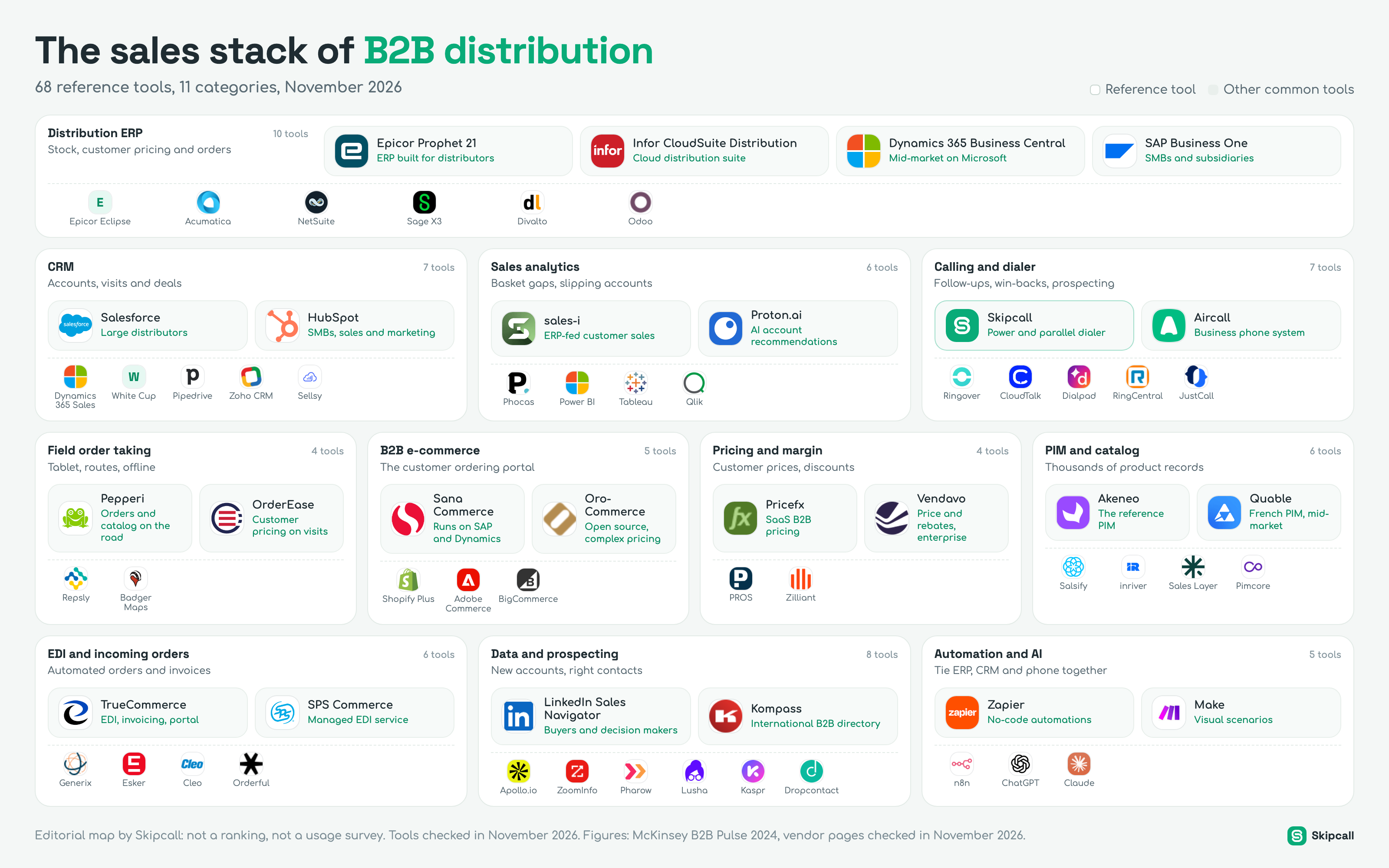
A distributor does not sell like a software company. Its customers come back every week, its catalog runs to tens of thousands of SKUs, every account has its own price, and margin is won or lost a point at a time. So its sales stack starts with the ERP, not the CRM, and it includes tools you never see elsewhere: the B2B ordering portal, the PIM, the pricing engine, EDI. Here is the map of those tools, sorted into eleven categories, for wholesalers, industrial distributors and specialty distributors.
This map adapts our B2B SaaS sales stack map to wholesale distribution. It takes the side of the company that buys to resell. If you manufacture and sell through a network of distributors, read our manufacturing sales stack instead: technical selling, configuring complex products and managing a channel are covered there.
The sales stack of B2B distribution
68 reference tools, 11 categories, November 2026
Distribution ERP
10 toolsStock, customer pricing and orders
 Epicor Prophet 21ERP built for distributors
 Infor CloudSuite DistributionCloud distribution suite
 Dynamics 365 Business CentralMid-market on Microsoft
 SAP Business OneSMBs and subsidiaries
- EEpicor Eclipse
 Acumatica
 NetSuite
 Sage X3
 Divalto
 Odoo
CRM
7 toolsAccounts, visits and deals
 SalesforceLarge distributors
 HubSpotSMBs, sales and marketing
- Dynamics 365 Sales
- WWhite Cup
 Pipedrive
 Zoho CRM
 Sellsy
Sales analytics
6 toolsBasket gaps, slipping accounts
 sales-iERP-fed customer sales
 Proton.aiAI account recommendations
 Phocas
 Power BI
 Tableau
 Qlik
Calling and dialer
7 toolsFollow-ups, win-backs, prospecting
 SkipcallPower and parallel dialer
 AircallBusiness phone system
 Ringover
 CloudTalk
 Dialpad
 RingCentral
 JustCall
Field order taking
4 toolsTablet, routes, offline
 PepperiOrders and catalog on the road
 OrderEaseCustomer pricing on visits
 Repsly
 Badger Maps
B2B e-commerce
5 toolsThe customer ordering portal
 Sana CommerceRuns on SAP and Dynamics
 OroCommerceOpen source, complex pricing
 Shopify Plus
 Adobe Commerce
 BigCommerce
Pricing and margin
4 toolsCustomer prices, discounts
 PricefxSaaS B2B pricing
 VendavoPrice and rebates, enterprise
 PROS
 Zilliant
PIM and catalog
6 toolsThousands of product records
 AkeneoThe reference PIM
 QuableFrench PIM, mid-market
 Salsify
 inriver
 Sales Layer
 Pimcore
EDI and incoming orders
6 toolsAutomated orders and invoices
 TrueCommerceEDI, invoicing, portal
 SPS CommerceManaged EDI service
 Generix
 Esker
 Cleo
 Orderful
Data and prospecting
8 toolsNew accounts, right contacts
 LinkedIn Sales NavigatorBuyers and decision makers
 KompassInternational B2B directory
 Apollo.io
 ZoomInfo
 Pharow
 Lusha
 Kaspr
 Dropcontact
Automation and AI
5 toolsTie ERP, CRM and phone together
 ZapierNo-code automations
MakeVisual scenarios
 n8n
 ChatGPT
 Claude
What makes distribution selling different
On paper, distribution sales tools look like SaaS sales tools: a CRM, data, a phone. In practice they serve a very different business, and four traits explain why.
Buyers have changed how they order. McKinsey’s B2B Pulse, run in 2024 with nearly 4,000 decision makers in 13 countries, describes a customer who switches channels without warning.
For a distributor, the takeaway is simple: the stack has to cover all three thirds. Outside reps for the in-person third, phone and video for the remote third, the B2B portal and EDI for self-service. And the CRM has to see all three, or nobody knows who spoke to the customer last.
How to read this map
The map reads in three layers, from the foundation out to the customer.
- 01
The foundation:
At the top, the distribution ERP. It holds stock, each customer’s price and the order history. Every other tool reads from it or writes to it.
- 02
The daily sales work:
In the middle, the tools reps live in: the CRM, calling, the sales analytics that tell them who to call, then field order taking for the road.
- 03
The channels and engines:
At the bottom, what lets customers order on their own (B2B portal, EDI), what keeps the catalog clean (PIM), what protects margin (pricing), then prospecting data and the automation that ties everything together.
In each category, the large tiles mark the reference tools: the ones a distributor will almost certainly meet when comparing. The small tiles list other common tools. This is not a ranking: we do not have usage data per tool, and we do not make it up.
Distribution ERP: the system of record
At a software company, the CRM is the source of truth. At a distributor, it is the ERP. It knows what is in stock and where, what each customer pays for each item, what they have ordered over five years, what is on backorder and what has been invoiced. A rep who cannot see this on a call is selling blind: promising a delivery date without knowing stock, or quoting a price that is not the contract price.
Distribution ERPs handle what general-purpose ERPs do poorly: customer- and family-level price matrices, stacked discount rules, multiple units of measure, substitutes, replenishment across several branches, and direct shipments from supplier to customer.
Epicor Prophet 21
- Best for
- Durable-goods distributors, especially in North America
- Strengths
- Multi-branch inventory, customer pricing, cloud or on-premises
- Watch out
- Add-on modules can push the bill up quickly, according to published reviews
Infor CloudSuite Distribution
- Best for
- Mid-size distributors moving to the cloud
- Strengths
- Designated successor to Infor SX.e, FACTS and A+, hosted by Infor
- Watch out
- Plan the migration if you still run a legacy version
Dynamics 365 Business Central
- Best for
- Mid-market companies already on Microsoft
- Strengths
- Large partner network, connectors to B2B portals
- Watch out
- Advanced distribution features often come from extensions
SAP Business One
- Best for
- SMBs and subsidiaries of SAP-run groups
- Strengths
- Official connectors to OroCommerce and Sana Commerce
- Watch out
- Project cost depends mostly on the implementation partner
Epicor Eclipse targets electrical, HVAC, plumbing and PVF distributors. Acumatica, NetSuite and Sage X3 serve distributors that want a more general ERP. In Europe, Divalto sells a version built for B2B wholesale, designed according to the vendor for large catalogs and complex pricing, and Odoo wins small companies on its entry cost.
What the ERP must give the sales team. Few teams look at this when they choose, and that is a mistake. Check three things: an API or connector that exposes stock, customer pricing and order history to the CRM; the ability to create a quote or an order from the CRM without retyping; and order history you can query by customer and product family, which will feed your sales analytics.
CRM: the memory of the relationship
If the ERP knows what was ordered, the CRM knows what was said. It keeps track of visits, calls, open quotes, promises made to the customer and next steps. In distribution it also splits the book of business: who owns this account, who should call back, who covers this territory when a rep is on vacation.
Salesforce serves large distributors that want deep customization. HubSpot suits small and mid-size distributors that want marketing and sales in one place. Dynamics 365 Sales is the usual pick for companies already on Business Central. White Cup is built specifically for distributors: the vendor, which acquired Sales Management Plus in 2024, says it serves more than 850 distributors. Pipedrive, Zoho CRM and Sellsy serve small teams.
| CRM | Best for | Entry price checked (Nov 2026) | Watch out |
|---|---|---|---|
| Salesforce Sales Cloud Large distributors | Complex processes, many branches, heavy customization | Starter at $25 per user per month; higher editions cost much more | The ERP connector is often a project of its own |
| HubSpot Sales Hub Small and mid-size distributors | Teams that want sales and marketing in one place | Professional at $90 per seat per month billed annually, according to HubSpot | Check how order history flows in from the ERP |
| Dynamics 365 Sales Microsoft shops | Distributors already on Business Central | Price published by Microsoft per edition, check its page | Stack Microsoft licenses carefully |
| Pipedrive Small teams | A handful of reps who want a simple pipeline | Lite at $14, Growth at $39 per seat per month billed annually | Not built for customer-level pricing: the ERP stays the reference |
How to choose. The best CRM for a distributor is the one that shows, on the account record, what the ERP knows: trailing twelve-month revenue, last order, open balance, product families bought. Without that view, reps open two screens on every call and soon stop updating the CRM. Skipcall integrates with HubSpot, Pipedrive, Salesforce and Attio: every call made from Skipcall is logged on the CRM record with its outcome.
The ERP knows what the customer bought. The CRM knows why they stopped.
Sales analytics: who to call this morning
This is the category most specific to distribution, and often the most profitable. These tools read ERP history and turn millions of order lines into a short list: the accounts to call today, and why. The rep no longer guesses who to call; they know who is ordering less, what is missing from the basket and which product to suggest.
sales-i, now part of SugarCRM, plugs into the ERP and shows sales by customer and product, with alerts when an account drifts from its usual pattern. Proton.ai describes itself as an AI-powered CRM for distributors: it ranks accounts by likelihood to buy and recommends products, factoring in churn risk and wallet share. Phocas, Power BI, Tableau and Qlik serve teams that prefer to build their own dashboards.
- 01
A broken rhythm:
An account that ordered every two weeks has not ordered for five. It is the simplest and most reliable signal.
- 02
A shrinking basket:
The customer still orders, but less. They are often testing a competitor on part of their needs.
- 03
A missing product family:
A whole line is absent from their orders while similar customers buy it. It is a cross-sell to offer, or a loss to understand.
- 04
Margin erosion:
Discounts have piled up on this account. The rep needs to know before granting the next one.
The trap. Buying the analytics tool and changing nothing in how reps work. A list of at-risk accounts that stays in a dashboard wins back nobody. It has to land in the rep’s call queue that same morning, with the reason for the call.
Calling and dialer: follow-ups, win-backs, prospecting
In distribution, the phone is not only for prospecting. It is how you hold the book of business. An inside rep spends the day calling back: a quote sent yesterday, an account ordering less, a buyer to warn about a price increase or a stockout, a dormant account to wake up. Three uses share their calls.
Business phone systems such as Aircall, Ringover, CloudTalk, Dialpad, RingCentral or JustCall provide lines, a softphone and call history: useful across the company, including reception and customer service. Dialers add what is missing to call at volume: working through a list without dialing each number and, for a parallel dialer, calling several numbers at once and connecting the rep only to the one who answers.
Skipcall belongs to the second family: a parallel dialer with up to four lines, a power dialer, recording and transcription, AI call summaries, sequences and integrations with HubSpot, Pipedrive, Salesforce and Attio. Built-in enrichment fills in missing numbers for the contacts you already have, imported from a CSV file or synced from your CRM; Skipcall has no contact database and does not build lists. It is our product. Plans with the dialers start from $70 per seat per month (pricing).
- Inside reps spend more than an hour a day on the phone.
- Sales analytics produce a list of accounts to call back every week.
- The team is prospecting to open a branch, a product line or a vertical.
- Your main line and reception: Skipcall is an outbound calling tool, with no IVR and no inbound call queues.
- Visits to strategic accounts.
- Choosing who to call: a dialer calls fast, it does not pick the list.
To put numbers on the gain before buying, our prospecting calculator gives the calls and hours needed by dialing mode, and the cost per meeting calculator puts a price on every conversation you get.
Field order taking: the route on a tablet
A distributor’s outside rep visits accounts, checks shelves and takes the order on site. They need the catalog, this customer’s price, available stock and a way to enter the order, even in a warehouse with no signal. These mobile apps link the route to the ERP.
Pepperi
- Best for
- Order taking, catalog and merchandising in a single app
- Strengths
- Works offline; returns, invoices and payments from the app
- Published price
- None; Pepperi is now part of Advantive
OrderEase
- Best for
- Taking orders on visits with live customer pricing and stock
- Strengths
- ERP sync, offline entry with automatic upload later
- Published price
- None
Repsly
- Best for
- Retail execution, merchandising, visit planning
- Strengths
- Optional image recognition to audit shelves
- Published price
- Quote-based, across Core, Grow, Scale or Flex plans
Badger Maps
- Best for
- Planning routes and mapping the book of business
- Strengths
- Route optimization, accounts to visit nearby
- Price reported
- Business at $58 per user per month billed annually, according to review sites
How to choose. Have two reps test the app on a real route, in the worst warehouse in your territory. Offline mode and catalog search speed matter more than every feature in the demo.
B2B e-commerce: the customer ordering portal
A B2B portal lets customers order on their own, at any hour, with their price, their history and their usual product lists. It looks nothing like a consumer store: it handles accounts with several buyers, approval workflows, payment terms, quotes to convert into orders and customer-specific prices.
Sana Commerce runs directly on SAP or Microsoft Dynamics ERP data instead of maintaining a separate database. OroCommerce is an open-source platform built for distributors and manufacturers, with complex price structures and account hierarchies. Shopify Plus includes native B2B features; Adobe Commerce and BigCommerce serve custom projects.
| Platform | Approach | Price checked (Nov 2026) | Watch out |
|---|---|---|---|
| Sana Commerce ERP-integrated | The portal reads SAP or Dynamics directly | Quote-based | Built for SAP and Microsoft: check your ERP |
| OroCommerce Open source | Commerce, CRM and quoting under one license | Free community edition, enterprise edition quote-based | You still need an implementation partner |
| Shopify Plus Native B2B | B2B and B2C storefronts on one platform | From $2,300 per month on a three-year term, $2,500 on a one-year term, according to buyer’s guides | Variable fee above a certain sales volume |
Pricing and margin: protect every point
In distribution, price is not a number on a pricing page: it is calculated for each customer, each item and each quantity. Pricing software analyzes sales history, proposes target prices by customer segment and product, sets the discount guardrails reps can use and finds margin leaks.
Pricefx offers B2B pricing as SaaS. Vendavo was named a Leader in Gartner’s April 2026 Magic Quadrant for B2B pricing and rebate optimization, according to trade press. PROS and Zilliant are the other reference names; in January 2026 Zilliant announced a partnership with German chemical distributor Julius Hoesch. None of these vendors publishes prices: these are enterprise projects with implementations measured in months.
When to add it. When discounts are decided rep by rep with no shared rule, and margin is falling without anyone knowing where. Before that, a clear discount matrix in the ERP and a monthly review of low-margin accounts often do most of the work.
PIM and catalog: thousands of clean product records
A PIM centralizes product information: descriptions, technical attributes, images, safety data sheets, cross-references, translations. It then feeds the B2B portal, print catalogs, marketplaces and the product files sent to customers. For a distributor receiving data from hundreds of suppliers in different formats, it is the tool that makes the catalog usable.
- Complete records to answer a technical question on the phone, without digging through a supplier PDF.
- Cross-references to suggest a substitute during a stockout.
- An up-to-date catalog on the portal, so fewer calls for basic information.
- Akeneo: free community edition; paid plans are negotiated, with review sites estimating entry around $45,000 a year.
- Quable: Business plan at €1,499 per month according to its G2 listing.
- Salsify, inriver, Sales Layer: quote-based.
- Pimcore: free community edition, enterprise plans quote-based.
Akeneo is the reference PIM on the market; Quable, a French vendor, mostly serves mid-market companies. Salsify and inriver equip large brands and international distributors, and Sales Layer and Pimcore round out the field.
EDI and incoming orders: when the order arrives on its own
Part of a distributor’s orders are never typed by a person. Large customers send their purchase orders by EDI, electronic data interchange, straight from their system to yours, and invoices go back the same way. EDI is not sales in the strict sense, but it changes sales work: a failed EDI order becomes an urgent call from the customer.
- 01
The order arrives:
The customer sends an EDI message from its ERP. The EDI platform translates it and passes it to your ERP.
- 02
The ERP processes it:
It checks the contract price and stock, then sends a confirmation back to the customer, again by EDI.
- 03
The invoice goes out:
Ship notice and electronic invoice leave without retyping. E-invoicing mandates are spreading: in France, for example, every business must be able to receive electronic invoices since September 1, 2026, under the 2024 finance law, which is pushing distributors to modernize these flows.
TrueCommerce bundles EDI, e-invoicing, a B2B portal and supplier enablement on one network. SPS Commerce runs a managed model: the vendor handles partner setup, mapping and monitoring; Software Advice lists it from $20 a month. Generix, a French vendor, is strong in retail and wholesale in Europe. Esker automates entry of orders received by email or PDF, and Cleo and Orderful complete the field.
Data and prospecting: finding new accounts
A distributor prospects less than a software company, but it does prospect: when opening a branch, launching a product line or entering a new vertical. Its target is often local and precise: companies in a given trade within a delivery radius.
LinkedIn Sales Navigator helps find buyers and decision makers. Kompass, an international B2B directory founded in 1944, remains a classic source for targeting companies by activity and area; it does not publish prices. Apollo.io, ZoomInfo, Lusha and Kaspr supply contact details; Pharow targets owners of small and mid-size French companies; Dropcontact enriches emails.
The trap. Buying a national database when your target fits in three counties. A distributor gains more from working every company in its delivery area thoroughly than from calling contacts it cannot serve at a competitive price.
Automation and AI: connecting ERP, CRM and phone
Automation tools move information between software that was never built to talk. Zapier and Make connect hundreds of apps without code; n8n does the same as open source you can host yourself. AI assistants such as ChatGPT and Claude help draft follow-ups, summarize an account’s history before a call or prepare a product description.
Skipcall includes an open API on every plan: it exposes contacts, call data and metrics, so you can feed a dashboard or a data warehouse alongside the ERP.
The stack by team size
Not every distributor needs all eleven categories. Here are three profiles, from simplest to most complete.
| Profile | Sales tools | What comes next |
|---|---|---|
| Local wholesaler 2 to 5 reps | ERP with order management, simple CRM connected to it, calling with a dialer for follow-ups, route planning | Basic sales analytics, even in a spreadsheet, to spot slipping accounts |
| Regional distributor 10 to 30 reps | Distribution ERP, connected CRM, sales analytics, dialer for the inside team, field order taking, B2B portal | A PIM when the catalog outgrows the ERP; EDI for the largest customers |
| National distributor 50 reps or more | All eleven categories, with a pricing engine and managed EDI | A team dedicated to data and integrations, and a yearly stack review |
How data flows between the tools
A distributor’s stack works when information makes the full loop without retyping. The ideal circuit has five steps.
- 01
The ERP publishes:
Stock, customer pricing, order history and open balances are exposed to the CRM and to sales analytics, at least once a day.
- 02
Analytics picks:
Slipping accounts, incomplete baskets and unanswered quotes make up today’s list.
- 03
The rep calls:
The list goes into the dialer; every call is recorded, transcribed and summarized.
- 04
The CRM keeps the record:
Outcome, summary and next step land on the account record, with no typing.
- 05
The ERP books the order:
Whether placed by phone, on the portal or by EDI, it returns to the history, and the loop starts again.
The most common mistakes
Audit your stack in one afternoon
Once a year, and before every contract renewal, ask each tool five questions.
- Who owns it, and who actually uses it every week?
- What does it cost per active user, not per seat purchased?
- What does it read from the ERP, and what does it write to the CRM?
- Which metric is it supposed to move: win-back rate, average order, margin, online orders?
- What would happen if we turned it off tomorrow?
- Fewer than half the seats are used each week.
- Nobody can say which number it improves.
- It copies information another tool already holds.
To go further, our sales tech stack guide explains the order in which to add each layer, our sales follow-up process helps structure quote follow-ups, and our B2B wholesale distribution page shows how teams in the sector use Skipcall day to day.