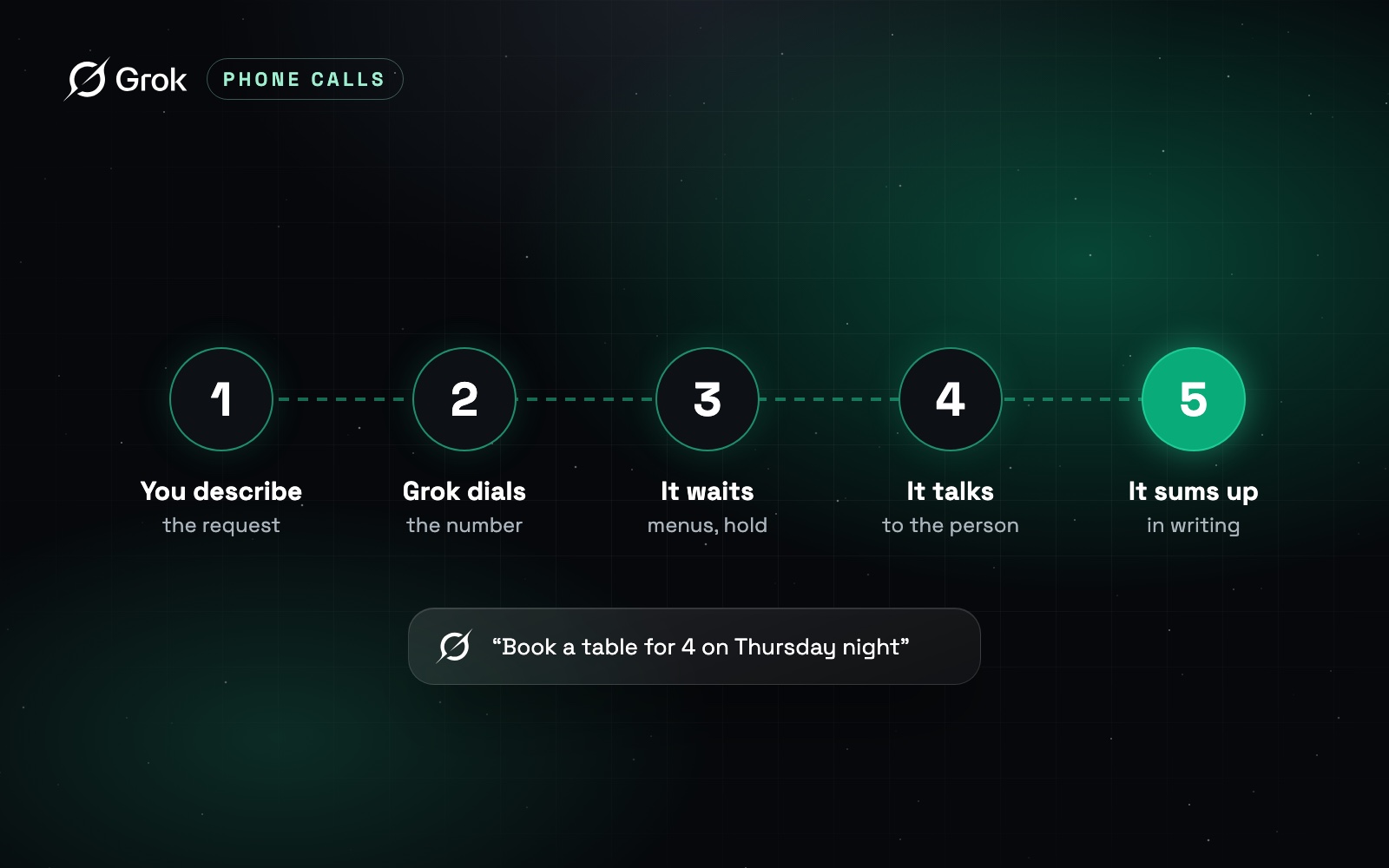
To have Grok make a phone call for you, you write Grok Bot a short brief, and it does the rest: dials, gets through menus and hold, talks to the person, hangs up and sends you a summary. The quality of the call depends almost entirely on that brief, so this guide spends most of its time there, with a five-field template and three examples you can paste as is.
One caveat up front: the walkthrough is based on Elon Musk’s October 25, 2026 announcement and on preview builds seen by testers, because xAI has not documented the feature yet. Our Grok Bot fact check covers availability, plans and devices. For how all of xAI’s phone tools fit together, see the Grok phone calls guide.
What do you need before Grok makes a call?
Check four things before you write a word. First, a plan that includes Grok Bot: on the X Subscription, that means Premium, Super or Ultra. Second, the app on a supported device: macOS, Windows, Linux, iOS 18 or later, or Android 9 or later. Third, the calling feature active on your account, which, according to the bot’s own answer to a tester, currently means a US location outside Washington and Illinois. Fourth, the information the call will need: the number, your name, and any booking or order reference.
If the first three are not in place, no brief will help. If the fourth is missing, Grok will either stall or improvise.
What happens during a Grok call, step by step?
We will follow one simple, low-stakes call: booking a table for four on Thursday night at Joe’s Bistro, a fictional restaurant that does not take online reservations. You would like the patio, and 9 PM is acceptable if 8:30 is taken.
You write the brief
You tell Grok Bot what you want, the way you would brief a human assistant: who to call, what to get, what it may say, and when to give up. If something is missing, Grok may ask you before dialing.
Grok dials
The assistant places the call. In the preview builds, a calls tab showed the call status. According to the terms excerpt, the person who answers hears a voice that identifies itself as a virtual assistant calling on the customer’s behalf.
It handles menus and hold
If the number leads to a phone menu, Grok picks options by pressing keys, then follows any transfer to the right department. If it is put on hold, it waits for you and the status says so. For a restaurant this is short. For an airline or a cable company, this is where you win back your afternoon.
It talks to the person
Grok states the request, answers questions within your limits, and applies your fallback if the patio is full. Testers saw a live transcript in the app during this stage, so you can follow along or close the app and get on with your day.
It wraps up
Once the booking is confirmed, or the goal is out of reach, Grok thanks the person and hangs up. This is where a stop condition matters: without one, an assistant might accept something you would have refused.
You get the summary
Grok sends a note summarizing the call, as Musk described: table for four, Thursday at 8:30 PM, patio requested. The full transcript stays available if you need to check a detail.
How do you write a brief Grok can’t misread?
A call is won before it is dialed. An AI on the phone cannot pause to text you a question mid-call, so everything it may say or accept has to be in the brief. Five fields are enough.
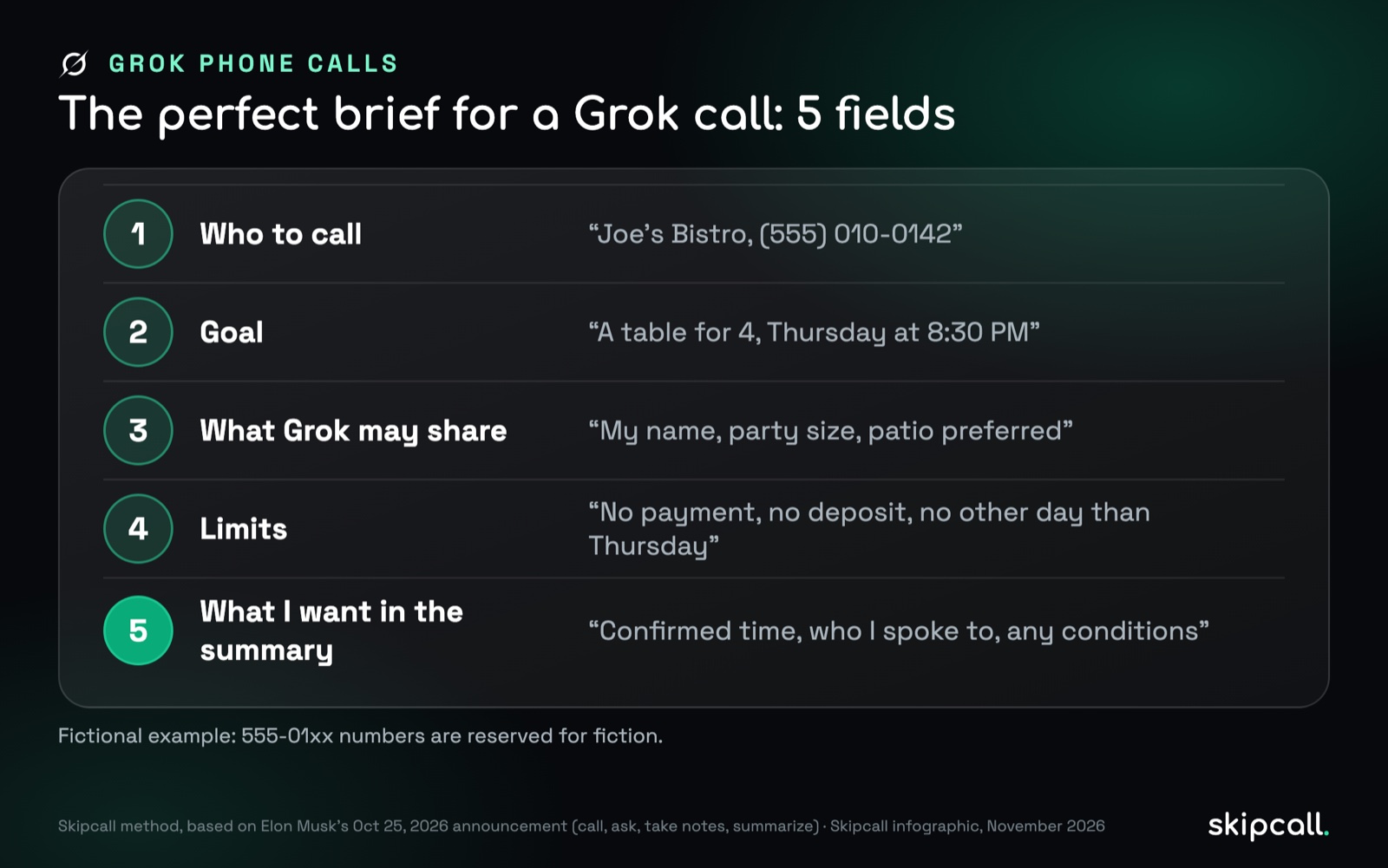
The fifth field is the one people forget: what you want to read in the summary. Asking for it up front makes Grok collect it during the call, such as the name of the person who confirmed. Add one rule for surprises: if it is asked something it cannot decide, Grok says you will call back rather than making something up.
The template. Replace the brackets and paste it into Grok Bot:
Call [business name] at [number], [department if there is a phone menu].
Goal: [specific, checkable result].
You may share: [name], [order or case number], [preferences].
Limits: no payment, no deposit, no card number. If [goal] is not possible,
you may accept [fallback]. Otherwise, confirm nothing and let me know.
If you are asked something you cannot decide, say I will call back.
In the summary, include: [item 1], [item 2], and the name of the person you spoke to.
An AI on a phone call cannot stop to ask what you think. Everything it is allowed to accept has to be written down before it dials.
Three briefs you can paste today
The template covers any call. These three are filled in for the errands people most want to hand off. Numbers and names are fictional.
Restaurant booking. “Call Joe’s Bistro at (555) 010-0142. Goal: a table for 4 this Thursday at 8:30 PM, patio if possible. You may share: the name Carter and the party size. If 8:30 is not available, 9 PM is fine; otherwise book nothing and tell me. No deposit. In the summary: confirmed time, table location, the name of the person you spoke to.”
Waiting on a customer service line. “Call my internet provider’s support line at (555) 010-0188 and ask for billing. Goal: find out why this month’s bill is $20 higher than last month. You may share: my account number [number] and my name. Do not agree to any plan change, upgrade or new contract. If they offer a credit, ask for it in writing by email. In the summary: the reason given, any credit offered, a ticket or reference number.”
Rescheduling an appointment. “Call Main Street Dental at (555) 010-0155. Goal: move my cleaning from Monday 10 AM to any weekday morning next week. You may share: my name and date of birth [date]. Do not share insurance details. If no morning is open, keep the Monday slot. In the summary: the new date and time, or confirmation that Monday stands.”
How do you check Grok’s call summary?
The summary is convenient, but it is still an AI’s reading of the call. Before you treat it as settled, check four points: was the goal met, yes or no; what was agreed, with the date, time and any amount; what is left for you to do, such as sending a document; and the name of the person on the other end, if they gave it.
If anything is unclear, open the transcript. It reflects what was actually said, so it outranks the summary. For calls that matter, save it: it is your record if a business does not honor what was agreed.
Why do Grok calls fail?
One cause of failure has nothing to do with your brief: the feature may simply not be active on your account or in your state yet. If nothing happens, check what is confirmed about Grok Bot calls before rewriting anything.
Which calls should you never hand to Grok?
Sort your calls by two things: the stakes, and how unpredictable the conversation is. Low stakes and a predictable script mean an assistant is a good fit.
| Call | Hand it to Grok? | Why |
|---|---|---|
| Booking a table, asking opening hours, checking a delivery date | Yes | Short, predictable, easy to fix if wrong |
| Waiting on hold for customer service, reporting an outage | Yes, with a tight brief | Saves the wait, but limits must be explicit |
| Requesting a quote, rescheduling an appointment | Yes, with a tight brief | Clear goal, but check the summary |
| Disputing a charge, negotiating a price, contested cancellation | No | Needs judgment, leverage and a human voice |
| Medical or banking matters | No | Identity checks and sensitive data |
| Sales or prospecting calls | No | Grok Bot’s terms rule out telemarketing and mass calling |
That last row is not only about rules. A sales call is built on a relationship, a history and the ability to handle an unexpected objection. We compared what an AI can and cannot carry in Grok vs. sales reps. And if you are on the receiving end of these calls, at a restaurant, a clinic or a help desk, how to tell if an AI is calling covers the tells and how to respond.
The bottom line
A call handed to Grok Bot follows six steps: you write the brief, Grok dials, gets through menus and hold, talks to the person, hangs up and sends a summary, with a live transcript along the way according to testers. Everything hinges on the brief: a specific goal, what it may share, a fallback and a stop condition. Check the summary against the transcript when it matters, and keep payments, disputes and sales calls for yourself. The feature is still undocumented, so treat it as a promising assistant, not yet a dependable one. For the full picture of Grok on the phone, see our Grok phone calls guide.
Sources: Elon Musk on X (October 25, 2026); x.ai, “Grok Voice 3” (October 14, 2026); docs.x.ai, Grok Bot FAQ; excerpt of Grok Bot’s terms (x.ai/legal); CellCog (October 25, 2026); Anymesgs (October 26, 2026); Techloy (October 31, 2026).