Our verdict on the Grok Voice Agent Builder: it is the fastest way we have seen to put an AI receptionist on a phone number without writing code, and at $0.09 a minute with an xAI number, cost is no longer the obstacle. The catch is maturity. It is a beta with a US number by default and little published about data handling, so pilot it on overflow and after-hours calls before it touches your main line.
xAI opened the Builder in beta on July 1, 2026. You describe the call in plain English, attach your documents and calendar, and the agent picks up. Below we cover the features, a realistic monthly bill, a front-desk brief you can copy, the calls it handles well and the ones it should not take. The Builder is the third layer of xAI’s voice stack, mapped out in our guide to Grok and phone calls.
What is the Grok Voice Agent Builder?
It is xAI’s no-code interface for building a voice agent that answers the phone. Where the Grok Voice Agent API asks you to run a server and handle audio streams and events, the Builder hides all of that behind a settings page.
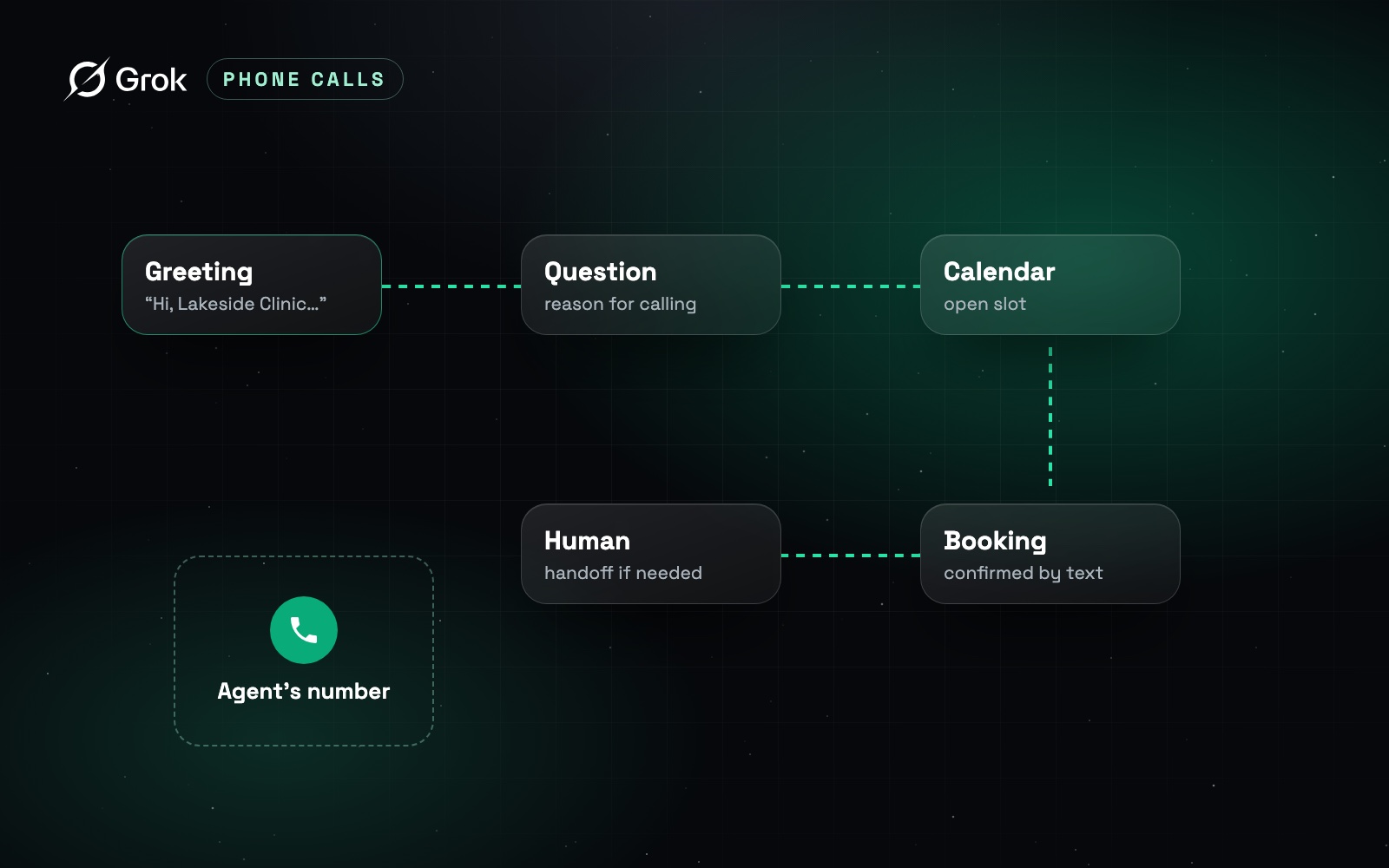
You configure it the way you would brief a new front-desk hire. “You answer calls for the clinic. Ask why they are calling, offer a slot from the calendar, confirm the appointment. If it sounds urgent, transfer to the front desk.” The agent applies that brief to every call, drawing on the documents and tools you have given it.
What can the Builder do out of the box?
This list sticks to what xAI’s official page states, not the extras some reviews add.
How much will a Builder agent cost you each month?
The official page lists $0.08 per minute, with no platform fee. A number provided by xAI adds $0.01 per minute, so $0.09 all-in. If you bring your own number over SIP, xAI publishes no surcharge, but your carrier will bill its usual plan and minutes. Tools the agent calls during a conversation, such as web search, are billed separately.
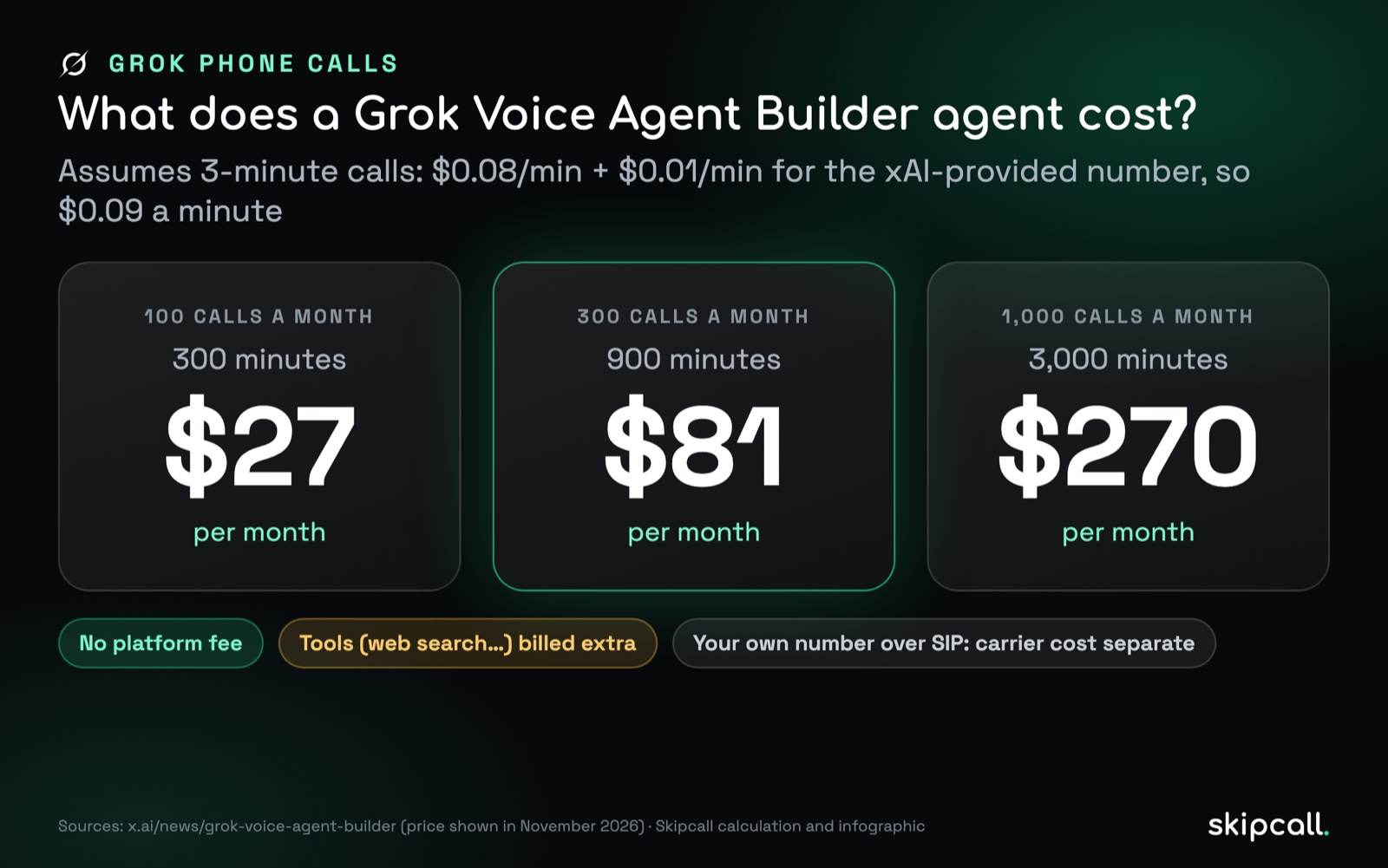
To put those numbers in context, run the same volume through our cost per meeting calculator: the AI minutes are rarely the expensive part. The real cost sits in writing the brief, reviewing transcripts and cleaning up the calls the agent fumbles.
How do you set up your first agent?
Write the brief
Define the agent’s role, what each call should achieve, what it must never do (quote unlisted prices, give medical or legal advice) and when it transfers. Precise edge cases mean less improvising.
Upload your documents
Hours, prices, FAQ, intake requirements. Remove anything outdated: the agent will repeat a wrong answer faithfully.
Connect the tools
Hook up the calendar the agent books into, with the narrowest permissions that work.
Pick the voice and language
A catalog voice, or a clone of your brand voice from about 2 minutes of audio, with written consent from the person recorded.
Test on the free number
Call it yourself, then have coworkers play difficult callers. Read every transcript and tighten the brief.
Point your real number at it
Once it holds up, route your number over SIP through your carrier. Our guide to connecting Grok to a phone number compares the options.
A front-desk brief you can copy
This starter brief follows the structure the Builder expects: role, goal, limits and handoff rules. Replace the bracketed parts.
You are the phone assistant for [business name]. In your first sentence, say you are an automated assistant and that the call is recorded. Your goal is to understand why the person is calling and offer an appointment from the calendar. Ask for their name, a callback number and the reason for the call in one sentence. Never quote a price that is not in the documents. Never give medical, legal or financial advice. If the caller mentions an emergency, sounds upset or asks for a person, transfer to [front desk number]. If nobody answers, take a message and promise a callback within [time frame]. Always end by reading back the appointment or the request.
Go-live checklist
- The brief discloses the AI and the recording in the first sentence.
- Documents are current: hours, prices, address, what to bring.
- The connected calendar can create appointments, not delete them.
- The transfer number is tested during and outside business hours.
- Ten test calls have been made by coworkers playing tough callers.
- Someone reads transcripts every day for the first two weeks.
- A recording retention period is set and written down. Our call recording notice generator helps with the disclosure wording.
Which calls should you route to the Builder?
xAI’s examples are inbound, and nothing in its documentation targets outbound prospecting. That is sensible. Cold calling is the hardest thing done on a phone, and in the US, AI-generated voices count as artificial voices under the TCPA since the FCC’s February 2024 ruling, which brings consent rules into play. We break down which calls an AI can take and which belong to your reps in Grok vs. sales reps.
A good voice agent does not replace your front desk. It gives them back the hours they spent reciting opening times.
What are the Builder’s limits today?
Two practical points round out the list:
- Disclosure is your job. The agent only announces itself as an AI if your brief tells it to. Put it in the first sentence.
- Voice quality depends on the line. Latency and packet loss on the phone side make any AI sound worse. We explain what is at stake in how Grok talks on the phone.
Builder, API or Grok Bot: which one fits your use case?
| Grok Bot | Voice Agent Builder | Voice Agent API | |
|---|---|---|---|
| Who it works for | You, as an individual | Your callers | Your product or phone line |
| Code required | No | No | Yes |
| Typical job | Calling a business on your behalf | Reception, booking, FAQs | Custom agents built into your software |
| Pricing | Included in X Premium, Super, Ultra | $0.08/min, +$0.01 with xAI number | $0.08/min plus your telephony |
| Status | Beta, calls announced October 25, 2026 | Beta since July 1, 2026 | Available since December 2025 |
Many teams start in the Builder to prove the idea in an afternoon, then move to the API when they need something the interface cannot do. If you are curious about the consumer side, our Grok Bot breakdown separates what is confirmed from what is only announced.
Our take
For a small business that loses calls because nobody is free to pick up, the Builder is genuinely compelling: no development, predictable cost, and useful building blocks like calendar booking and live transfer. For teams handling sensitive customer data, or serving callers outside the US, the beta status, the US default number and the silence on data location argue for a limited pilot. For outbound sales, it is the wrong tool.
If what your team actually needs is better phones for human reps, Skipcall gives sales teams business numbers, a power dialer, call transcription and CRM sync, from $25 per month (billed annually), no commitment.
The bottom line
The Grok Voice Agent Builder puts an AI phone agent within reach of anyone who can write a clear brief: documents, a calendar, a number, and it picks up. At $0.08 per minute with no platform fee, or $0.09 with an xAI number, money is not the barrier. Maturity is: a moving beta, a US number by default, little published on data handling, and a design aimed at inbound calls rather than prospecting. Pilot it where a missed call costs you most. To see how it sits next to Grok Bot and the API, revisit our Grok phone calls guide.
Sources: xAI, “Grok Voice Agent Builder” (July 1, 2026) and “Grok Voice 3” (October 14, 2026); xAI real-time API documentation; Cobus Greyling, Builder analysis; FCC Declaratory Ruling FCC 24-17 (February 8, 2024); Regulation (EU) 2024/1689, Article 50.