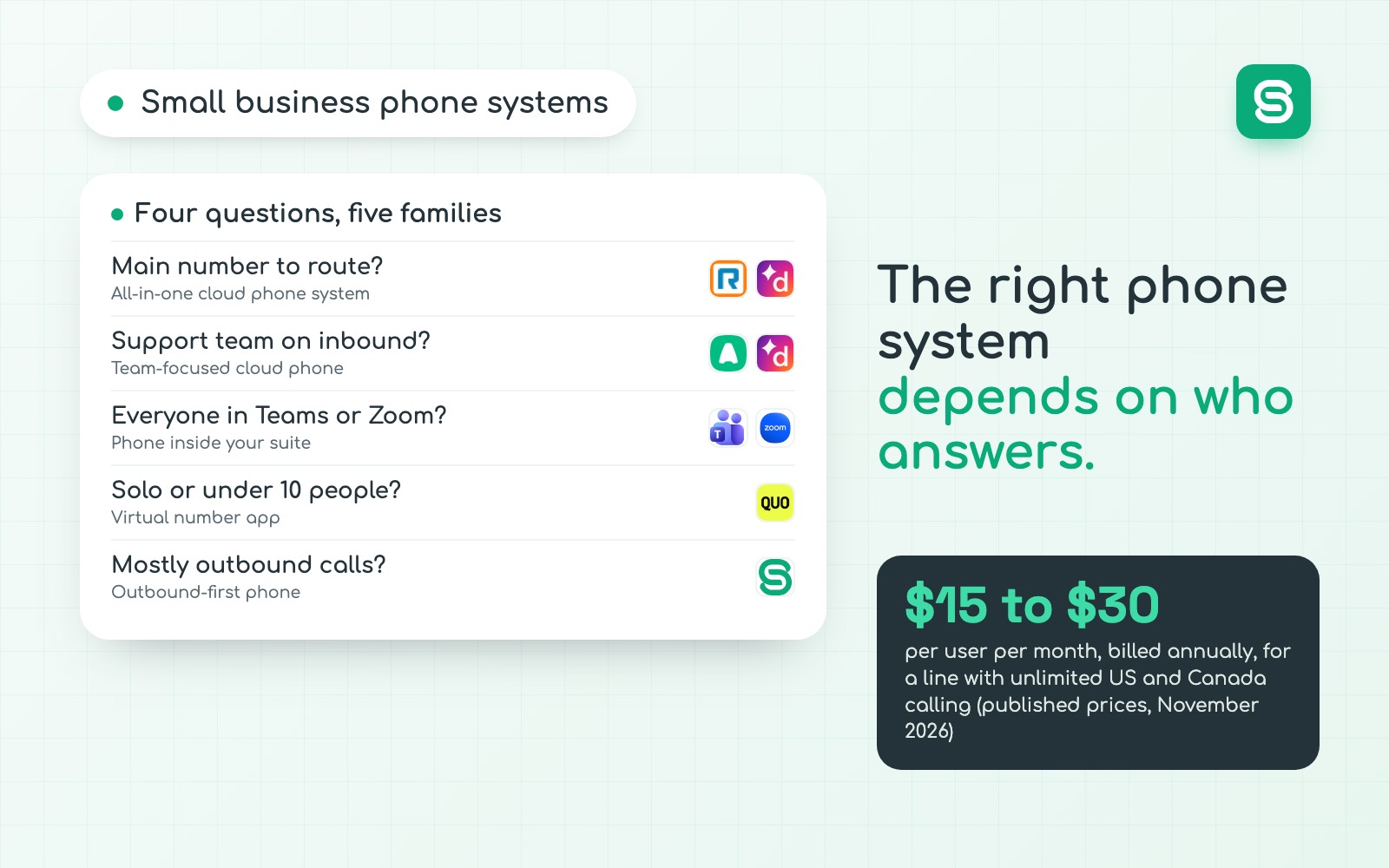
Picking the best small business phone system is rarely about price. RingCentral, Nextiva, Dialpad and Zoom all land within a few dollars of each other per user, Microsoft and Google bundle a phone into the suite you already pay for, and Grasshopper or Quo will put a business number on your cell in ten minutes. The sticker prices look alike. What you are actually buying is different: a front desk that routes calls, a line for every employee, a business number on personal phones, one bill with your collaboration suite, or a phone built for making calls rather than taking them.
Cloud phone system, VoIP app or suite add-on: what does a small business actually need?
“Business phone service” now covers five different products. Putting them in one table is like comparing a rental car to a transit pass: both get you to work, not the same way.
For the mechanics of a phone system (what an IVR is, how a call gets routed, the difference between a PBX, an IP-PBX and a cloud system), our guide to the business phone system goes into detail, and our explainer on how many lines a small business needs does the capacity math. Here the goal is narrower: find your family, then the provider.
The 12 small business phone systems at a glance
The prices below are those shown on each provider’s official US pricing page on November 18, 2026, for the entry plan a small business would realistically buy. Where we could not load a page, we say so.
 RingCentral
- Family
- All-in-one cloud phone system
- Entry price
- RingEX Core, $20 per user per month annually, $30 monthly
- Calling
- Unlimited US and Canada
- Watch for
- Call queues sold as a booster on the pricing page
Nextiva
- Family
- All-in-one cloud phone system
- Entry price
- NEXT Core, $15 per user (annual term), $23 otherwise
- Eligibility
- Annual small business price for 1 to 100 employees
- Inbound
- Simple IVR in the plan comparison
 Dialpad
- Family
- All-in-one, strong on AI
- Entry price
- Connect Standard, $15 per user per month
- AI
- Live transcripts and call summaries included
- Watch for
- Billing period not labeled on the page we read
 Zoom Phone
- Family
- Phone inside your suite
- Entry price
- US & Canada Unlimited, $16 per user annually, $18 monthly
- Inbound
- Auto attendants and call queues in every plan
- Watch for
- International calling is metered
 Microsoft Teams Phone
- Family
- Phone inside your suite
- Entry price
- With Calling Plan, $17 per user (list price since April 2025)
- Also needed
- A Microsoft 365 license that includes Teams
- Watch for
- Pricing page did not load during our check
Google Voice
- Family
- Phone inside your suite
- Entry price
- Starter, $10 per user (up to 10 users); Standard, $20
- Also needed
- A Google Workspace plan, except one-user Voice-only
- Inbound
- Auto attendants and ring groups from Standard
Grasshopper
- Family
- Virtual number app
- Entry price
- Plans advertised from $14 per month
- Pricing unit
- Per account, with set numbers and extensions
- Watch for
- Plan details blocked outside the US during our check
 Quo (formerly OpenPhone)
- Family
- Virtual number app
- Entry price
- Starter, $15 per user annually, $19 monthly
- Inbound
- Phone menus from Business ($23 annually, $33 monthly)
- Included
- One local or toll-free number per user
Vonage
- Family
- All-in-one cloud phone system
- Entry price
- Mobile, Premium and Advanced tiers, priced per line
- Watch for
- Pricing page refused our automated check: get a quote
- Inbound
- Auto-attendant from Premium, call groups on Advanced
8x8
- Family
- All-in-one cloud phone system
- Entry price
- X-series plans, quote-led
- Watch for
- Pricing page blocked our checks: get a written quote
- Best at
- Multi-site and international calling
 Aircall
- Family
- Team-focused cloud phone
- Entry price
- Essentials, $30 per license per month annually
- Minimum
- 3 licenses
- Inbound
- IVR, queues and business-hours routing from Essentials
 Skipcall
- Family
- Outbound-first phone
- Entry price
- Business VoIP, from $25 per license per month annually
- Minimum
- One license, no commitment
- Inbound
- No: no IVR, no queues, no inbound routing
How much does a small business phone system really cost per user?
The big number on the pricing page is rarely what you pay. To compare, bring every provider back to the same question: what does it cost to equip 15 people, each with their own line, per month?
That chart only compares published entry prices. It says nothing about what is included, and that is where the gaps open up. Three examples from the same pricing pages.
Taxes and regulatory fees: the line nobody advertises
US phone bills carry charges that never show up on pricing pages: the federal Universal Service Fund contribution, state and local 911 fees, sales and telecom taxes that vary by state and city, and sometimes a provider “regulatory recovery” fee. Quo says it plainly: “Applicable taxes and fees added at checkout.” The amount depends on where your users are, so the only reliable number is an all-in quote for your addresses. Ask every provider for one, and compare those, not the list prices.
The three-year price: the calculation quotes do not make for you
A monthly price only compares at equal duration. Use total cost of ownership: upfront costs, plus the subscription times the months you will use it, plus running costs, plus exit costs. When you are not sure how long you will stay, run it at least over the contract term. That is where commitments change the ranking.
The two offers are fictional, to isolate the mechanism. The committed offer wins as long as the team stays stable; it loses the moment headcount drops, because committed seats are paid until the end. Ask two questions before you sign: does the commitment cover a number of seats or a dollar amount, and can you remove seats mid-term? Multi-year contracts are common with the all-in-one providers, especially when a sales rep offers you a discount or free months to switch.
For the full budget of a phone rollout (internet, headsets, desk phones, deployment time), our guide to business VoIP phone service breaks down every line.
The 12 phone systems, one by one
RingCentral
Type: The reference all-in-one cloud phone system, for businesses that want one vendor for phone, video and chat
RingCentral’s pricing page, read November 18, 2026, lists RingEX Core at $20, Advanced at $25 and Ultra at $35 per user per month billed annually, or $30, $35 and $45 billed monthly. Core includes unlimited calling in the US and Canada, on-demand call recording, 100 toll-free minutes and 25 texts per user. Advanced adds CRM integrations, multi-site management and 1,000 toll-free minutes. The page also sells add-ons: a Call Queues booster at $35, an AI Receptionist from $39 and Conversational Intelligence from $60 (units not stated on the page), and it was running a “6 months free” promotion. Ask which inbound features your tier includes before you sign.
- Complete platform: phone, video, messaging
- Mature desk phone and multi-site support
- Large integration catalog from Advanced
- Many features sold as boosters and add-ons
- CRM integrations only from Advanced
- Promotions make the real price hard to read
Full review: our RingCentral review. Torn between the two most common shortlist names? Our Dialpad vs RingCentral comparison puts them side by side.
Nextiva
Type: All-in-one cloud phone with built-in CRM and ticketing, aggressive small business pricing
Nextiva’s pricing page shows NEXT Core at $15 per user with $23 beside it (“Save 35%”), NEXT Engage at $25 with $50 beside it (“Save 50%”) and NEXT Scale at $75. The page does not label which figure is annual: the footnote says annual small business pricing applies to new customers with 1 to 100 employees on a term of 12 months or more, so read $15 and $25 as annual-term prices and confirm. Core includes unlimited voice and video, 100 business texts per user, skills-based routing, a simple IVR, basic CRM and ticketing, and 50 AI transcriptions and summaries per user. Engage adds 2,000 toll-free inbound minutes and 200 AI transcriptions; Scale makes AI unlimited. The page was also running a Black Friday offer of three free months.
- Lowest entry price among the all-in-one systems
- Routing, texting and AI quotas included from Core
- CRM and ticketing built in
- Annual vs monthly not labeled clearly
- AI features capped per user on Core and Engage
- Toll-free number is an add-on on Core
Dialpad
Type: Cloud phone with the most AI in the base plan
Dialpad lists Connect Standard at $15 and Connect Pro at $25 per user per month, with Enterprise on quote. The page has a monthly/annual toggle, but the figures we read were not labeled with a billing period, and Dialpad notes that the price shown can differ by region: confirm the billing basis on your quote. Standard includes unlimited calls, live transcripts and instant call summaries; Pro adds key CRM integrations, 24/7 support and multi-office management. The same page sells separate Sell (from $39) and Support (from $89) products for sales and contact center teams.
- Transcription and AI summaries from the entry plan
- Clean apps on desktop, iOS and Android
- Clear upgrade path to sales and support tiers
- CRM integrations only from Pro
- Billing period not stated next to the price
- Dialers live in separate, pricier products
Full review: our Dialpad review.
Zoom Phone
Type: The phone inside Zoom, for teams that already meet there
Zoom’s US pricing page lists US & Canada Unlimited at $16 per user per month annually and $18 monthly, on top of the free Workplace Basic. Bundles with Workplace Pro and Workplace Business run $20.50 and $24.50 annually ($24 and $29 monthly). Every phone plan includes auto attendants and IVR, call queues, business-hours and holiday routing, call recording, voicemail transcription, a domestic number and post-call summaries, plus SMS and MMS. International calls are metered. For a team that already runs on Zoom, this is one of the most complete phone systems per dollar on the list.
- Auto attendants and queues in every plan
- Single seat, monthly billing available
- One app for meetings, chat and calls
- Best value only if Zoom is your meeting tool
- International calling billed per minute
- Fewer CRM options than dedicated phone tools
Microsoft Teams Phone
Type: The phone inside Teams, for businesses already standardized on Microsoft 365
Microsoft’s Teams Phone page timed out repeatedly during our November 18 check, so the figures here are Microsoft’s list prices as announced for April 1, 2025, as reported by UC Today: Teams Phone Standard $10 per user per month, Teams Phone with a domestic Calling Plan $17 in the US, with pay-as-you-go calling $13, and with domestic and international calling $34, with a 5% surcharge for paying an annual plan monthly. Teams Phone Standard alone does not reach the phone network: you add a Calling Plan, an Operator Connect plan from a partner carrier, or Direct Routing. You also need a Microsoft 365 license that includes Teams. Confirm current prices with Microsoft or your partner before you budget.
- No new app for the team
- Auto attendants and call queues in Teams
- Central admin with your Microsoft accounts
- Bill in layers: Microsoft 365, Teams Phone, calling
- Calling plans come with pooled minute allowances
- Setup usually goes through a Microsoft partner
Google Voice
Type: The cheapest credible phone for small teams on Google Workspace
Google Voice’s product page lists three tiers: Starter at $10 per user per month, for up to 10 users (or a single user without Workspace), Standard at $20 with unlimited users, and Premier at $30. All include unlimited US calling and texting, voicemail transcription and support for desk phones. Standard adds auto attendants, ring groups, call queuing for ring groups, on-demand recording and SIP Link for bringing existing numbers; Premier adds automatic call recording and BigQuery reporting. Except for the one-user Voice-only option, you need a Google Workspace plan on top.
- $10 Starter for tiny teams
- Simple admin inside Google Workspace
- Auto attendants and ring groups from Standard
- Workspace subscription required for teams
- Starter capped at 10 users, no auto attendant
- Few native CRM integrations
Grasshopper
Type: Virtual number for solo owners and micro businesses that work from their cells
Grasshopper’s pricing page blocked our check from outside the US and Canada, leaving only its headline: plans “starting at $14/month.” Unlike most providers here, Grasshopper prices per account, not per user: each plan comes with a set number of phone numbers and extensions that ring on your existing phones through its app. That makes it cheap for one or two people and less obvious to compare past five. Read the plan grid from a US connection, check how many numbers and extensions you get, and whether texting and call recording are in your plan.
- Low entry price for a single business line
- Works on the phones you already have
- No hardware, no IT
- Priced per account, hard to compare per user
- Lighter routing than a full phone system
- Plan details not readable during our check
Quo (formerly OpenPhone)
Type: Modern virtual phone for small teams that text as much as they call
Quo lists Starter at $15, Business at $23 and Scale at $35 per user per month billed annually, or $19, $33 and $47 monthly, all in USD with taxes and fees added at checkout. Every plan includes one local or toll-free number per user and unlimited calling and texting in the US and Canada under a fair-use policy, plus voicemail transcripts. Business adds phone menus, call transfers, custom ring orders, automatic call recording, AI call summaries and transcripts, and HubSpot and Salesforce integrations. Texting from a business number requires carrier registration: Quo lists a one-time $19.50 fee plus $1.50 to $3 a month. If you are moving off it, our Quo alternatives page lists the options.
- Single seat, transparent annual and monthly prices
- Shared numbers and team texting done well
- AI summaries and CRM sync on Business
- No phone menus on Starter
- “Unlimited” under a fair-use policy
- Light on call center features
Vonage
Type: All-in-one cloud phone with a flexible per-line model and strong API roots
Vonage Business Communications sells three tiers per line: Mobile, Premium and Advanced. Its pricing page refused our automated check on November 18, 2026, so we cannot quote a price we read ourselves. Third-party trackers that read the page in the fall of 2026 report roughly $14 to $28 per line on annual terms and $20 to $40 month-to-month, with lower per-line prices for larger accounts. In the usual split, Premium adds the auto-attendant, video meetings and CRM integrations, and Advanced adds call recording and call groups. Ask for a written quote at your seat count, with the per-line price and the contract term.
- Per-line pricing that drops with volume
- Mature desk phone support
- Strong communications API for custom builds
- Recording only on the top tier
- Price depends on line count and term
- Pricing page unreadable during our check
8x8
Type: All-in-one cloud phone for multi-site and international businesses
8x8 rate-limited every attempt we made to read its pricing page on November 18, 2026. 8x8 leans on sales-led quotes for its X-series plans, and third-party trackers report X2 around $24 and X4 around $44 per user per month on annual terms in 2026, with higher month-to-month rates; treat those as ballpark figures, not prices we verified. The X-series is known for unlimited calling to dozens of countries on its higher tiers, which matters if you have staff or customers abroad. Get a written quote, including the number of countries covered and the contract length.
- International calling on higher tiers
- Phone, video, chat and contact center in one family
- Built for multi-site companies
- No price we could verify on the day
- Sales-led buying process
- More platform than a 5-person business needs
Aircall
Type: Team-focused cloud phone for support and sales teams, deep in integrations
Aircall’s US pricing page lists Essentials at $30 and Professional at $50 per license per month on annual billing, with a three-license minimum and a note that annual billing saves 25%. Essentials includes one local or toll-free number ($6 a month for each extra), unlimited inbound calls, unlimited outbound calls in the US and Canada under its terms of use, IVR, queues, ring groups, business-hours routing, call recording and transcription, and integrations such as HubSpot, Pipedrive and Zendesk. Professional adds AI call summaries, smart routing, queue callback, a power dialer and the Salesforce integration. AI Assist Pro costs $49 per seat per month.
- Full inbound toolkit from the entry plan
- Large integration marketplace
- Strong for support teams on a helpdesk
- Three-license minimum
- AI summaries and Salesforce only from Professional
- Highest entry price in this comparison
Full review: our Aircall review.
 Skipcall
Type: Outbound-first phone for teams that make more calls than they take
Skipcall’s Business VoIP plan starts at $25 per license per month billed annually. Each user gets a local or mobile number, the web and mobile apps, 150 conversations and 100 texts a month, with call recording, transcription and AI call summaries included. Calls sync to HubSpot, Pipedrive, Salesforce and Attio through native integrations, and an API is included. Customer data is hosted in the European Union.
Let us be clear about what it is not. Skipcall is not a front-desk phone system: it has no IVR, no call queues and no inbound routing. If your main number takes calls that need to be routed, pick a cloud phone system from this list. Number porting is not available yet: Skipcall will soon let you port your existing numbers. For sales teams, Starter and the higher plans add a power dialer and a 4-line parallel dialer; our ranking of the best VoIP for sales teams puts them against the competition.
- Single license, no commitment
- Recording, transcripts and AI summaries included
- Native HubSpot, Pipedrive, Salesforce and Attio sync
- No IVR, no queues, no inbound routing
- Number porting: Skipcall will soon let you port your existing numbers
- 150 conversations per license per month
Skip it if: your main number receives calls that must be routed, you run a support line with queues, or you need to keep your current numbers on day one.
How to choose a small business phone service: eight criteria
A price comparison is not enough: two $20 plans do not buy the same thing. Here are the eight questions to put to every provider, in the order that eliminates the most candidates fastest.
Who calls whom? Start with inbound
Count your inbound calls over a typical week: how many hit the main number, how many go straight to an employee’s line, how many go unanswered. If the main number gets dozens of calls a day that need routing (phone menu, queues, business hours, overflow to a colleague), you need a real auto-attendant. If most calls are outbound or reach the right person directly, a lighter phone is enough. This is the question that separates providers most clearly, and the one most comparison sites skip. Our guide to IVR systems explains what a good phone menu looks like, and our speed to lead guide covers the opposite case: calling back web leads fast.
Numbers: keep yours, get new ones
Check whether your current numbers can be ported (main line, direct lines, toll-free), how long it takes and what it costs. Check the number types on offer: local in any area code, toll-free, vanity, and international if you sell abroad. And ask how the provider signs your outbound calls under STIR/SHAKEN and what it does when a number gets labeled “Spam Likely”: our guides to STIR/SHAKEN caller ID authentication and caller ID reputation explain what to ask.
Mobility: the same number everywhere
In a small business, a good share of the team spends part of the week away from a desk. Require a mobile app that calls out on the business number, not just call forwarding to personal cells, and test it on your team’s actual phones, on cellular data, before you sign.
The real price per user over 12 months
Add up the license, overages, extra numbers, toll-free minutes, add-ons (recording, AI, queues), setup fees, desk phones, and taxes and fees. Bring the total back to one user and one month over a year. A $15 entry price can end at $23 with phone menus, then more with monthly billing and taxes.
Contract term and exit
Month-to-month, one year or three: annual prepay saves 25% at Aircall and about a third at RingCentral. The risk is elsewhere: read the early termination clause, what happens to discounts and free months if you leave, and whether you can drop seats mid-term. A number you cannot take with you ties you down more than any contract.
Support, during your hours
A phone system that is down on a Monday morning costs more than a year of price differences. Ask for the channels (phone, chat, email), the hours, and what is reserved for higher tiers: Quo, for example, offers phone support only on Scale, and Dialpad advertises 24/7 support from Pro.
Security, compliance and 911
Recordings and transcripts are sensitive data. Ask for the SOC 2 report, where recordings are stored, and, if you handle health data, whether the provider signs a HIPAA business associate agreement. And check 911: under Kari’s Law and RAY BAUM’S Act, multi-line systems must allow direct 911 dialing and send a dispatchable location, which means every remote user needs an up-to-date address in the system.
Integrations and AI: useful or decorative?
A call that logs itself in the CRM, a summary that saves typing notes: that is real time saved if your team actually uses a CRM. Otherwise it is another line on the bill. Ask what is in the base price and what is extra: Aircall’s AI Assist Pro is $49 more per seat, while Dialpad and Zoom include summaries in the entry plan.
How do you break a tie between two similar quotes?
With a weighted scorecard. List your criteria, give each a weight based on how much it matters to you, score each quote, and add it up. It forces you to say, before you see prices, what really counts. And it gives you something to show your partner or your accountant afterward.
In the example, quote 1 handles inbound better, quote 2 wins on contract terms and compliance: 60 points to 57. If inbound is critical for you, raise its weight, or treat it as a deal-breaker. If weighting feels artificial, use a simpler version: mark each criterion as must-have, nice-to-have or irrelevant.
To fill the scorecard with comparable answers, send the same written request to every provider. Written answers also help at signing: what is not written down will not bind anyone.
The right phone provider is not the one that checks the most boxes. It is the one that does well the thing your business depends on: answering, calling, or being reachable anywhere.
Before you sign: the connection, not the provider, is the weak link
With a cloud phone system, the guarantee that matters most is often your internet line, not the vendor’s: if the connection drops, the best phone system on the market stops ringing. Ask your ISP what repair time it commits to on a business line, add a cellular backup if the front desk cannot go silent, and make sure the mobile app takes over when the office connection fails. Measure your connection first with our VoIP speed test.
If you still have copper lines, alarm panels or fax machines on analog service, plan for them now: carriers are retiring copper across most of their footprint, and our guide to POTS line retirement covers what to move and when.
Which phone system for which small business?
| Profile | Main need | Family to look at first |
|---|---|---|
| Solo founder or 2-person shop | A business number on personal cells, texting | Virtual number app (Quo, Grasshopper, Google Voice Starter) |
| 5-person professional firm (law, accounting, architecture) | Direct lines, mobility, confidentiality | Quo Business, Google Voice Standard, or RingCentral Core |
| 15-person agency or services company | Main number with a phone menu, a line per person | All-in-one cloud phone (RingCentral, Nextiva, Dialpad) or Zoom Phone |
| Multi-location business, 40 people | A number per site, transfers, reporting | All-in-one cloud phone on a negotiated contract (RingCentral, 8x8, Vonage) |
| Microsoft 365 or Google Workspace shop | No new app | Teams Phone or Google Voice |
| Business whose team mostly makes calls | Numbers, mobility, call records in the CRM | Outbound-first phone (Skipcall), next to a cloud phone system if needed |
The last row is often a combination: a cloud phone system for the front desk and support, an outbound-first phone for the people who sell. If you are already on CallHippo or ConnectAndSell and weighing a switch, our CallHippo alternatives and ConnectAndSell alternatives pages compare the options.
Switching providers without losing your numbers
Switching phone systems scares small business owners for a good reason: the main number has been on the trucks, the website and the Google Business Profile for years. It moves without downtime if you follow the right order.
- 01
Inventory everything that rings.
Main number, direct lines, toll-free numbers, fax lines still in use, alarm panels, card terminals, elevator phones: everything that runs over a phone line. Carriers retiring copper will force this inventory on you anyway.
- 02
Pull your latest bill and Customer Service Record.
The new provider needs a letter of authorization signed by the account holder and a recent bill, and the details must match the old carrier’s Customer Service Record exactly: account number, PIN, service address, authorized name. Most rejected ports fail on a mismatch here.
- 03
Do not cancel anything yourself.
The new provider requests the port, and the completed port ends your old service on those numbers. Cancel first and you risk losing the number for good.
- 04
Time the cutover around your contract end.
Leaving before the end of a term usually triggers early termination fees: read them before you choose a date. Our number porting checklist walks through the steps.
On timing, the FCC requires simple ports (a single line, no complex features) to complete within one business day once validated. Business ports with many numbers, toll-free numbers or hunt groups are not “simple” and often take one to four weeks, and toll-free numbers move through a separate RespOrg process. For the full process and the mistakes that lose a number, read our guide to business phone number porting.
Common mistakes when a small business picks a phone system
What to remember
There is no best small business phone system in the abstract, but there is a right family for every business. Start with inbound: if a number takes calls that need routing, an all-in-one cloud phone system belongs at the top of your list, and RingCentral, Nextiva and Dialpad are the first to price. If your team lives in Microsoft 365, Zoom or Google Workspace, get a quote for the phone add-on. If you are a solo founder, Quo, Grasshopper or Google Voice Starter will cover you for a fraction of the price. And if your team mostly makes calls, a lighter outbound-first phone is enough. Whatever you choose, bring every quote back to an all-in price per user over twelve months, taxes and fees included, read the exit terms, and start the port before you cancel anything.
Sources
Prices and terms read on November 18, 2026 on the following official pages:
- RingCentral, plans and pricing; Nextiva, pricing; Dialpad, pricing.
- Zoom Phone, pricing; Google Voice; Quo, pricing; Aircall, pricing.
- Grasshopper, pricing (headline only, plan grid blocked outside the US and Canada).
- Not readable on November 18, 2026: Microsoft Teams Phone (timeout), Vonage (access refused), 8x8 (rate-limited).
Other sources:
- UC Today, Microsoft hikes Teams Phone price, November 13, 2024: list prices effective April 1, 2025.
- FCC, Porting: keeping your phone number when you change providers.
- FCC, Kari’s Law and RAY BAUM’S Act: multi-line telephone systems and 911.