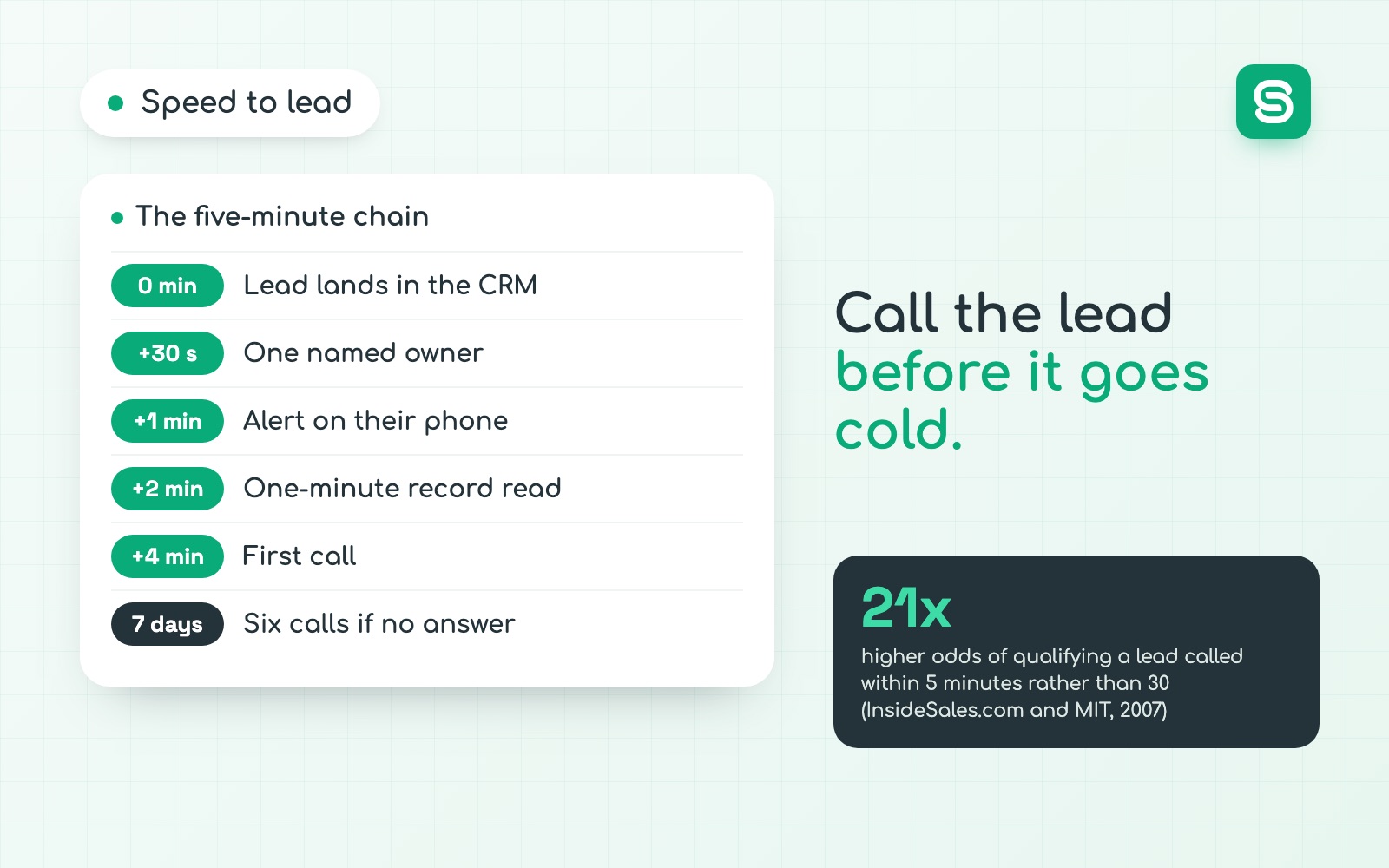
A VP of operations in Denver fills out your demo form at 10:12 a.m. At 10:15 she is still on your site, probably with a competitor’s pricing page open in the next tab and her calendar open in a third. At 11:30 she is in a meeting. Tomorrow she has already talked to someone else. Speed to lead is the gap between her request and your first call, and it is the simplest metric in inbound sales. It is also one of the worst managed: most teams know how many leads they get each month, and very few know how long those leads wait.
What is speed to lead, and why does lead response time matter so much?
Speed to lead is the time between a prospect raising their hand and your team’s first attempt to reach them. You will also see it called lead response time or time to first touch. An inbound lead, here, is someone who made the first move: a demo request, a contact form, a quote request, a free sign-up followed by “have someone call me.” It is not a contact from a list you are cold calling. If any of the vocabulary (MQL, SQL, SDR, BDR) needs a refresher, our cold calling glossary in the Academy defines it.
Three forces explain why minutes matter.
Speed to lead is not “responsiveness” in general. It does not measure call quality or how fast you turn around a proposal. It measures one thing: how long a buyer who raised her hand waits for a human to answer. That is why it is easy to manage: one number, two timestamps, a clear target.
How fast should you respond to a lead? What the studies really say
Four pieces of research show up in almost every article on the subject, usually misquoted. Here is what each one says, from the original sources.
| Study | Sample | Headline finding | Main caveat |
|---|---|---|---|
| InsideSales.com and James Oldroyd (MIT), Lead Response Management Study presented October 16, 2007 | 6 companies, 15,000+ leads, 100,000+ call attempts over 3 years | Odds of contact 100x higher at 5 min than at 30 min; odds of qualifying 21x | Vendor customers, mostly mortgage and insurance; no close rates |
| Oldroyd, McElheran and Elkington, "The Short Life of Online Sales Leads," Harvard Business Review March 2011 | Audit of 2,241 US companies; 1.25 million leads from 42 companies | 37% respond within an hour, 23% never; 42-hour average | 29 of the 42 companies were B2C; no mention of five minutes |
| Velocify, The Ultimate Contact Strategy November 2012 | About 3.5 million leads, 400+ companies | +391% conversion for a call within the first minute; 93% of converted leads reached within 6 attempts | Vendor customers, mostly B2C (lending, insurance, education) |
| Chili Piper, Chili Insights: vendor response time February 2022 | Demo requests submitted by hand; sample size not published | 80%+ take over 5 min or never respond; 4 h 50 min average | Unknown sample; scheduling software vendor |
The 2007 study: where “five minutes” comes from
This is the paper that set the five-minute rule. Presented by Dave Elkington, then CEO of InsideSales.com, and James Oldroyd, a PhD from MIT’s Sloan School, it covers three years of data from six companies. Its exact wording: the odds of contacting a lead called in 5 minutes rather than 30 “drop by 100 times,” and the odds of qualifying it “drop 21 times.” Between 5 and 10 minutes, the odds of contact already fall by a factor of 5, and of qualifying by 4.
Two details change how you should read it. First, “contact” and “qualify” are separate measures that most articles blend together: the 100x is about reaching the person, the 21x about qualifying them. Second, the study says it outright: “This study did not address close ratios.” It says nothing about signed revenue.
The 2011 Harvard Business Review article: the state of the market
The same authors, joined by Kristina McElheran, sent a test lead to 2,241 US companies. Result: 37% responded within an hour, 16% within one to 24 hours, 24% after more than 24 hours, and 23% never. Among companies that responded within 30 days, the average response time was 42 hours.
On a second dataset, 1.25 million leads received by 42 companies, firms that attempted contact within an hour were “nearly seven times as likely to qualify the lead” as those that waited an hour longer, and more than 60 times as likely as companies that waited 24 hours or more. Qualifying, in the article, means having a meaningful conversation with a decision maker. Despite what you will read on a hundred blogs, the HBR piece never mentions five minutes.
Velocify, Drift and Chili Piper: newer looks at the same question
Velocify pooled about 3.5 million leads from the first half of 2012 across more than 400 customers. A call attempted within one minute of the lead arriving raised conversion by 391%. The more useful finding for day-to-day work: 93% of converted leads had been reached within six call attempts. It tells you how many times to try, not just how fast.
Chili Piper submitted demo requests by hand on B2B vendor websites in 2022: more than 80% of companies took longer than five minutes or never responded, close to 30% never did, and the average for the rest was 4 hours 50 minutes.
Drift, the chat vendor, ran the same kind of test in 2017 and again in 2018. Across 433 B2B SaaS companies, 7% responded within five minutes and 55% had not responded after five business days. A year later, across 512 B2B companies, 10% responded in five minutes or less and 58% did not respond within the five-day window. Put side by side, the research tells a consistent story.
What a B2B team should take from it in 2026
These studies share three uncomfortable traits. They are old: the most quoted ones rest on data from before 2011, before every rep carried a smartphone. Most were published by vendors selling the tool that was supposed to fix the problem. And they skew toward consumer sales, in mortgage, insurance and education. We found no rigorous recent primary study of B2B lead response that measures closed revenue.
The direction of the effect is robust: no study finds that waiting helps you reach a buyer. The multipliers do not transfer. If you want a number for your team, it will come from your CRM, not from a 2007 slide deck. That is why our speed to lead calculator starts from a deliberately conservative decay curve, which you can replace with your own measurements.
Do day and time matter as much as speed?
The 2007 study also looked at timing, a section almost nobody quotes. The authors conclude that day and hour have a real effect, but one “dwarfed” by response time. In plain terms: a lead that comes in Monday at 1 p.m. gets called at 1:05, not Wednesday at 8:30 a.m. because that is supposedly a better slot.
Those windows come from three years of data from six US customers, mostly mortgage and insurance, published in 2007. Use them for follow-up attempts, not for the first call: when you reschedule a try, prefer early morning or late afternoon in the lead’s time zone. Our best time to call tool helps pick those slots by audience.
Why do most teams call inbound leads back too late?
When you take apart a multi-hour response time, you rarely find a lazy rep. You find a chain with broken links. HBR named three causes back in 2011: leads pulled from the CRM once a day, reps busy generating their own pipeline, and routing based on geography or “fairness” rather than availability. Fifteen years later the list is longer, but not by much.
Every link has a failure point. The form posts to a shared inbox that everyone reads and nobody owns. The routing rule assigns the lead to an admin user or a rep on PTO. The alert goes out by email and waits for lunch. The rep is already on a call with a customer. And when the first call hits voicemail, nothing triggers the second attempt.
Response time almost never leaks during the call. It leaks between the form and the moment one specific person knows it is their call to make.
Kixie’s two pieces on the subject describe the same gap inside Salesforce: the CRM records the assignment (the owner field changes), not the action. Between assignment and first touch there is human latency the CRM rules cannot see. That latency is what you have to shrink, and you fix it with process before you fix it with tooling.
How long do your leads really wait?
Ask a sales team and the answer is almost always “a few minutes.” It is often true during office hours, and false for the buyer. The wait that counts is not the one on your business-hours clock; it is the one the person on the other end lives through.
Lead A, in on a Tuesday at 10 a.m., gets a call in six minutes. Lead B, in on a Friday at 7 p.m., gets a call Monday at 9:10 a.m. Both times, the team “called within ten minutes of opening.” For Lead B, 62 hours and 10 minutes went by. And B2B forms do not stop at 6 p.m.: plenty of founders and small-business owners compare vendors in the evening, once the day quiets down.
US teams have a second blind spot that European teams rarely face: time zones. A New York team that closes at 6 p.m. Eastern stops covering a Seattle buyer at 3 p.m. her time. Every lead from the West Coast that lands after 3 p.m. Pacific waits overnight, and the dashboard, built on Eastern business hours, never shows it.
You can run this math on your own numbers. The speed to lead calculator asks for your monthly leads, your conversion rate, your median response time and your callback hours, hour by hour. It works out the real wait by arrival time, sizes the “Monday morning pile,” compares what evening or Saturday coverage would return, and estimates the headcount needed to hold your target using the Erlang C formula call centers use. Your numbers never leave your browser.
What is a good lead response time for each type of lead?
Not every inbound lead deserves a sprint. A demo request and an ebook download do not signal the same urgency, and trying to call both within five minutes wears the team out for little gain on the second. Here are the targets we suggest as a starting point. They are working benchmarks, not published standards: adjust them after a quarter of measurement.
| Lead type | Target | Why |
|---|---|---|
| Demo, quote or callback request | 5 minutes during callback hours | Peak intent; the buyer often compares several vendors the same day |
| Callback booked for a specific time | On the dot | A missed appointment costs more than a slow callback |
| General contact form | 15 minutes | The need is real but vaguer: read the message before you dial |
| Free trial or account sign-up | 1 hour | The user is exploring; calling too fast interrupts them |
| Content download, webinar | Same business day | Curiosity more than buying: qualify before you push |
| Trade show or event lead | 48 hours | A big batch at once: sort by score before calling |
For leads that come in after hours, an automatic confirmation does not replace the call, but it changes the wait. The buyer knows when you will call and keeps that slot open. Send it from your form tool or your CRM within a minute of the request.
Three rules make it work. A specific time instead of “as soon as possible.” The name of the person who will call. And a task created at the same moment, for that person, at that time, in the lead’s time zone: otherwise the email’s promise becomes one more callback nobody keeps.
How do you set up your team to call every lead within 5 minutes?
The operating model fits in seven steps. None needs a specific product; each needs a written rule and a name.
- 01
Get every lead into the CRM instantly.
The form must create the record in the CRM the moment it is submitted, with its source, the landing page and the message the buyer typed. A shared inbox is not a lead system. If your site runs a separate form tool, check that it pushes contacts in real time, not in an hourly or daily batch.
- 02
Give each lead one named owner, not a team.
The routing rule must point to a person who is available right now. A lead assigned to “Sales” waits for someone to volunteer.
- 03
Ping that person where they actually look.
A mobile push or a Slack or Teams message with a direct link to the record. An alert email buried among fifty others does not count.
- 04
Staff lead-duty shifts.
For every open slot, one rep is “on leads”: they keep their phone free and handle inbound before going back to outbound prospecting.
- 05
Make the record readable in one minute.
The form message, the page viewed, the company, the title, the size if you have it. That is what lets a rep call fast without calling blind.
- 06
Dial from the tool that logs the call.
The call goes out with the business number on caller ID, gets a timestamp and attaches to the record. A call from a personal cell leaves no trace, and your response-time metric becomes fiction.
- 07
Schedule the next attempt before hanging up.
If the lead does not answer, the next try is already on the calendar, with a date and an owner, before the rep moves on.
Lead routing rules that hold five minutes
Routing is the link that breaks most often, because someone configured it once and forgot it. There are four models, and the right one depends on your volume.
The duty rotation
One time slot, one name. From 9 to 11, it is Maria; from 11 to 1, it is Devon. Every lead in the slot goes to whoever is on duty. It is the simplest and most reliable model under about 300 leads a month: everyone knows when it is their turn, and nobody has an excuse.
Round robin
Leads rotate across several reps, ideally starting with the least loaded. Fair, but fragile: if the next rep in line is in a meeting, the lead waits. You need a fallback, such as automatic reassignment if the lead has not been called after 10 minutes.
Territory or segment routing
The lead goes to the rep who owns its region or vertical. Useful for enterprise accounts, expensive in minutes: the territory owner is not always free. One hybrid keeps both: the on-duty rep makes the first call, qualifies, and hands off to the territory owner.
First come, first served
The lead appears in a shared queue and whoever grabs it keeps it. Fast when the team is hungry, unfair when it is not, and ownerless if nobody bites. Keep it for small, tight-knit teams.
Covering evenings, weekends and other time zones
If 20 to 30% of your leads arrive outside your hours, that is your biggest lever. Four ways to cover it, from cheapest to most expensive.
Labor law applies to on-call shifts. If your SDRs are non-exempt under the Fair Labor Standards Act, on-call time that keeps them tied to the phone generally counts as hours worked, and some states, California first among them, add their own rules. An informal arrangement where everyone “keeps an eye” on notifications on Sunday ends badly, for the leads and for the team.
The callback policy, ready to copy
Everything above fits on one page, signed by the head of marketing and the head of sales. It is the service-level agreement between the two teams: marketing commits to complete, accurate records, sales to the response time. Without it, every slow callback becomes a debate in which nobody is ever wrong.
Adjust the hours and thresholds to your team, but keep the structure: scope, response time, a name, a fallback, a cadence and a measure. For a new hire, this page belongs in their onboarding plan from week one.
How do you get the lead to the rep who will call it?
This is the technical part, and the part where tool marketing gets confusing. There are two paths, and neither needs heavy engineering.
The lead lands in the CRM, the rep calls from their phone system
This is the most common setup. The form creates the contact in HubSpot, Pipedrive, Salesforce or Attio. The CRM assigns it, alerts the owner and creates a “Call within 5 minutes” task. The rep dials. If the phone system syncs with the CRM, the call is timestamped and attached to the right record, which makes response time measurable without manual logging.
With Skipcall, the native HubSpot, Salesforce, Pipedrive and Attio integrations sync both ways: changes made in the CRM flow into Skipcall, and every call is written back to the record with its outcome, duration, recording and AI summary, depending on your settings.
The lead is pushed into the calling tool through an API
The second path runs through an automation platform (Zapier, Make, n8n) or a short script. The form triggers a workflow that creates the contact in the calling tool and adds it to a working list. In Skipcall’s case, the public API documentation describes two operations that matter here: create a contact, and add contacts to an existing sequence. The lead lands in the sequence, and the rep working it makes the call.
Either way, keep the same discipline: one place where leads are created, one routing rule, and calls placed from the tool that logs them. If reps sometimes call from the CRM and sometimes from their cell, your response-time number is worthless. Our guide to sales prospecting automation covers what connects easily and what should stay human, and our explainer on the sales engagement platform shows where the CRM stops and the cadence tool begins.
What should you say on the first call to an inbound lead?
A fast callback that is badly prepared wastes the head start. The goal of the first call is not to qualify everything: it is to reach the person while she is available, confirm the need and set the next step. Five minutes is often enough. Here is a framework to adapt.
The most common mistake is calling back in two minutes to deliver a fifteen-minute pitch. The buyer asked for a conversation, not a presentation. For which questions to ask and in what order, lean on our method for qualifying leads on the phone. And if the lead is called by someone who never opened the record, she will hear it within ten seconds.
What if the lead does not answer the first call?
This is the most common case, and the one many teams handle worst: one fast attempt, then nothing, because no follow-up was ever scheduled. Speed is worthless if you give up after one try. The first call opens a window; the next ones convert it.
This starting cadence leans on the only solid number available: in the Velocify data, 93% of converted leads were reached within six attempts. Three calls on day one, at different times. A short voicemail right after the first missed call, and a text if your form captured consent for it. Then one call per business day that counts, and a break-up email on day seven. Our call attempts calculator helps you tune that number to your actual connect rate, and our sales follow-up process guide covers what happens after the first conversation.
The voicemail and the text, ready to copy
The voicemail runs about twenty seconds. It references the request, gives a time you will try again and a way to reach you.
For more versions, our B2B voicemail scripts and our text templates after a call give you copy you can adapt. Business texting from a local US number also needs A2P 10DLC registration with the carriers, which our 10DLC guide walks through. Every attempt should be a dated task assigned to the same rep: that is how you see, every morning, which leads are overdue. In Skipcall, the Tasks tab shows today’s callbacks, overdue ones and how many attempts have already been made.
When to stop
Stop as soon as the lead answers, even to say “not now,” and the moment they ask not to be called again. After six attempts without a response, move the lead to an email nurture instead of calling more. The 2007 study also noted that beyond 20 hours, each additional call attempt hurt qualification: persistence does not make up for being slow.
That finding and Velocify’s six attempts look contradictory. They reconcile once you look at when the attempts happen: the cadence above puts three in the first hours, before the 20-hour mark, then spaces out the rest and switches channels (voicemail, text, email). Our reading: what hurts is piling up late calls at the same rhythm, not following up with restraint. The 2007 authors themselves raised the question of handing off to channels other than the phone.
What US law says about calling back an inbound lead
A lead who asked to be called is not a cold contact. Here is how the main US rules apply, in plain English. This is not legal advice, and our article on whether cold calling is legal covers the baseline in more depth.
What about one-to-one consent? The FCC’s 2023 rule, which would have limited each written consent to a single named seller, was vacated by the Eleventh Circuit in January 2025. A bill introduced in September 2026, the Stop Spam Calls Act, would bring it back; it is not law. Our breakdown of the TCPA changes in November 2026 tracks where it stands. For your own forms, the safe habit is the same either way: one form, one company named, a checkbox that is not pre-ticked, and the exact wording stored on the lead record with a timestamp. If you also sell to consumers in states with mini-TCPAs, or record calls, talk to counsel.
How do you measure lead response time in your CRM?
You cannot manage what you do not measure, and most CRMs do not calculate speed to lead on their own. You have to build it, and build it right.
- 01
Two timestamps, and only these two.
Lead creation (the form submission, not the import date) and the first call attempt, connected or not. Not the first conversation: response time measures your speed, not the buyer’s availability.
- 02
In clock minutes, nights and weekends included.
Calculate a business-hours version too if you want to judge the team, but show the buyer’s wait first. Leads never called count separately, as infinite delays.
- 03
Calls logged automatically.
A call logged by hand at 4:30 p.m. for a call made at 9:05 a.m. shows seven and a half hours of delay. Kixie flags this bias in its Salesforce article: without a synced phone system, the metric is wrong from the start.
- 04
A median and a 90th percentile, not an average.
Three leads forgotten for a week wreck the average. The median says what a typical lead lives through; the 90th percentile (the value 90% of leads fall under) says what the worst-served leads live through.
- 05
Response time crossed with conversion.
Over a quarter, calculate the meeting or win rate by response-time band. With a few hundred leads you get your own curve, far more useful than the 2007 one.
In Salesforce, the approach Kixie describes adds a “first contact date” field on the lead, filled by a Flow when the first call is logged, then a formula field for the delay. In HubSpot, a date property set by a workflow on the first call activity does the same job. If your calls go through Skipcall, the API exposes calls with their start time, so you can rebuild the response time in your own spreadsheet or BI tool.
Why so much insistence on the median? Because the average response time almost always lies. Take twenty leads from an ordinary week: fourteen called within 15 minutes, three within the hour, two within the day, and one that came in Friday night and got a call on Monday.
The average shows more than four hours, and the team thinks it is slow. The median shows 7.5 minutes, and the team thinks it is fast. Both are wrong without the 90th percentile: three hours is what the two worst-served leads of the week went through, and that is where the work is. In Google Sheets or Excel, =PERCENTILE.INC(range, 0.9) gives the 90th percentile in one line, and =MEDIAN(range) gives the median.
The six numbers to review every week
| Metric | What it tells you | Starting target |
|---|---|---|
| Median time to first call | What a typical lead lives through, on the clock | Under 5 min during callback hours |
| 90th percentile response time | What the worst-served leads live through | Under 1 hour during callback hours |
| Share called within 5 minutes | How consistent the duty shifts are | Over 80% during callback hours |
| Share called after 24 hours | The weight of evenings, weekends, time zones and misses | Under 10% |
| Share never called | The holes in routing | Zero |
| Contact rate at 7 days | How well follow-up works | Measure it, then push it up |
These targets are starting points, not norms. Break each metric down by source (demo request, contact, quote, content) and by rep. A decent average often hides a neglected source, typically content leads that nobody treats as urgent. To fit these into how you run the team, see our guide to sales KPIs.
How do you audit your speed to lead in one week?
The CRM gives you the response time you record. A mystery-shop test gives you the one the buyer experiences, including everything the CRM cannot see: a form that breaks on mobile, a phone field with bad validation, an alert that went to spam. It is the HBR audit method, pointed at your own website.
Run the test every quarter, and after any change to forms, CRM or team structure. It takes an hour to prepare and often reveals a problem months of dashboards never showed. The recordings of those test calls also make excellent material for a sales coaching program: you hear exactly how the team opens an inbound call.
What is a five-minute callback worth?
This is the question leadership asks before approving a Saturday shift. The honest answer: you cannot pull it from the studies, but you can bracket it with your own numbers.
The 1.5-point lift is there for illustration. If it looks too optimistic, halve it: the math usually still works. The calculator runs the same reasoning more rigorously, from the actual distribution of your delays.
A word of honesty about selection bias: leads called fast are often the hottest ones. A demo request gets priority; an ebook download waits. If you compare conversion for leads called within 5 minutes against leads called the next day, part of the gap comes from the source, not the speed. Compare leads from the same source, or test it: one week with an evening shift, one week without.
The mistakes that kill speed to lead
One last mistake, subtler: giving inbound leads to the same people who spend their day on outbound, with no priority rule. A rep in the middle of a call block does not see the alert. The rule has to be explicit: when an inbound lead arrives, it goes ahead of every outbound call. In inside sales teams this is often what splits the roles: one SDR on inbound, the others on prospecting.
What to remember
Speed to lead is one of the few sales levers that needs no extra marketing budget and no new pitch: only calling back faster the people who already asked you to call. The original studies are old and imperfect, but they point the same way, and your CRM will tell you within a quarter what they are worth for your team. Start by measuring your real median response time, nights, weekends and time zones included. Then fix the weakest link in the chain: almost always routing or the hours nobody covers. Then build the follow-up, because a lead reached on the fourth call is worth as much as one reached on the first.
Sources
- InsideSales.com and James Oldroyd (MIT), Lead Response Management Study, presented October 16, 2007 (PDF, 7 pages).
- James B. Oldroyd, Kristina McElheran and David Elkington, The Short Life of Online Sales Leads, Harvard Business Review, March 2011.
- Velocify, The Ultimate Contact Strategy, November 2012.
- Drift, Lead Response Report 2017, and Lead Response Report 2018 (archived copy).
- Chili Piper, Chili Insights: vendor response time, February 2022.
- Kixie, Why Salesforce Lead Assignment Fails at Speed-to-Lead and How to Accurately Track Lead Response Time in Salesforce, November 2025.
- Code of Federal Regulations, 47 CFR 64.1200: TCPA consent, calling hours and the established business relationship.
- Eleventh Circuit, Insurance Marketing Coalition v. FCC, January 24, 2025, vacating the one-to-one consent rule.
- US Department of Labor, Fact Sheet #22: Hours Worked under the FLSA.
- Skipcall, public API documentation, accessed November 18, 2026.