Sales prospecting automation has a bad reputation, and it mostly earned it. Say “automated outbound” to a VP of Sales and they picture emails that open with the wrong first name, LinkedIn invites fired off by the hundred and robocalls nobody asked for. That is not what this guide is about. Done right, automation strips out the parts of a rep’s day that need zero judgment, so they spend more time on the one thing software still can’t do: the conversation.
So the real question isn’t “should we automate prospecting?” It’s “what, in what order, and where do we stop?” That is what this guide maps, one step at a time.
What is sales prospecting automation?
It’s using software for the repetitive parts of outbound: the tasks that come up dozens of times a day and require no judgment. Find a number, check it’s valid, dial it, listen to it ring, hang up on a voicemail greeting, log the outcome in Salesforce or HubSpot, schedule the next touch. None of those steps sells anything. All of them eat time.
And the time isn’t marginal. Salesforce’s 2026 State of Sales report, a survey of 4,050 sales professionals in 22 countries, found reps spend 40% of their week actually selling. The other 60% goes to everything else, data entry and prospecting busywork included. That 60% is what automation goes after.
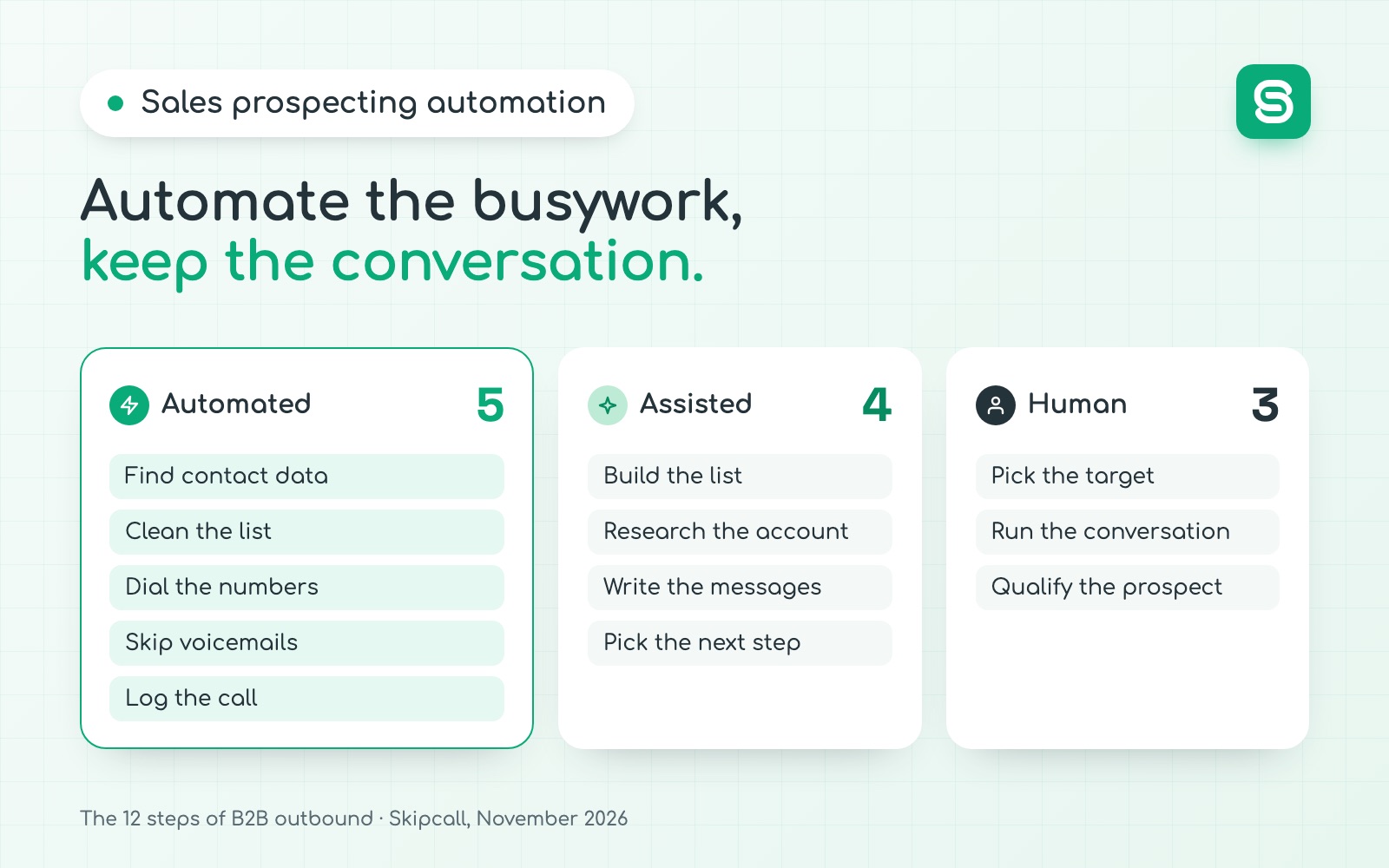
It helps to separate three levels that vendors love to blur together.
Keeping those levels apart avoids the two classic mistakes. The first is keeping everything manual out of caution, and paying $75K-OTE reps to punch in phone numbers. The second is automating everything out of excitement, and blasting thousands of people with messages nobody read.
Automation doesn’t replace the rep. It replaces what the rep does between conversations.
Automation, AI, agents: what’s the difference?
Vendors use the three words interchangeably. They aren’t. An automation applies a rule: “if the call hits voicemail, drop the prerecorded message.” It’s predictable. An AI feature produces something that wasn’t written in advance: a transcript, a summary, a voicemail detection, a draft email. It’s sometimes wrong, which is why it usually belongs in the “assisted” column. An agent chains several decisions with no human in the loop: it picks who to contact, writes, sends and replies. That’s the riskiest level, and it belongs only on tasks where a mistake is cheap to undo. If any of the jargon in this guide (power dialer, AMD, cadence, SDR) is new, our cold calling glossary has plain-English definitions.
What can you automate in sales prospecting, step by step?
Here’s the full chain for a phone-led B2B outbound motion, in 12 steps. For each one, the column shows what’s realistic today with tools on the market, not what looks great in a demo.
The dotted line shows how the work actually flows: it bounces back and forth between software and people. Nobody automates “prospecting” in one go. You automate links in the chain, and the quality of the whole thing depends on the handoffs.
Pick the target and build the list: human, then assisted
Deciding who you’re going after is the heaviest decision in the chain. A badly targeted list can’t be rescued by a great script or a clever sequence. That call stays human: it commits the offer, the positioning and the whole team’s time.
Once the ICP is set, building the list goes faster with tools: industry and headcount filters in a B2B database, buying signals (hiring, funding rounds, job changes), exports from your CRM. The tool proposes, the rep cuts. Our sales prospecting guide covers targeting and qualification upstream of any automation.
Find and verify contact data: automated
This is the step that automates best and pays back fastest. Enrichment tools query one or more data providers in sequence (the “waterfall”) and return a direct dial, a mobile number or an email for each contact. Doing it by hand, digging through the company site, LinkedIn and ZoomInfo search results, takes several minutes a record.
Two caveats. First, no provider finds everything, and advertised match rates are hard to verify: our guide to B2B phone number enrichment gives you a 100-contact test protocol. Second, a number found isn’t a number that works. Verification (format, live line, direct dial vs. main switchboard) is part of the step.
Clean the list: automated
Inconsistent phone formats, duplicates, contacts who asked not to be called, accounts that are already customers: a raw list always has enough junk to wreck a calling block. Those checks are mechanical and can be set once. A cleaning step normalizes numbers to E.164 and flags duplicates on every import so nobody has to think about it. For a one-off pass on an existing export, our free CSV cleaner reformats numbers and flags dupes.
The check people forget most is the do-not-call list. Anyone who said “take me off your list” has to be excluded from every future campaign, whichever tool heard it. Under FCC rules that’s an obligation for telemarketing calls, not a courtesy (more on that in the legal section).
Research the account and write the messages: assisted
Generative AI genuinely changed this step. Summarizing a company’s website, its recent news and the CRM history takes an assistant a few seconds. You can even plug your CRM into ChatGPT or Claude through MCP and prep a calling block by asking questions in plain English; we explain how in our guide to MCP for cold calling.
But picking the angle stays human. The AI surfaces ten facts; the rep picks the one that earns the call. Same for messaging: one template per persona, one line written or approved by the rep. A message that’s fully generated and sent without review is the number one cause of the botched “personalization” that makes prospects roll their eyes.
Dial and skip voicemails: automated
This is where the biggest pile of wasted time sits, and it’s the least visible. In a 100% anonymized Skipcall sample of 86,168 outbound B2B calls over twelve months, 17.9% were answered, 70.8% hit voicemail, and it took 9.1 dials to get one conversation longer than 30 seconds. That’s one set of teams and markets, not an industry benchmark, but the order of magnitude speaks for itself.
Dialing by hand means repeating the same motions nine times for one conversation. Three automations change that math:
- 01
A power dialer dials the next number.
The moment a call ends, the next one starts, no click. The rep stops hunting for records and stops typing numbers. - 02
A parallel dialer dials several numbers at once.
Up to four lines for a single rep. As soon as someone picks up, the other calls stop and those prospects see a missed call. Details on our parallel dialer page. - 03
Voicemail detection frees up the line.
The tool tells a human voice from a greeting and, depending on your settings, drops a prerecorded voicemail or sends a text. How it works and where it misfires is covered in our guide to answering machine detection.
Run the conversation: human
This is the only step where value gets created, and it stays fully human. Listening, asking the right question, sensing that an objection is a reflex and not a no, knowing when to push and when to hang up: none of that automates well in B2B today. AI voice agents are getting better, but a VP who realizes in the first sentence that they’re talking to a machine hangs up, and your brand goes with them. Tools that listen in and suggest a response live are assistance, not replacement.
Log the call and update the CRM: automated, then reviewed
The second big time sink. A rep who types up notes after every conversation spends several minutes on it, and plenty of reps just don’t: the CRM goes stale and the manager loses visibility. Today the call can be recorded (with the right notice, since states like California and Florida require all-party consent), transcribed, summarized, and the outcome written to the CRM record with no typing.
A review is still needed: transcripts mangle names, and a summary can miss the nuance that matters. Our sales call summary template lists what a good summary has to contain, which is exactly what you should check in the one your tool produces.
Pick the next step and follow up: assisted
After every attempt, somebody has to decide: call back in two days, send an email, try another contact at the account, or let it go. A sequence sets that logic in advance and the tool creates the tasks at the right time. That’s assistance, not pure automation, because the rule has to bend to what the prospect said: “call me after Q1 close” doesn’t fit any standard cadence.
To build the sequence itself, see our guide to B2B sales cadence. If your team runs several channels, our breakdown of the sales engagement platform category explains which kind of tool orchestrates what.
Qualify and hand off: human
Deciding that a prospect is ready for an AE meeting spends another rep’s time and the team’s credibility. A tool can structure that decision (a BANT or MEDDIC scorecard filled in the CRM), but it shouldn’t make it. An auto-booked meeting with someone who has no need and no budget costs more than a meeting you didn’t book.
How much time does prospecting automation actually save?
Vendors throw around huge numbers, rarely with a source. The honest move is to run the math on your own team. Here’s the method, with an example.
Read the chart left to right: the dark bar is time spent on calls that go nowhere, the green bar is note-taking. The first jump (power dialer plus AI summaries) cuts the total by about three in this example. The second (several lines, voicemails skipped) cuts it in half again. Swap our assumptions for your real durations: time ten attempts and ten call notes on a Tuesday morning, and you’ll have your own chart.
The math shows something most guides on this topic skip: the savings come almost entirely from the calls that fail. Automating an email send saves seconds. Automating dialing and voicemail screening saves hours, because those motions repeat for every number, answered or not. Rerun the numbers with your team’s real dial count: that’s usually what decides the first thing you automate.
The savings come from the calls that fail, not the ones that connect.
What should stay human in sales prospecting?
Anything that combines two traits: the task is rare or unique to each prospect, and a mistake is costly. The grid below lets you decide task by task with two questions: how often does this happen, and what does getting it wrong cost?
Applied to prospecting, the grid leaves six tasks that stay human, whatever the tool.
The fake personalization trap
The most common automation, and the most damaging, is the kind that pretends to be human. An email that opens with “Loved your recent LinkedIn post” when nobody read it, a text signed by a rep who doesn’t exist, a “just bumping this to the top of your inbox” sent to someone who already said no. Prospects see it, and they draw conclusions about how you’ll treat their account.
The simple rule: automate what’s openly automatic (a reminder, a prerecorded voicemail that sounds like one, a meeting confirmation) and never pass a machine off as a person. Beyond brand damage, there’s law on this too. California’s bot disclosure law (the B.O.T. Act, SB 1001) makes it unlawful to use a bot online to mislead someone about its artificial identity in order to drive a sale. And in February 2024 the FCC ruled that AI-generated voices count as “artificial” voices under the TCPA.
In what order should you automate prospecting?
In the order where each step makes the next one useful. Most teams do the opposite: they start with sequences because that’s the visible part, then discover their emails are bouncing off bad addresses and nobody knows what was said on the phone.
- 01
Clean data.
Enrich the contacts you already own, verify numbers, dedupe, and keep one central do-not-call list. Move on when at least half your records have a verified direct dial or mobile. - 02
Automatic call logging.
Every call and every outcome written to the CRM with no typing, plus recording, transcripts and summaries if you use them. Move on when a manager can read the week’s activity without asking anyone for a report. - 03
Dialing and voicemail.
Power dialer first, parallel dialer if most of your calls hit voicemail; voicemail detection and message drop. Move on when you know your conversations per hour and the number has stabilized. - 04
Sequences and follow-ups.
A written cadence, tasks created automatically, follow-up emails from reviewed templates. Move on when reply rates per step are tracked and you know which step books the meetings. - 05
AI assistants.
Account research, message drafts, call analysis for coaching. They pay off most when the four steps below them feed them reliable data.
Why call logging before dialing? Because a dialer ramps up volume, and volume nobody records is invisible. Go from 60 to 200 dials a day without outcomes flowing into the CRM, and you lose exactly what would tell you whether the change worked.
Which tools automate each step?
No single tool automates the whole chain well. “All-in-one” platforms cover lots of steps, each one less deeply than a specialist. The table maps each step to a tool category; our sales tech stack guide goes deeper on the layers and what they cost.
| Step | Tool category | What gets automated |
|---|---|---|
| List and targeting Assisted | B2B databases, CRM, intent and signal tools | Filters, signal alerts, exports to the CRM |
| Contact data Automated | Enrichment, waterfall, number validation | Finding phones and emails, checking format and line type |
| Research Assisted | AI assistants, CRM connected through MCP | Account brief, history, draft opener |
| Dialing Automated | Power dialer, parallel dialer | Next number, several lines, voicemail detection, message drop |
| Call logging Automated | Recording, transcription, summary, CRM sync | Notes, outcome, tasks, record updated |
| Follow-up Assisted | Sales engagement platform, cold email tool, dialer tasks | Scheduled callbacks, follow-up emails, task creation |
| Glue between tools Automated | APIs, webhooks, Zapier, Make, n8n | Moving a lead between tools, alerts, exports |
The last row deserves attention. The glue between tools is the least visible automation and the most fragile: someone renames a field in Salesforce and the flow silently stops. For each integration, write down who watches it, what it moves and how to switch it off.
A special case: calling inbound leads back
One automation almost always pays, even on a team that automates nothing else: alerting a rep the moment a lead fills in a form and putting the callback at the top of their list. Response time is one of the few conversion factors your tooling fully controls. We gave it its own guide on speed to lead.
Which automation rules should you set up first?
A useful automation fits in one sentence: “if this happens, then the tool does that.” Writing your rules in that form before you touch any software forces you to answer the two questions that matter: what exactly is the trigger, and who checks that the rule does what you expect? Here are the eight rules that pay off most in a phone-led outbound motion.
How much does prospecting automation cost?
Less in licenses than people expect, more in setup time. The cost breaks into five buckets: data (enrichment credits, paid per contact found), dialing (a dialer, per rep license), sequences (a platform, or your CRM’s built-in sequences), integrations (Zapier, Make or n8n, priced by task volume) and AI (often bundled in your tools, otherwise an assistant subscription). The bucket nobody budgets is the sixth: the time of whoever sets up, monitors and shuts off the automations.
For a sense of scale, the list prices we checked on November 18, 2026 for our sales engagement platform comparison start around $56 per user per month on annual billing for multichannel sequencing plans, before calling add-ons. Enterprise platforms like Outreach and Salesloft are quote-only. The right setup depends mostly on team size.
The math that settles it is always the same: compare the monthly cost of the tools with the rep time they give back, valued at your SDRs’ fully loaded hourly cost. If an automation doesn’t return its price in conversation hours, it waits.
Is automated prospecting legal in the US?
This is the section most automation guides skip, and the one that gets expensive when you get it wrong. US rules turn on three questions: who’s calling (a person or an automated system), what kind of line you’re reaching (a business landline or a cell phone) and which channel (call, voicemail, text or email). The rules below were checked on November 18, 2026.
| Situation | Rule | Source |
|---|---|---|
| A rep live-dials a business line Human call, B2B | No TCPA consent needed. Identify yourself and your company, call within local calling hours, honor do-not-call requests | TCPA, 47 CFR 64.1200; TSR |
| Prerecorded or AI voice, voicemail drop To a cell phone | Prior express written consent for telemarketing. No B2B exemption on mobile numbers | TCPA; FCC 22-85 (2022); FCC AI voice ruling (2024) |
| Automated text SMS to a cell | Consent, standardized opt-out keywords, A2P 10DLC registration for texts from local numbers | TCPA; FCC revocation order; carrier rules |
| Calls into certain states Mini-TCPAs | Florida, Oklahoma, Washington and Maryland add rules with no B2B carve-out. Florida caps attempts at 3 per 24 hours | FTSA (FL), OTSA (OK), state law |
| Cold email B2B | No consent needed, but no B2B exception either: honest headers and subject, postal address, opt-out honored in 10 business days | CAN-SPAM Act, FTC |
A few details that change how you implement it:
- The “automated system” line. The TCPA bites when you use an autodialer or an artificial or prerecorded voice. Ringless voicemail to a cell phone is a “call” under the TCPA (FCC 22-85), and the FCC’s February 2024 ruling put AI-cloned voices in the same bucket. Damages run $500 per violation, up to $1,500 if willful, and the TCPA lets recipients sue as a class. Our breakdown of whether ringless voicemail is legal applies the same reasoning to voicemail drops on mobiles.
- Mobiles have no B2B exemption. A CFO’s cell is protected like anyone’s. That’s why our guide to whether cold calling is legal treats the business-landline exemption as narrower than most teams think.
- The TSR now reaches B2B. The FTC’s Telemarketing Sales Rule mostly exempts business-to-business calls, but its 2024 amendments extended the ban on misrepresentations to B2B calls. Overpromising on a call is now an FTC problem too.
- What’s changing right now. New FCC rules on how people revoke consent take effect November 25, 2026. Our article on the November 2026 TCPA changes has the checklist. To check a specific campaign in two minutes, run it through our cold calling compliance checker.
- Caller ID. Carriers score outbound numbers and label suspicious ones “Spam Likely”. How STIR/SHAKEN fits in is covered in our guide to STIR/SHAKEN caller ID authentication.
If you also prospect into France or the EU, the rules are stricter: B2C calls in France require prior consent since August 11, 2026, and automated messages need consent even in B2B. Get local counsel before you point a US playbook at Europe.
What mistakes make prospecting automation fail?
Every automation needs an owner who knows how to turn it off.
How do you measure whether automation pays off?
Compare before and after, on the same kinds of lists, with outcome metrics and guardrail metrics. The first set tells you whether automation saves time; the second tells you whether it’s breaking something on the way.
| Metric | What it measures | Red flag |
|---|---|---|
| Conversations per hour Outcome | Rep time freed up by dialing and voicemail screening | Flat despite a new dialer: the list is the problem |
| Meetings per 100 dials Outcome | Quality of the targeting and the conversation | Drops as volume rises: the ICP got wider too fast |
| Reply rate per sequence step Outcome | Which follow-ups actually work | Zero-reply steps that keep sending |
| CRM records with a call outcome Guardrail | Quality of automatic call logging | Empty activities with no outcome or note |
| Opt-out and complaint rate Guardrail | How much volume your market tolerates | A spike after a cadence or messaging change |
For running a team on numbers more broadly, our guide to sales KPIs lays out which metrics to track and how often. One simple rule: don’t add an automation until the last one has been measured for at least two weeks.
The automation plan to copy
Paste this into a doc and fill it in with your team. It follows the order of the staircase above.
Which AI prompts help with prospecting prep?
Step 5 usually starts with a chat assistant (ChatGPT, Claude, Gemini) and a few well-written prompts. The three below cover the “assisted” tasks in the chain. They share one trait: they ask the AI to flag what it doesn’t know instead of making it up. Only feed them data you’re allowed to process, and never a recording the prospect wasn’t told about.
Every output gets reviewed before use: that’s what keeps these tasks in the “assisted” column, not the “automated” one. For prompts tailored to your role and ICP, our AI sales prompt generator builds a full set. And for where AI fits in the calls themselves (dialers, conversation intelligence, synthetic voices), see our guide to AI for sales prospecting.
Where Skipcall fits in the chain

Skipcall automates the phone links in the chain: power dialing or parallel dialing on up to four lines, AI voicemail detection, call recording, transcription and summaries, task creation, and updates to HubSpot, Pipedrive, Salesforce or Attio. It also enriches phone numbers and emails for contacts you already own, on credits.
Its sequences chain outbound calls through a list. They trigger exactly one automatic send: when the AI detects voicemail, a prerecorded voicemail or a text goes out, depending on your settings. That’s rule 1 in the chart above, with the same consent caveats for cell phones, and nothing more.
What it doesn’t do, so you can build your chain with eyes open: email, scheduled texts and LinkedIn are not orchestrated in a Skipcall sequence (those channels stay in your other tools, connected through the API). Skipcall isn’t a contact database, doesn’t build lists, and doesn’t offer a voice agent that calls in place of the rep. Plans start at $70 per license per month (Starter, billed annually), and you can start with a single license, no commitment. The conversation stays human.
What to remember
- Automating means removing busywork, not removing people. The conversation, the targeting and the qualification stay with the rep.
- Twelve steps, three levels. Five automated (contact data, list hygiene, dialing, voicemail, call logging), four assisted, three human.
- The biggest win is on the phone, on the calls that fail: 9.1 dials per conversation in our sample.
- Order matters: data, call logging, dialing, sequences, AI. Each step depends on the one before.
- Write your rules as if/then, each with a human guardrail. Stop rules (opt-outs, booked meetings) come before send rules.
- US law cares about the line and the voice. A rep live-dialing a business line needs no consent; a prerecorded message or automated text to a cell phone does, B2B or not. CAN-SPAM covers every cold email.
- Measure outcomes, not activity: conversations and meetings per hour, with opt-out rates as your guardrail.
Sources
- Salesforce, State of Sales, 7th edition (2026): 4,050 sales professionals in 22 countries, 40% of time spent selling.
- FCC, declaratory ruling FCC 22-85 on ringless voicemail (2022).
- FCC, ruling that the TCPA applies to AI-generated voices (February 2024).
- FCC, Reassigned Numbers Database.
- FTC, CAN-SPAM Act: a compliance guide for business: no B2B exception, opt-outs within 10 business days, penalties up to $53,088 per email.
- California, SB 1001 (B.O.T. Act) on bot disclosure.
- Google, email sender guidelines.
- Yahoo, sender best practices.
- LinkedIn, User Agreement, section 8.2.
- Skipcall, 100% anonymized sample of 86,168 outbound B2B calls over twelve months (answer rate, voicemail rate and dials per conversation).