A batch dialer is the kind of tool people search for after a bad week on the phones: 200 dials, 11 conversations, and most of the day spent listening to rings and voicemail greetings. The pitch is simple. Instead of calling one number at a time, the software calls three or four at once and hands the rep the first person who picks up. The catch is in the details, and the details are where the label stops meaning the same thing from one vendor to the next.
What is a batch dialer?
A batch dialer is an auto dialer that places calls in groups. You load a list, pick a batch size, and the software dials that many numbers simultaneously for one rep. When one call is answered by a person, the rep is connected to that person. The rest of the batch is stopped, or, depending on the product, sent somewhere else. When the conversation ends and the rep logs the outcome, the dialer fires the next batch.
The idea is old call center logic applied to a single seat. Most outbound dials end in no answer, a busy signal or voicemail. On a cold list, the rep’s day is mostly waiting. A batch dialer moves that waiting into the software: the rep only hears a phone line when a human is on the other end. It is one member of the auto dialer family, alongside the four modes compared below.
Why the term means three different things
Search “batch dialer” and you will find at least three meanings, sometimes on the same page of results.
| What people mean | What it is | Where you see it |
|---|---|---|
| Multi-line dialing per rep | Several numbers dialed at once for one rep, first answer connected. The meaning used in this guide | Call centers, sales dialer comparisons, vendor blogs |
| List or campaign dialing | Any auto dialer that works through an uploaded list in order, one batch of contacts after another, even on one line | Older dialer software, some CRM add-ons |
| BatchDialer, the brand | A specific cloud dialer, with plans of 3 or 5 lines per agent | Real estate investing, roofing and solar, collections |
Nextiva, for instance, defines a batch dialer as auto dialer software that dials multiple contacts at once and connects agents only to live answers, and places it between predictive and power dialers in its guide to batch dialers. That matches the first meaning, and it is the one this article uses. A newer fourth meaning shows up on AI voice platforms, where “batch calling” means launching a list of calls handled by an AI agent instead of a person. That is a different product entirely and outside the scope here.
How does batch dialing work?
The mechanics are the same in every serious product. What changes is how each step is configured.
- 01
You load a list and set the batch size.
A CSV or a CRM view, usually filtered by time zone so you don’t call Los Angeles at 7 a.m. Then a number of lines per rep: 2, 3, 4, sometimes more. - 02
The dialer calls the whole batch at once.
If the batch size is 3, three phones start ringing at the same time, all showing your caller ID. - 03
It listens for a human.
Busy signals, disconnected numbers and no-answers are logged automatically. Many dialers also try to tell a voicemail greeting from a person; our guide to answering machine detection explains how that works and where it fails. - 04
The first live answer goes to the rep.
The rep hears the prospect, ideally with the record already on screen. - 05
The rest of the batch is stopped or routed.
This is the step that differs most. Good setups stop the other lines while they are still ringing, so those contacts see a missed call. Others let them ring on and send a second answer to another free agent, or to a recorded message, or to nothing. - 06
The rep logs the outcome, and the next batch fires.
Disposition, note, next step. A consistent set of call disposition codes matters more here than on a manual dialer, because the dialer reuses them to decide who gets called again.
Fixed pacing is the defining trait
The word that separates a batch dialer from a predictive one is “fixed.” A batch dialer does not forecast anything. It does not estimate how long the current conversation will last or start dialing for a rep who is still talking. Each rep gets their batch when they are ready, and only then. That makes it more predictable for the rep and much easier to keep compliant than a predictive system, which dials ahead of reps by design. Our explainer on how a predictive dialer works goes into the pacing model if you want the contrast in detail.
A batch dialer waits for the rep. A predictive dialer bets on when the rep will be free.
Batch dialer vs. power, parallel, predictive and preview dialers
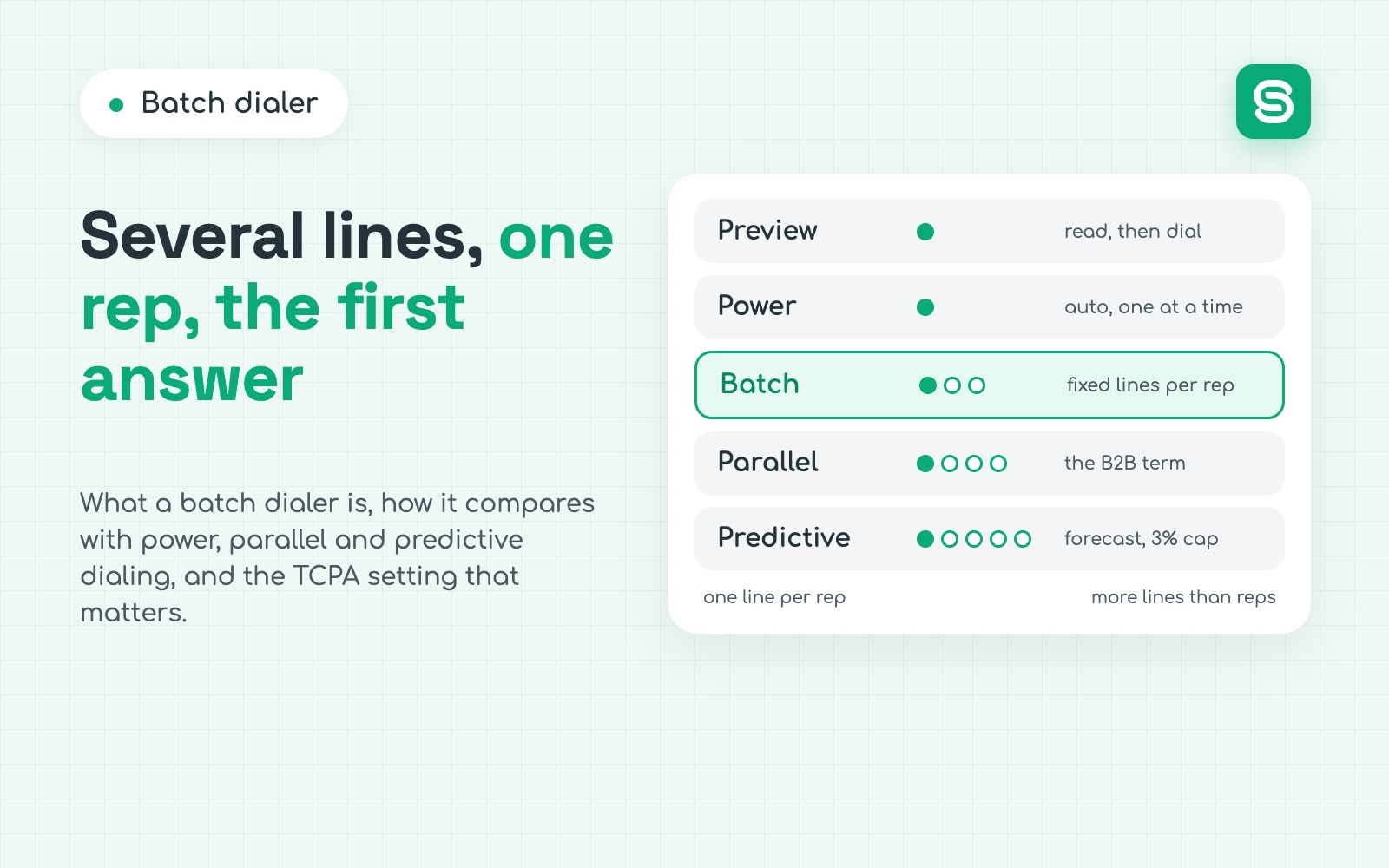
Five dialing modes cover almost every product on the market. Here they are side by side, ordered from the most careful to the most aggressive. You can enlarge the diagram or download it as a PNG for your team.
Batch dialer vs. power dialer
A power dialer calls one number at a time per rep and moves to the next number on its own when the call ends. The rep still listens to every ring and every voicemail greeting, but never dials by hand. A batch dialer removes the listening as well, at the price of calling contacts who will not get a conversation in that round.
The practical difference shows up in two numbers: conversations per hour and contacts used per conversation. On a list where most people answer (warm inbound leads, scheduled callbacks), a power dialer gets you nearly the same conversations without spending extra contacts. On a cold list where most dials go unanswered, a batch dialer can add half again as many conversations per hour, or more (see the worked example further down). Some vendors call that one-line automatic mode “progressive” instead; the two labels overlap.
- Your answer rate is already decent (callbacks, inbound, referrals)
- Each contact is precious and you don’t want to spend attempts
- Reps are new and need a few seconds between calls to reset
- You want zero chance of two people answering at once
- Most dials end in no answer or voicemail
- The list is large and can absorb missed calls
- Reps are experienced and can open a call cold, with no ring time to prepare
- Your cost per conversation, not per contact, is the number you manage
Batch dialer vs. parallel dialer
This is the comparison that confuses buyers most, because the honest answer is that they are the same technique. A parallel dialer dials 2 to 5 lines per rep and connects the first person who answers. Sales tools built for SDR teams tend to say “parallel.” Call center software and real estate tools tend to say “batch,” “multi-line” or “rapid-fire.” The mechanics underneath are the same.
What does differ from product to product is the configuration, and that is what you should compare:
- Who starts each round. In most B2B parallel dialers, the rep starts a session and each batch fires only once the previous call is logged. In some call center setups, batches fire continuously.
- What happens to the other lines. The best practice is to stop them while they are still ringing, before anyone picks up. Then nobody hears silence.
- The maximum number of lines. Two to four lines per rep is the usual B2B range. Past that, missed calls pile up fast. Our guide on how many lines a parallel dialer should use works through the trade-off.
Batch dialer vs. predictive dialer
A predictive dialer works on a pool of agents. It watches how long calls last and how often people answer, then dials ahead so that a call connects the moment a rep frees up. It deliberately dials more lines than there are available reps. When the forecast is wrong, someone answers and no rep is free: the call is dropped or put on hold. That is an abandoned call, and it is why predictive dialers sit under an explicit cap in federal rules. For the long version of that trade-off, read power vs. predictive dialers.
A batch dialer has no forecast. If it’s configured to stop extra lines at the first answer, it never needs to drop anyone. If it lets extra lines ring and has nobody to send a second answer to, it can produce abandoned calls too, even without a predictive algorithm. Which brings us to the setting that matters.
Batch dialer vs. preview dialer
A preview dialer is the opposite philosophy. The rep sees the contact’s record, reads it, and only then clicks to dial. It is the slowest mode and the most personal. Preview makes sense when every call is worth five minutes of research: a named enterprise account, a renewal, a referral. Batch dialing makes sense when the call is short, the list is long and the research can happen in the first ten seconds of the conversation, from what’s on screen.
| Mode | Lines per rep | Best list | Main risk |
|---|---|---|---|
| Preview | 1, rep clicks to dial | High-value accounts, warm referrals | Low volume |
| Power or progressive | 1, automatic | Callbacks, inbound leads, decent answer rates | Rep time spent on rings and voicemail |
| Batch or parallel | 2 to 5, fixed | Cold lists with low answer rates | Missed calls, double answers |
| Predictive | More than 1, forecast | Large consumer call centers | Abandoned calls, 3% cap |
Not sure which family you need? The free dialer quiz asks about your list, team and calling volume and suggests a mode in under two minutes.
What happens when two people answer at once?
This is the question most batch dialer pages skip, and it is the one that decides your risk. When three phones ring at the same time, sometimes two people pick up within the same second. The dialer can only give the rep one of them. What happens to the other one depends entirely on the product.
How often does it happen? It depends on your answer rate and your batch size. Here is a simple model, built for this article, assuming each number in a round is answered independently.
That is the real argument for keeping batches small on B2B lists. Going from 3 to 4 lines adds conversations, but it also raises the share of rounds where someone else wanted to talk to you and didn’t get the chance. Those contacts are not lost forever, but their attempt is spent and your number has left a missed call on their phone. Burn through a list too aggressively and the next pass gets worse; our guide on the burned prospect list shows how that happens.
Is batch dialing legal? TCPA and abandoned calls
Batch dialing is legal. Using it carelessly can still put you on the wrong side of three sets of rules. This section is a practical summary for US teams, not legal advice; for anything consumer-facing or high-volume, talk to counsel.
The abandoned call rule
The FCC rule at 47 CFR 64.1200(a)(7) bars abandoning more than three percent of all telemarketing calls that are answered live by a person, measured over a 30-day period for a single calling campaign. A call is abandoned if it is not connected to a live sales representative within two seconds of the called person’s completed greeting. When no rep is available within those two seconds, the caller must play a short prerecorded message with the business name and a number to make a do-not-call request.
The FTC’s Telemarketing Sales Rule mirrors this in its call abandonment safe harbor at 16 CFR 310.4(b)(4): no more than 3% abandonment per campaign over 30 days, unanswered calls allowed to ring for at least 15 seconds or four rings, the same recorded message, and records that prove it. Our sister guide on call abandonment rate shows how to measure it campaign by campaign.
Cell phones and the autodialer question
The TCPA’s consent requirement for autodialed calls to cell phones depends on what counts as an “automatic telephone dialing system.” In Facebook v. Duguid (2021), the Supreme Court held that the definition covers equipment that uses a random or sequential number generator. A dialer that calls a list you uploaded generally falls outside that definition. But artificial or prerecorded voice messages still require consent, several states have their own telemarketing laws with broader definitions, and federal rules keep moving. Our guides on cold calling cell phones in B2B and the TCPA changes of November 2026 go into the details.
Do Not Call lists and calling hours
A batch dialer works through numbers faster, so mistakes travel faster too. Scrub against the National Do Not Call Registry and your internal list before each campaign (see our guide to DNC scrubbing), respect calling hours in the contact’s local time zone, and keep opt-out requests in your CRM so the dialer never serves that number again.
The legal risk of a batch dialer is not the number of lines. It is the silence on the other end of a dropped answer.
Which dialing mode fits your list?
Three questions are usually enough to choose. Answer them for one specific calling session, not for your whole team: the same SDR can use preview mode for ten strategic accounts in the morning and batch mode for a cold list in the afternoon.
Who uses batch dialers, and for what?
Batch dialing is a volume tool. It shines where lists are long, answer rates are low and calls are short. Here is how that plays out for the teams that use it most.
B2B SDR teams: cold outbound to mid-market and SMB lists, where most dials hit voicemail and the goal is a booked meeting. Two to four lines per rep, a short opener, and a power dialer kept on hand for callbacks.
Real estate investors and agents: owner lists, expired listings and FSBOs, where answer rates are low and calls are brief. This is BatchDialer’s home market. Our guide to cold calling for real estate covers the rules that apply to consumer numbers.
Recruiters and staffing agencies: calling passive candidates in bulk for high-volume roles. Batch mode for first contact, one-to-one calls for anything after the first conversation.
Insurance, solar and home services: re-engaging aged inbound leads. Consent rules for consumer numbers are stricter here, so the dialer settings matter even more.
Avoid if: you sell six-figure deals to a few hundred named accounts, most of your calls are warm callbacks, or you cannot guarantee a rep for every answered call.
What batch dialing does to a rep’s hour
Here is a second worked example, built for this article, using the same assumption of 1 live answer in 10 dials.
Before you start, decide how many attempts each contact gets and stick to it, so batch dialing doesn’t burn through the list in a week.
How to set up a batch dialer the right way
Most problems with batch dialing are configuration problems. Five steps get you a setup that adds conversations without adding risk.
Start with 2 or 3 lines
Measure conversations per hour and missed calls per conversation on one list, with one or two reps. Raise to 4 lines only if answer rates stay low and reps keep up.
Stop extra lines at the first answer
Confirm in writing with the vendor that the other lines in a batch are ended while still ringing, not left to ring through to voicemail or to a recording.
Segment by time zone and list quality
Run Eastern contacts in the morning, Pacific in the afternoon. Keep high-value accounts out of batch mode and call them one at a time.
Track abandonment and missed calls
Pull the share of live answers that were not connected to a rep within two seconds, per campaign, every week. It should be close to zero on a well-configured setup.
Watch your caller ID health
More dials per number means more missed calls on prospects’ phones. Spread calls across enough numbers and keep an eye on spam labels before answer rates drop.
The five mistakes that make batch dialing backfire
- 01
Too many lines too soon.
Six lines on a list with a decent answer rate means double answers every few rounds and reps who feel ambushed. - 02
Letting extra calls ring on.
The default in some call center setups. It is how a batch dialer quietly turns into an abandonment problem. - 03
Batching your best accounts.
A strategic account deserves a researched, one-to-one call. Batch mode spends attempts you will want back. - 04
Ignoring time zones.
A national list dialed in one block reaches someone in Honolulu at dawn. Filter before each session. - 05
Sloppy dispositions.
If reps log “no answer” for a wrong number, the dialer keeps calling it. Clean outcomes keep your list honest.
What to ask a vendor before you turn batch dialing on
Every vendor will tell you their dialer is compliant. These questions get you specific answers. Copy them into your next demo or your security questionnaire.
Batch dialer vendor questions (12)
Checklist written for this article. Ask for answers in writing.
1. How many lines per rep can we set, and can we set it per campaign?
2. When the first person answers, what happens to the other lines in the batch, exactly?
3. Are the other lines ended while still ringing, before anyone can answer?
4. If two people answer at the same moment, where does the second call go?
5. How long can an answered call wait before a rep is connected? Is it under two seconds?
6. Can the dialer play the prerecorded identification and opt-out message when no rep is free?
7. Do you report our abandonment rate per campaign over 30 days? Can we export it?
8. Does the dialer pace ahead of reps (predictive) or wait for each rep (fixed)?
9. How do you detect voicemail, and what is the false-positive rate you measure?
10. Can we filter by local time zone and block calls outside allowed hours?
11. How are do-not-call requests captured and synced back to our CRM?
12. How many caller IDs do we get, and how do you help us keep them out of spam labels?
Where Skipcall fits

Skipcall has no mode called “batch.” It offers the two modes that cover the same ground for B2B teams: a power dialer for one line at a time, and a parallel dialer that dials up to 4 lines per rep. When a call is answered, the other lines stop and those contacts see a missed call; no one is left listening to silence. AI voicemail detection filters out greetings, calls are recorded, transcribed and summarized, and results sync to HubSpot, Pipedrive, Salesforce or Attio. Plans with the dialers start at $70 per license per month, billed annually, with one license and no commitment. If you are still weighing the budget, our breakdown of how much a dialer costs compares vendors on real cost per conversation.
Key takeaways
Sources
- eCFR via Cornell LII: 47 CFR 64.1200, delivery restrictions (FCC abandoned call rule, paragraph (a)(7))
- eCFR via Cornell LII: 16 CFR 310.4, abusive telemarketing acts (TSR abandonment safe harbor, paragraph (b)(4))
- eCFR via Cornell LII: 16 CFR 310.6, exemptions (business-to-business calls, paragraph (b)(7))
- Supreme Court of the United States: Facebook, Inc. v. Duguid, 592 U.S. (2021)
- Nextiva: What is a batch dialer?
- BatchDialer: pricing page, checked November 20, 2026
- BatchDialer: homepage and FAQ, checked November 20, 2026