Monday pipeline review. Your SDR team made 3,200 dials last week, and the CRM says 1,100 of them were “Contacted.” Contacted how? A voicemail? A receptionist who said “she’s in a meeting”? A VP who asked for a call back in January? Nobody knows, because “Contacted” means all three. That’s what a bad set of call disposition codes does: the activity is there, the information isn’t.
What are call disposition codes?
A call disposition code is a short, predefined label that records the outcome of a single call. After each dial, the rep picks one code from a fixed list (or the dialer picks it for them), and that code is stored with the call activity in your dialer and CRM. “Disposition” is the contact center word; HubSpot calls the same thing a call outcome, and other tools say call result or call status. Same idea: one call, one outcome, from a closed list.
The closed list is the whole point. Free-text notes are great for context, but you can’t count them. Codes are what let you answer questions like “how many dials does it take to reach a decision maker on this list?” or “why do prospects say no this month?” Our call metrics guide covers which numbers to track; this article covers the raw material those numbers are built from.
Three things teams confuse with a disposition
Most messy call data comes from one field doing three jobs. Before writing a single code, separate these three layers.
| Layer | What it describes | Who sets it | Example values |
|---|---|---|---|
| Technical call status | What the phone network returned | The dialer, automatically | Connected, voicemail, busy, failed, invalid number |
| Call disposition | What happened on this one call | The rep, right after hanging up | Gatekeeper, callback requested, not interested, meeting booked |
| Lead or contact status | Where the contact stands over weeks | The rep or a workflow, when it changes | New, working, nurture, qualified, disqualified |
A contact might collect nine dispositions (four no answers, two voicemails, a gatekeeper, a callback requested, a meeting booked) before its lead status moves once, from Working to Qualified. If your disposition list contains “Working” or “Nurture,” you have merged two layers, and both your call metrics and your pipeline reports are now wrong.
Why do disposition codes matter for sales reporting?
Because every outbound metric is a ratio of dispositions. Connect rate, conversation rate, meetings per conversation, bad-data rate: each one is “count of these codes ÷ count of those codes.” If the codes are vague or overlapping, every ratio inherits the error, and you end up coaching reps on problems that are really list problems, or buying data to fix what is really an opener problem.
Two lessons in those numbers. First, the outcomes reps log most often are the boring ones. In that sample, roughly seven dials out of ten went to voicemail, so a list that lumps “voicemail” into one code hides most of your activity in a single bucket. Our cold calling statistics break that sample down further. Second, reps already spend most of their week on work that isn’t selling, according to Salesforce’s State of Sales. A disposition list that takes 30 seconds of thinking per dial will be skipped or faked. Clean data comes from a list that is fast to use, not from reminders to “log properly.”
Every outbound metric is a ratio of dispositions. Vague codes don’t make one number wrong; they make all of them wrong.
Codes also drive action, not just reports. “Callback requested” should create a dated task. “Do not call” should suppress the number everywhere. “Bad number” should send the contact back to enrichment. When a code triggers nothing, reps learn it doesn’t matter which one they pick, and the data degrades from there.
The call dispositions list: 18 codes for B2B prospecting
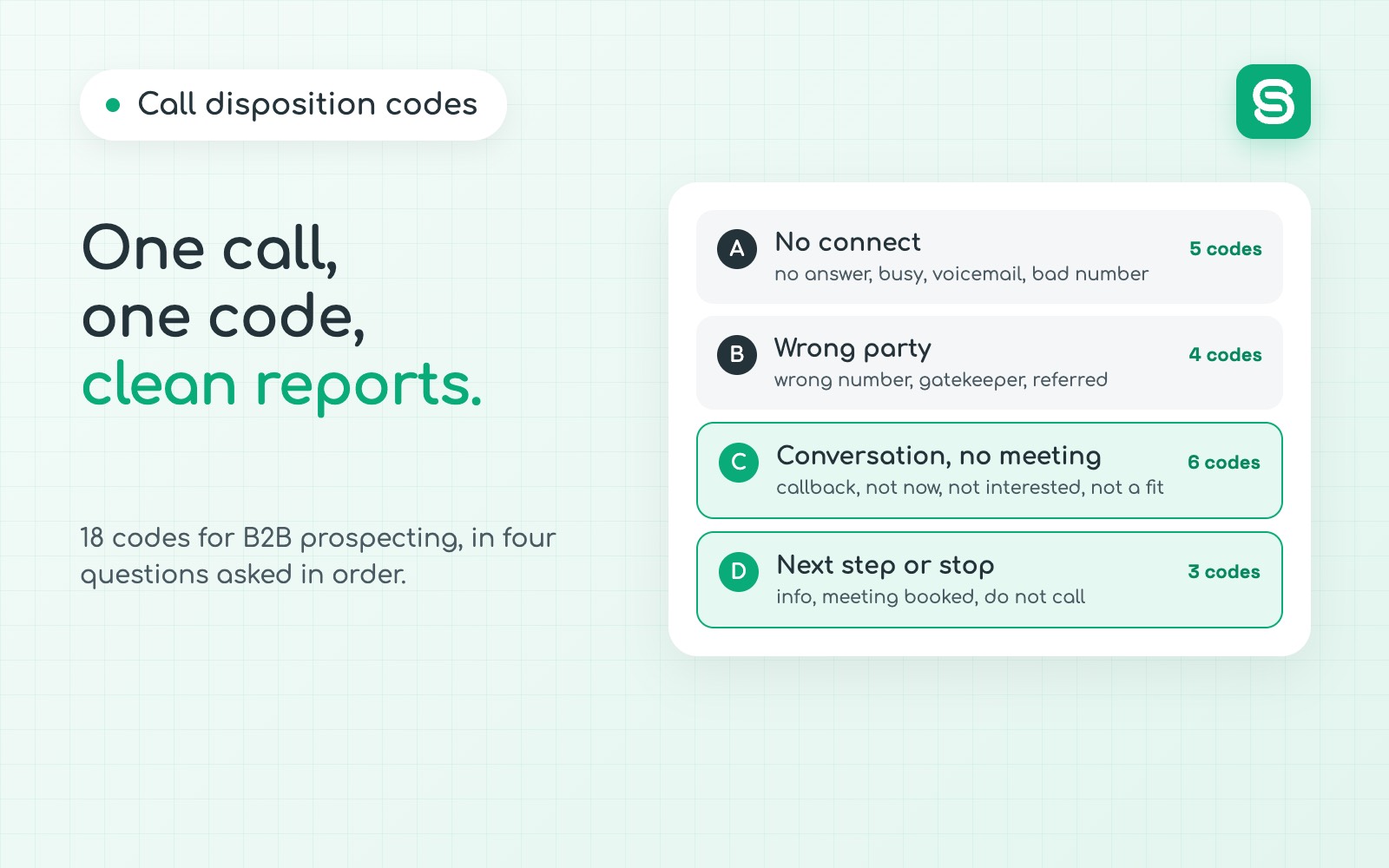
Here is the list we recommend for B2B outbound teams calling direct dials, mobiles and switchboards. It is built to be mutually exclusive (one call can only fit one code), exhaustive (no need for “Other”) and ordered: the rep asks four questions in sequence and stops at the first match. You can enlarge the decision path or download it for your team wiki.
Group A: no connect (codes 01 to 05)
Nobody picked up. On a modern dialer, most of these should be set automatically, with no click from the rep.
| Code | Use it when | Next action | Feeds |
|---|---|---|---|
| 01 No answer | It rang out and no voicemail picked up, or the call was not answered before your ring limit | Next attempt per cadence | Attempts per contact, best calling windows |
| 02 Busy | Busy signal or line engaged | Retry later the same day | Calling windows |
| 03 Voicemail, message left | You reached voicemail and left a message | Follow-up email referencing the voicemail | Voicemail callback rate |
| 04 Voicemail, no message | You reached voicemail and hung up without leaving one | Next attempt per cadence | Attempts per contact |
| 05 Bad number | Disconnected, not in service, fax tone or invalid format | Remove the number, send the contact to enrichment | List quality, data vendor accuracy |
Why split voicemail in two? Because most cadences only leave a message on some attempts, and you can’t measure whether voicemails get callbacks if you don’t know which dials left one. Our analysis of whether to leave a cold call voicemail shows why that choice deserves data, and answering machine detection explains how a dialer tells a machine from a human in the first place.
Group B: wrong party (codes 06 to 09)
A human picked up, but not the person you were trying to reach. These codes measure the quality of your contact data and your ability to navigate an org chart. They are not failures by the rep.
If 06 and 09 climb together on one list, the list is old. Our B2B data decay calculator estimates how fast that happens, so you know when a list is due for a refresh rather than another pass.
Group C: conversation, no meeting (codes 10 to 15)
You reached the right person. These six codes carry the most coaching value, because they tell you why conversations don’t convert.
| Code | Use it when | Next action | Feeds |
|---|---|---|---|
| 10 Hung up early | The prospect hung up within the opener, before any real exchange | Next attempt in a few days, different angle | Opener effectiveness |
| 11 Callback requested | The prospect asked you to call at a specific time | Dated task at the time they gave | Callback show rate |
| 12 Not now | Relevant problem, wrong timing: budget cycle, reorg, busy quarter | Re-engage date set by the rep | Timing objections, nurture pipeline |
| 13 Has a solution | They use a competitor or built it in-house and are not looking | Log the vendor and renewal date if given | Competitive landscape, renewal calendar |
| 14 Not interested | Heard the pitch, said no, no reason or a soft reason | Long nurture or a new angle in a few months | Message and targeting |
| 15 Not a fit | Disqualified on your criteria: too small, wrong industry, no use case | Disqualify the contact or account | ICP accuracy of the list |
The split between 12, 13, 14 and 15 is where most lists are too coarse. Lump them into “Not interested” and you can’t tell a timing problem from a targeting problem. For the conversations themselves, see our responses to “I’m not interested” and to “call me back later”.
Group D: next step or stop (codes 16 to 18)
- 16
Info requested.
The prospect asked for an email, a deck or pricing before deciding on a meeting. Next action: send it within the hour and book a follow-up call two or three business days later. Watch this code: a high share often means reps accept “send me something” as a polite exit. Feeds: info-to-meeting conversion. - 17
Meeting booked.
A meeting is on the calendar with a date and time, not “let’s talk next week.” Next action: calendar invite plus confirmation, and the lead status moves. Feeds: meetings per conversation, meetings per dial. This is the only code that counts toward meeting quotas. - 18
Do not call.
The person asked not to be called again, whatever words they used. Next action: suppress the number everywhere, immediately. Feeds: opt-out rate by list and by opener. Never fold this into Not interested.
Copy-ready disposition list for your CRM
Here is the same list in two formats. The first is a plain picklist you can paste into a CRM or dialer setting, one value per line. The second is the definitions sheet to pin in your team wiki and use in onboarding. HubSpot limits custom outcome names to 50 characters; every label below fits.
Picklist values (18 codes)
Paste one value per line into your CRM or dialer outcome settings.
01 No answer
02 Busy
03 Voicemail, message left
04 Voicemail, no message
05 Bad number
06 Wrong number
07 Gatekeeper, no transfer
08 Referred elsewhere
09 Left the company
10 Hung up early
11 Callback requested
12 Not now
13 Has a solution
14 Not interested
15 Not a fit
16 Info requested
17 Meeting booked
18 Do not call
Definitions sheet for your team wiki
Ask the four questions in order. Pick the first code that fits. One code per dial.
HOW TO PICK A CODE
Q1. Did a person pick up? If no, use group A.
Q2. Was it the prospect? If no, use group B.
Q3. Did it turn into a real conversation without a meeting? Use group C.
Q4. Otherwise, use group D.
Rule: log the LAST thing that happened on the call.

A. NO CONNECT
01 No answer: rang out, no voicemail. Next: next attempt per cadence.
02 Busy: busy signal. Next: retry later today.
03 Voicemail, message left: Next: follow-up email that mentions the voicemail.
04 Voicemail, no message: Next: next attempt per cadence.
05 Bad number: disconnected, not in service, fax, invalid. Next: remove number, send to enrichment.

B. WRONG PARTY
06 Wrong number: a person answered, the number is not the contact's. Next: remove number.
07 Gatekeeper, no transfer: assistant or receptionist did not put you through. Next: retry at another time or find a direct line.
08 Referred elsewhere: someone named a better contact. Next: create that contact, note who referred you.
09 Left the company: Next: mark contact as gone, ask for the replacement, flag the account.

C. CONVERSATION, NO MEETING
10 Hung up early: hung up during the opener. Next: new attempt in a few days, new angle.
11 Callback requested: prospect named a time. Next: dated task at that time.
12 Not now: relevant problem, wrong timing. Next: re-engage date.
13 Has a solution: uses a competitor or in-house tool. Next: log vendor and renewal date.
14 Not interested: heard the pitch, said no. Next: long nurture.
15 Not a fit: fails your qualification criteria. Next: disqualify.

D. NEXT STEP OR STOP
16 Info requested: wants an email or deck first. Next: send within the hour, follow-up call in 2 to 3 business days.
17 Meeting booked: date and time on the calendar. Next: invite and confirmation, update lead status.
18 Do not call: asked not to be called again. Next: suppress the number everywhere, now.
If you track calls in a spreadsheet rather than a CRM, our call log template gives you a ready-made sheet with a shorter outcome list and the formulas to count it. The 18 codes here are the team-level version: when you outgrow the sheet, map its outcomes onto this list so your history stays comparable.
What can you learn from call disposition data?
Once every call carries one of these codes, your funnel builds itself. Each level of the funnel drops one group of codes, and the ratio between two levels is a metric you can act on.
The five ratios worth computing every week
A worked example
Now read it like a manager. A 20% meeting rate on real conversations is strong: the rep is not the problem. Thirty early hang-ups out of 140 reached prospects (21%) says the opener loses one prospect in five. And 8% of dials burned on bad data is a list issue worth more than any script tweak. To rerun this logic on your own numbers, the sales funnel calculator chains the ratios for you. Your no-connect codes also tell you when to stop: if a contact has piled up six or seven group A codes across different days and times, the next dial is unlikely to be the one that connects.
How many call disposition codes should you have?
Enough that each code triggers a different next action or answers a different question, and no more. Two forces pull in opposite directions: fewer codes are faster to pick, more codes give richer reports. In practice, the limit is human. When a rep has to scroll a list of 30 options after every dial, they start choosing the first plausible one.
Your CRM may also set limits. HubSpot lets Sales Hub and Service Hub Professional or Enterprise accounts create up to 30 custom call outcomes, with names of 50 characters at most, and you cannot edit an outcome after saving it, because edits would affect reporting (HubSpot Knowledge Base, updated December 2025). HubSpot’s six default outcomes are Busy, Connected, Left live message, Left voicemail, No answer and Wrong number (HubSpot developer docs). Notice that “Connected” covers everything from a gatekeeper to a booked meeting: that’s why most teams add their own.
Solo founder or one rep: 8 to 10 codes
Keep 01, 03, 04, 05, 07, 11, 12, 14, 17 and 18. Merge Busy into No answer, Has a solution and Not a fit into Not interested, and use notes for the rest. You need follow-ups to fire correctly more than you need an objection breakdown.
SDR team of 3 to 25 reps: the full 18
This is where the list pays for itself. You compare reps, lists and openers, so you need groups B and C split finely. Add nothing until you’ve run the list for a full quarter.
Agency calling for several clients: 18 plus client tags
Keep the same 18 codes for every client so you can benchmark across accounts, and put client-specific details (product line, campaign, qualification answers) in tags or custom fields, never in new disposition codes. Twenty clients with twenty custom lists means no comparable data at all.
Rule of thumb: add a code only when a recurring outcome needs a different next action than every existing code, and you can name the metric it will feed.
Can AI set call dispositions automatically?
Partly, and the split follows the same line as the three layers above. Technical outcomes (no answer, busy, voicemail, invalid number) are already detected by dialers automatically: the network response and answering machine detection tell the system what happened, with no rep input. Conversation outcomes are harder. A transcript can show that a meeting was booked or that the prospect said “take me off your list,” but the difference between Not now and Not interested, or between Info requested and a polite brush-off, is a judgment call that even two experienced managers will sometimes make differently.
What works in 2026: let software set group A, let the transcript and summary suggest the conversation code, and have the rep confirm it in one click before the next dial.
That design keeps the rep accountable for the call while removing most of the typing. It also gives you an easy audit: when the suggested code and the rep’s choice disagree, that call goes into the weekly review. Over a quarter, the disagreements show you exactly which codes need a sharper definition. If you are weighing tools for this, our overview of AI call transcription and summaries explains what the technology reads reliably and where it still guesses.
Whatever you automate, keep one rule: the code you report on must come from the closed list. A free-text “AI outcome” field that says “prospect seemed open but busy” can’t be counted, filtered or wired to a task, so it brings you back to the “Contacted” problem from the first paragraph of this guide.
Disposition codes examples: six tricky calls
Most disposition errors come from the same few ambiguous situations. Here is how the decision path settles them. Use these in onboarding: play the recording, ask the new rep to pick the code, then compare.
The assistant takes a message
You ask for the CFO, the assistant says she’s out and offers to take a message. You leave your name and number. Code: 07 Gatekeeper, no transfer. You never reached the prospect, so it is not 03 (that’s for voicemail) and not 11 (the prospect requested nothing).
Voicemail, then a callback ten minutes later
You leave a voicemail. The prospect calls back and books a meeting. Two calls, two codes: 03 on your outbound dial, 17 on the inbound callback. That’s how you measure voicemail callback rate.
Interested, but asks for an email
“Sounds interesting, send me something and I’ll look.” No meeting is set. Code: 16 Info requested, with a follow-up call scheduled. If you booked a tentative slot with a date and time, it is 17.
The right company, the wrong person
The contact says “I don’t handle that anymore, talk to Sam, our new RevOps lead.” Code: 08 Referred elsewhere. Not 15: the account still fits, only the persona changed.
Says no, then asks to be removed
The prospect starts with “not interested” and ends with “and take me off your list.” Code: 18 Do not call. Log the last and strongest outcome. An opt-out always wins.
Hangs up after your name
“Hi, this is Jordan from…” click. Code: 10 Hung up early, not 14. They never heard the pitch, so it says nothing about your offer and a lot about your opener. Our cold call openers are the fix.
How to roll out disposition codes in your CRM and dialer
Changing a disposition list mid-quarter breaks every trend line, and some CRMs won’t let you edit a saved outcome. Do it once, properly. A rollout takes about two weeks.
Map your current codes
Export the last 90 days of call activities. List every disposition in use and how often. Decide which new code each old one maps to, so you can restate history in one column.
Split automatic and manual
Check which outcomes your dialer already sets on its own. Those become read-only for reps. The rep’s menu should only show groups B, C and D.
Wire one next action per code
Callback requested creates a dated task. Bad number sends the contact to enrichment. Do not call suppresses. Info requested triggers the email template and a follow-up task. Codes without automation get ignored.
Train on ten recorded calls
Play ten real calls, including the six tricky cases above. Each rep picks a code; compare and discuss. Make the disposition field mandatory before the next dial.
Audit after two weeks, then monthly
Listen to twenty recorded calls per month and check the code against what happened. Look for codes under 1% of use and frequent confusions. Change the list at most once a quarter.
How this looks in practice depends on your phone setup. Some dialers classify the technical outcome of every attempt automatically: Skipcall’s dashboard sorts each call into seven statuses (connected, voicemail, wrong number, wrong country, cancelled, not connected, failed) with no input from the rep, and its pre-CRM lets reps tag contacts and filter by those tags combined with the last call outcome. Whatever tool you use, the test is the same: after a call, how many clicks does the rep need, and does the code reach your CRM without retyping? Our guide to connecting your phone system to your CRM covers what a good sync should carry, including the disposition.
Call disposition mistakes that ruin your reporting
Disposition data also feeds the way you run calling sessions. If your follow-up cadence depends on whether a voicemail was left, or if your weekly call review samples calls by outcome, a clean list makes both faster. And when you compare reps in your SDR metrics, you’ll be comparing the same thing.
Key takeaways
Sources
- Skipcall: cold calling statistics, including the 100% anonymized sample of 86,168 calls placed on Skipcall
- Salesforce: State of Sales, 6th edition (July 2024)
- HubSpot Knowledge Base: Create custom call and meeting outcomes (updated December 23, 2025)
- HubSpot developer documentation: Calls API, hs_call_disposition default values
- Cornell LII (CFR text): 47 CFR 64.1200, delivery restrictions, including do-not-call request handling in paragraph (d)