The Gong renewal quote just landed, and someone in finance asked the obvious question: how many of these seats does anyone actually open? It’s a fair question. Gong is the reference in conversation intelligence, but many teams pay for forecasting, deal boards and AI scoring while using it mostly to record calls and read summaries. If that’s you, there are good Gong alternatives at a fraction of the price. If it isn’t, switching will cost more than it saves.
What are the best Gong alternatives?

Here are the ten tools this guide reviews, grouped by the job they do best. The groups matter more than the ranking: a note-taker and a revenue platform are not competing for the same budget line.
| Group | Tools | What they replace in Gong |
|---|---|---|
| Revenue platforms | Chorus (ZoomInfo), Salesloft with Clari, Outreach | Most of it, including deals and forecasting, if you already use the platform |
| Mid-market conversation intelligence | Avoma, Jiminny, Sybill | Recording, coaching, scorecards, some deal insight |
| AI note-takers | Fathom, Fireflies, Otter | Recording, transcripts, summaries, CRM notes |
| Dialer with recording built in | Skipcall | Recording, transcripts and summaries of outbound phone calls |
If you’re new to the category and want to understand what conversation intelligence measures before choosing, read our explainer on conversation intelligence for sales first. If your main goal is coaching, our comparison of sales coaching software goes deeper on scorecards and role play.
What does Gong do that you need to replace?
Gong is several products in one. Before you compare prices, check which of these your team uses every week. Be honest: the answer is often two or three, not seven.
- 01
Recording and transcription.
Calls from your phone system and video meetings, captured, transcribed and searchable. Every alternative in this guide does this; the differences are in which sources it can capture. - 02
AI summaries and CRM notes.
A summary after each call, pushed to the CRM. Also widely available, including on the cheapest tools. - 03
Conversation analytics.
Talk-to-listen ratio, topics, trackers for competitors or pricing mentions, longest monologue. Mid-market tools cover most of it. Our guide to the talk-to-listen ratio explains what’s worth tracking. - 04
Coaching and scorecards.
Manager scorecards, AI-suggested answers, coaching workflows. Gong’s documentation notes that its AI Call Reviewer does not score calls with fewer than 100 transcribed words, which matters for SDR teams with many short calls. - 05
Deal intelligence.
Deal boards, risk warnings, multi-threading signals built from emails, calls and meetings. This is where cheap tools fall short. - 06
Forecasting.
Rep and manager forecast submissions with AI support. Only revenue platforms compete here. - 07
Engagement.
Sequences and tasks inside Gong. If you already sequence in Outreach or Salesloft, you probably don’t use this.
How much does Gong cost?
Gong doesn’t publish prices. Its pricing page states that licenses are priced per user and that there is a platform fee based on the number of users supported, with no dollar amounts. That’s what we saw when we checked on November 20, 2026.
The numbers buyers report are estimates, not list prices. Quo’s roundup of sales call coaching software cites third-party estimates of $5,000 to $50,000 a year for the platform fee and $1,300 to $1,600 per user per year for seats. Treat them as a range to sanity-check your quote, not as a price you’ll be offered.
Two features of that pricing model drive most switching decisions. The platform fee doesn’t shrink much when you cut seats, so small teams pay a much higher cost per seat. And modules like forecasting or engagement are typically priced on top, so the “Gong” in your budget may be two or three products.
The platform fee is why Gong hurts most on small teams: cut half your seats and the bill doesn’t halve.
Gong alternatives compared at a glance
Prices below are list prices from each vendor’s own pricing page, checked on November 20, 2026, per seat per month. “Annual” means billed annually.
 Chorus (ZoomInfo)
- Best for
- Teams already on a ZoomInfo contract
- Price
- Not published, demo request
- Free plan
- No
 Salesloft (with Clari)
- Best for
- Teams that sequence and forecast in Salesloft or Clari
- Price
- Not published, talk to sales
- Free plan
- No
 Outreach
- Best for
- Teams that already run sequences in Outreach
- Price
- Not published; per user, no platform fees
- Free plan
- No
 Avoma
- Best for
- Mid-market teams that want coaching without Gong's price
- Price
- $19 annual ($29 monthly), plus $29 annual for Conversation Intelligence
- Free plan
- No; 14-day trial
 Jiminny
- Best for
- Teams that want coaching-focused seats and viewer seats
- Price
- Bespoke quote; no platform fee, one-time setup fee
- Free plan
- No; 14-day trial
Sybill
- Best for
- AEs who want deal summaries and CRM autofill
- Price
- Pro $30, Business $90 (annual)
- Free plan
- Yes, 500 credits a week
Fathom
- Best for
- Small teams that want notes plus light coaching metrics
- Price
- Team $15, Business $25 (annual), 2-user minimum
- Free plan
- Yes, free forever
 Fireflies
- Best for
- Cheap, broad meeting capture with CRM integrations
- Price
- Pro $10, Business $19, Enterprise $39 (annual)
- Free plan
- Yes
 Otter
- Best for
- Individual note-taking, small workspaces
- Price
- Pro $8.33, Business $19.99 (annual)
- Free plan
- Yes, Basic
 Skipcall
- Best for
- Outbound teams whose calls happen on the phone
- Price
- From $25 (recording, transcripts, AI summaries); dialer from $70 (annual)
- Free plan
- No; one license, no commitment
How we checked prices
We read each vendor’s own pricing page on November 20, 2026, and quote only what it displays. When a page publishes no price, we say so; the only estimate in this guide is Gong’s, and it’s labeled as third-party. For Fireflies, whose pricing page did not display amounts in our check, we use the figures from Fireflies’ own pricing guide. Prices change often in this category, so check the page again before you sign.
We kept tools that come up in US “Gong alternatives” searches and that we could verify. We left out tools whose pricing page failed to load during our check, and tools built for inbound contact center QA. Skipcall is our product; it’s included for one specific case, with its limits stated.
The Gong alternatives, reviewed
Chorus by ZoomInfo
Best for: teams already on ZoomInfo who want call analysis tied to contact and company data.
Chorus is the closest thing to a like-for-like Gong replacement in the enterprise tier. ZoomInfo’s product page covers call recording, coaching, deal intelligence and CRM sync, with ZoomInfo data attached to each conversation. The commercial logic is bundling: if your ZoomInfo renewal is coming up, Chorus can be priced into it, which is often where the savings come from.
- Covers calls, meetings, coaching and deal views
- Contact and company data in the same place
- Quote-only, no plan detail in public
- Less compelling if you don’t use ZoomInfo data
- Not published: the page offers a demo request only.
Salesloft (including the former Clari Copilot)
Best for: teams that already sequence in Salesloft or forecast in Clari, and want conversation intelligence in the same contract.
This is the entry that changed most this year. Clari Copilot, formerly Wingman, was Clari’s conversation intelligence product. Clari and Salesloft announced their merger in August 2025 and completed it on December 3, 2025. When we checked on November 20, 2026, both Clari’s Copilot page and its pricing page redirected to Salesloft’s website. In practice, if you were shortlisting Clari Copilot, you’re now talking to Salesloft. The combination is the most direct challenger to Gong’s “one platform” pitch: engagement, conversations and forecasting in one vendor.
- Sequences, calls and forecasting under one vendor
- No extra tool for reps already in Salesloft
- Post-merger packaging still settling: ask what’s included
- Mostly relevant if you already use Salesloft or Clari
- Not published: the pricing page routes to sales.
Outreach
Best for: teams whose reps live in Outreach sequences and who want conversation intelligence where they already work.
Outreach started as a sales engagement platform and now sells AI and conversation intelligence inside its plans. Its pricing page doesn’t show dollar amounts (“Request pricing”), but it states “per user pricing, no platform fees,” with AI credit packages from 10,000 to 100,000 depending on the tier. That pricing model alone is a real difference from Gong for smaller teams. For the bigger picture on this category, see our guide to sales engagement platforms.
- No platform fee, per its pricing page
- One tool for sequences and call insight
- AI usage metered in credits: model your volume
- No public dollar amounts
- Quote-only, per user; AI credit packages of 10,000, 25,000, 50,000 or 100,000 depending on the tier.
Avoma
Best for: mid-market teams that want recording, coaching and some deal insight, with prices they can see before the first call.
Avoma is the most transparent mid-market option. Its pricing page prices per “recorder” seat (viewers are free) and splits capabilities into a base plan plus add-ons. The base plans handle recording, notes and CRM sync. Conversation Intelligence (AI coaching recommendations, coaching scorecards) and Revenue Intelligence (AI deal risks, forecasting, two-way CRM field updates) are add-ons, each $29 per seat per month on annual billing. That modularity is the point: you pay for the Gong-like parts only for the people who use them.
- Startup: $19 annual, $29 monthly, up to 25 paid seats
- Organization: $29 annual, $39 monthly, up to 100 paid seats
- Enterprise: $39, annual only, 10-seat minimum
- Conversation Intelligence: $29 annual, $35 monthly
- Revenue Intelligence: $29 annual, $35 monthly
- Lead Router: $19 annual, $25 monthly
- Published prices, free viewer seats
- Coaching and deal modules can be bought separately
- A full “Gong-like” seat stacks up: $19 + $29 + $29 = $77 a month
- No free plan, only a 14-day trial
Jiminny
Best for: teams that want a coaching-centered tool with separate seats for reps, managers and read-only viewers.
Jiminny doesn’t list prices: its pricing page says pricing is “bespoke to your team.” What it does publish is useful for budgeting: three seat types (Recording, Insights and Listener), no platform fee, a one-time setup fee, a 12-month minimum contract with monthly or annual billing, and a 14-day free trial with no credit card. Native Salesforce and HubSpot integrations are listed. The seat mix is what makes it cheaper than Gong in practice: you don’t pay full price for people who only read.
- No platform fee
- Listener seats for people who only review
- 12-month minimum and a setup fee
- No public price to compare against
- Quote-only, based on the number and type of seats.
Sybill
Best for: account executives who want deal summaries and CRM fields filled from their calls, more than manager coaching.
Sybill positions itself around the AE’s workload: summaries, follow-up emails and CRM autofill. Its pricing page lists a free plan (500 credits a week), Pro and Business tiers, and a custom Enterprise tier, with “no surprise fees or add-on modules.” Based on the page’s 17% annual discount, Pro works out to $30 per user per month billed annually ($36 monthly) and Business to $90 ($108 monthly). Business adds a deal workspace and CRM autofill on up to 10 fields; Enterprise makes autofill unlimited.
- Free plan to test on real calls
- Strong on admin time saved for AEs
- Business tier is close to $1,100 per seat a year
- Coaching and deal inspection less central than at Gong
- Free $0; Pro $30 annual, $36 monthly; Business $90 annual, $108 monthly; Enterprise custom.
Fathom
Best for: small teams that want great meeting notes now and light coaching metrics later, without a sales call.
Fathom is the surprise on this list. It started as a free AI note-taker for Zoom, and its Business plan now includes features that used to be Gong territory. According to its pricing page, Business ($25 per user per month annual, $34 monthly, 2-user minimum) adds CRM field sync, a deal view, and coaching metrics with AI scorecards. The Team plan ($15 annual, $19 monthly) has CRM sync limited to 3 users per domain. There’s a free-forever plan for individuals.
- Free plan, low entry price
- Coaching metrics and AI scorecards on Business
- Built around video meetings first
- CRM sync capped at 3 users per domain on Team
- Free; Premium (individual) $16 annual, $20 monthly; Team $15 / $19; Business $25 / $34; Enterprise annual only.
Fireflies.ai
Best for: teams that want every meeting captured and summarized across many tools, at the lowest price per seat.
Fireflies is the budget workhorse. Its pricing guide lists four plans: Free, Pro at $10 per seat per month billed annually, Business at $19 and Enterprise at $39 (annual only), all with unlimited transcription and AI summaries. App and CRM integrations sit on the paid tiers. It’s a strong replacement for the “recording plus notes” half of Gong; it doesn’t try to be a forecasting tool.
- Lowest published price for a team plan
- Unlimited transcription on every plan, per Fireflies
- Deal and coaching depth far from Gong
- Teams over 50 members are asked to contact sales
- Free; Pro $10; Business $19; Enterprise $39 (per seat per month, billed annually).
Otter.ai
Best for: individual reps and small workspaces that mostly need transcripts and summaries.
Otter is a general-purpose transcription and note-taking tool rather than a sales platform. Its pricing page shows Basic (free), Pro ($8.33 per user per month billed annually, $16.99 monthly), Business ($19.99 annual, $30 monthly) and a custom Enterprise plan. Workspace size is capped (up to 25 members on Business), and CRM sync is limited by user count below Enterprise. It’s on this list because it’s often what teams downgrade to, not because it replaces Gong’s analytics.
- Very low cost per seat
- Familiar to many reps already
- Not built for sales coaching or deals
- CRM sync limited below Enterprise
- Basic free; Pro $8.33 annual, $16.99 monthly; Business $19.99 annual, $30 monthly; Enterprise custom. The page also shows promotional prices with conditions.
 Skipcall
Best for: outbound teams whose important conversations happen on the phone, and who use Gong mostly to listen to calls and read notes.
Skipcall is our outbound calling platform, so read this entry with that in mind. It isn’t a conversation intelligence suite. What it does is record, transcribe and summarize by AI every call your reps place through it, and attach the summary to the contact in HubSpot, Pipedrive, Salesforce or Attio. For an SDR team that pays for Gong mainly to capture prospecting calls, that covers the part they use, inside the tool they dial from, with a power dialer and a four-line parallel dialer on top. See how recording and transcription work.
The limits are real. Skipcall doesn’t record your Zoom or Teams meetings, doesn’t score calls automatically, and doesn’t do deal intelligence or forecasting. For scoring, our free sales call scorecard gives managers a template to use on the transcripts.
- Recording, transcripts and AI summaries included, no add-on
- One license possible, no commitment
- Phone calls only, no video meetings
- No scorecards, deal analytics or forecasting
- From $25 per license per month (Business VoIP, billed annually) with transcripts and AI summaries; power and parallel dialer from $70 (Starter), $140 (Intermediate) or $240 (Expert). Details on the pricing page.
Also worth knowing
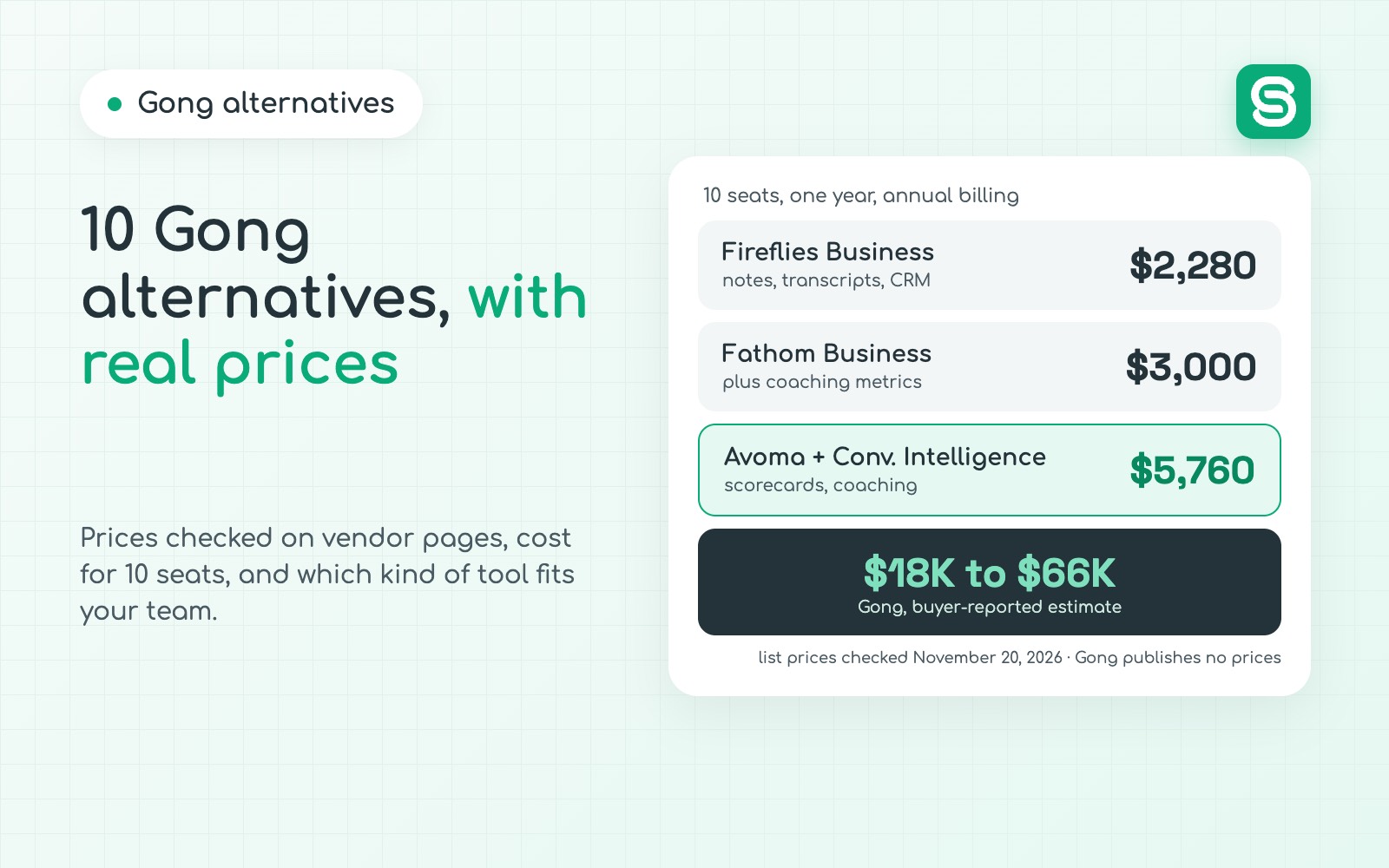
What do Gong alternatives cost for a 10-rep team?
List prices per seat are hard to compare in your head. Here they are as a yearly bill for 10 seats, annual billing, at the plan that comes closest to a “Gong-like” use for each tool. You can enlarge the chart or download it for your budget review.
The gap is wide, but the chart compares list prices, not like-for-like products. Three corrections to make before you take the cheapest bar to finance:
Which Gong alternative fits your team?
Start from what you use Gong for, not from the feature grid. The diagram below routes the four most common answers.
| Your team | Look at first | Why |
|---|---|---|
| 50+ reps, RevOps team, forecast calls every week | Salesloft with Clari, Chorus, Outreach | You need deal and forecast depth; negotiate within the platform you own |
| 10 to 50 reps, managers who coach weekly | Avoma with add-ons, Jiminny | Scorecards and coaching without Gong pricing |
| AEs drowning in CRM admin | Sybill, Fathom Business | Summaries and CRM fields filled automatically |
| Founder-led sales, under 10 seats | Fathom, Fireflies | Free or low-cost plans; Gong platform fee is hard to justify |
| SDR team on the phone all day | A dialer with recording, transcripts and summaries | Captures every call where it happens; add a scorecard for coaching |
Questions to ask every Gong alternative in a demo
Demos are built to show the best call. Use the same scorecard with each vendor so you compare answers, not presentations. Copy it into your evaluation doc.
Gong replacement scorecard
Template written for this article. Score each line 0 (no), 1 (partly), 2 (yes).
VENDOR: ____________   DATE: ________   EVALUATOR: ________

CAPTURE
[  ] Records our phone system / dialer calls (name it: ________)
[  ] Records Zoom / Teams / Google Meet
[  ] Transcribes short calls (under 1 minute) usefully
[  ] Handles the languages our reps sell in

WORKFLOW
[  ] Pushes summaries to our CRM as notes
[  ] Writes CRM fields (which ones: ________)
[  ] Search across all calls by keyword, competitor, rep

COACHING
[  ] Manager scorecards we can customize
[  ] AI-suggested or automated scoring (minimum call length: ____)
[  ] Talk-to-listen ratio, trackers, topics

DEALS AND FORECAST (only if we use them in Gong today)
[  ] Deal view across calls, emails, meetings
[  ] Risk warnings we would act on
[  ] Forecast workflow

COMMERCIAL
[  ] Published price, or written quote for our seat mix
[  ] Platform fee: yes / no   Setup fee: yes / no
[  ] Minimum term: ____ months   Minimum seats: ____
[  ] Viewer or listener seats at reduced or zero cost

MIGRATION AND COMPLIANCE
[  ] Can import or link our existing Gong recordings
[  ] Recording consent notice configurable per call type
[  ] Data retention settings and deletion on request

TOTAL: ____ / 40
The commercial block often decides it. A platform with a 12-month minimum and a setup fee can cost more in year one than a pricier tool billed monthly. Score the contract, not just the features.
How to switch from Gong without losing your call library
Your Gong library holds years of calls: onboarding examples, objection handling, win stories. Losing it is the hidden cost of switching. Plan the move like a migration, not a cancellation.
Read the contract
Find the renewal date, the notice period and the auto-renew clause. Many teams discover the switch window closed weeks ago. Set a calendar reminder for next year either way.
Audit usage
Export logins, listened calls and deal views per user. Decide which capabilities you’re really replacing, and which seats you can drop.
Save what matters
Ask Gong how you can export recordings and transcripts, and in what format. Then pick the 50 to 100 calls worth keeping (best discovery calls, top objection handling, recent wins) and save them where your new tool or your enablement library can reach them.
Run both in parallel
A pilot group on the new tool, same CRM, same scorecards. Compare summary quality and manager time per review.
Cut over and retrain
Update the recording notice, the CRM field mapping and the coaching cadence. Managers adopt a new tool when the weekly review gets faster, not when IT announces it.
Call recording consent doesn’t change with the tool
Whatever replaces Gong, recording law stays the same. Federal law and most states allow recording with one party’s consent, but several states require every party’s consent, and a call between states can bring in the stricter rule. Configure the new tool’s recording notice before the first call. Our guide to call recording laws for business covers the risk, the call recording laws by state tool gives the rule for each state, and the recording notice generator writes the disclosure for you.
Do you need conversation intelligence at all?
It’s worth asking before you sign anything new. Conversation intelligence pays when managers actually review calls and act on what they hear. If they don’t, the cheapest seat is still wasted.
- Managers run weekly call reviews with a scorecard
- You onboard new reps every quarter and want a library of real calls
- Deals involve several stakeholders and you forecast from deal signals
- Win/loss analysis is part of how you plan
- Nobody has opened a recording in the last month
- Reps want notes in the CRM, not analytics
- Your calls are short outbound conversations, mostly on the phone
- You have fewer than five reps and one manager who listens live
For the second group, a transcription tool plus a simple coaching routine does most of the job. Our AI call transcription and summaries guide explains what accuracy to expect, our best call transcription software roundup compares 13 options, and the sales call summary template gives you a format to standardize notes. If you’re looking for a recorder specifically, our sibling guide to call recording software compares the options, and for practice outside live calls, see our guide to AI sales role play.
Key takeaways
Sources
- Gong: pricing page (checked November 20, 2026)
- Quo: sales call coaching software, with third-party Gong price estimates
- ZoomInfo: Chorus product page
- Salesloft: pricing page
- destinationCRM: Clari and Salesloft to merge (August 2025)
- Business Wire: Clari and Salesloft complete merger (December 3, 2025)
- Outreach: pricing page
- Avoma: pricing page
- Jiminny: pricing page
- Sybill: pricing page
- Fathom: pricing page
- Fireflies: pricing guide
- Otter: pricing page
- tl;dv: pricing page
- Gong help center: AI Call Reviewer