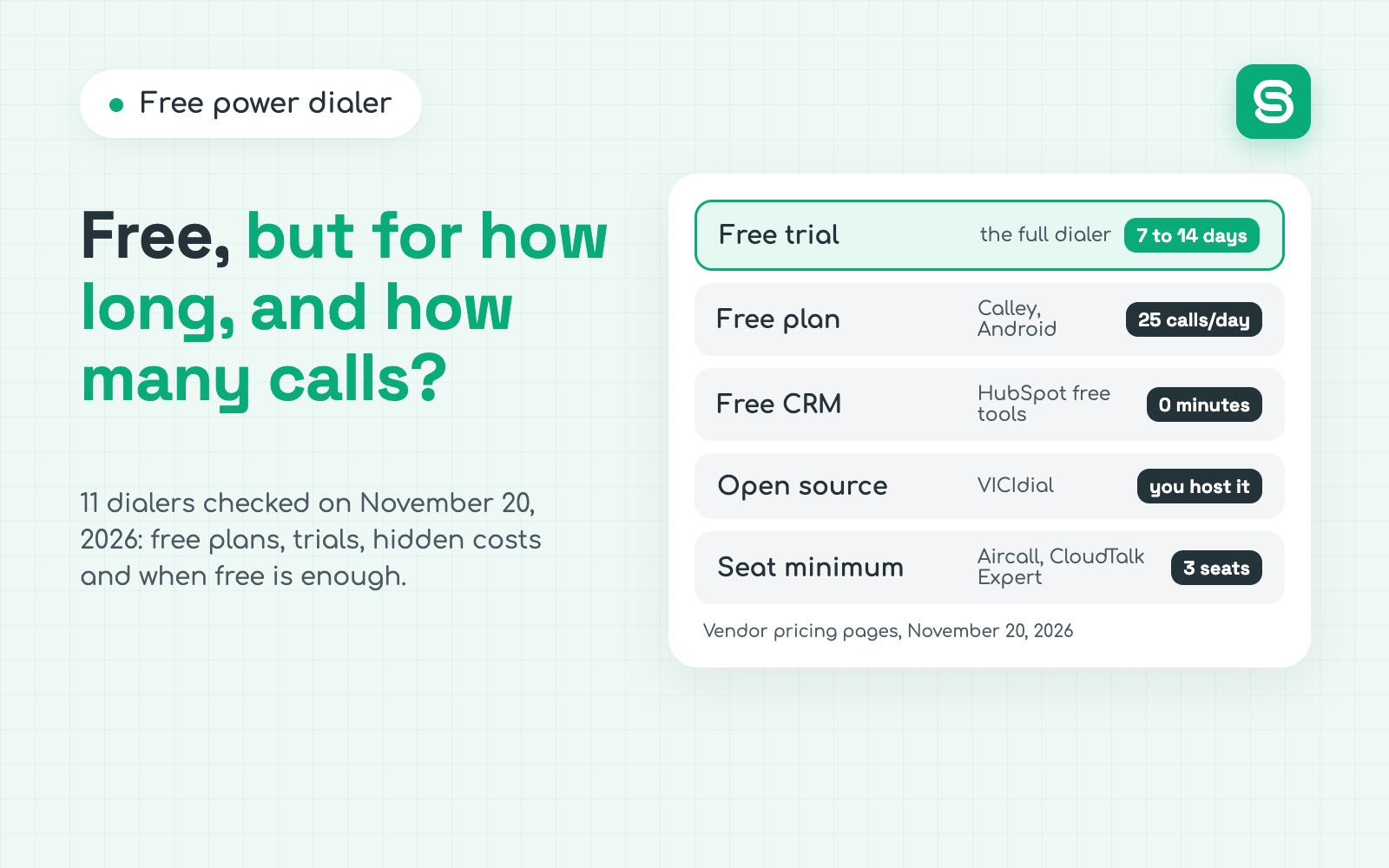
Search “free power dialer” and the results promise a lot: “free dialer,” “try free,” “start free.” Click through and most of those offers turn out to be a 7-day clock, a plan that can’t dial, or a price that only appears once you’ve entered a credit card. We read the pricing pages of 11 dialers and calling tools on November 20, 2026 to sort out what is actually free, for how long, and what the bill looks like the day free ends.
What does “free power dialer” actually mean?
A power dialer calls the next number on your list automatically as soon as the previous call ends. No typing, no clicking, no hunting for the next record. That automation is exactly what vendors charge for, so when a page says “free,” it nearly always means one of five things.
The distinction matters because each kind of free fails in a different way. A trial gives you the real product but ends before you’ve finished testing if you aren’t ready. A free plan lasts forever but caps volume far below a working day. A CRM’s free tier lets you log calls, but you dial them by hand. Open source removes the license fee and adds a server, a phone carrier and someone to maintain it. And “unlimited minutes” is a feature of a paid seat, not a free product, even when the ad puts the word “free” next to it.
If you’re also hunting for free tools for the rest of your outbound stack (list cleaning, number checks, scripts), our map of free sales prospecting tools covers 58 of them by step.
Which power dialers are free or have a free trial?
Here is what each official pricing page showed on November 20, 2026. Prices are per user per month in US dollars, before taxes. We list the cheapest plan that includes a power dialer, not the cheapest plan overall.
| Tool | Free offer | Cheapest plan with a power dialer | Catch |
|---|---|---|---|
| Calley getcalley.com/pricing | Free forever Personal plan | Free plan dials automatically; PRO plan priced in Indian rupees | 25 calls a day, one list of 50, one user, Android |
| Kixie kixie.com/pricing | 7-day trial, no credit card | Single-Line or Multi-Line PowerDialer, no price shown | Prices only through sales; voice detection and DNC are add-ons |
| PhoneBurner phoneburner.com/pricing | Free trial with free minutes | Standard, $140 billed annually, $165 monthly | Numbers are an add-on; 30-day recording storage on Standard |
| JustCall justcall.io/pricing | 14-day trial, no credit card | Pro, $49 billed annually, $69 monthly | 2-license minimum |
| Close close.com/pricing | 14-day trial, no credit card; no free plan | Growth, $99 billed annually, $109 monthly | Calls and numbers billed on usage |
| CloudTalk cloudtalk.io/pricing | 14-day trial on Expert, no credit card | Expert, $49 billed annually, or Starter plus a $15 power add-on | 3-license minimum on Expert |
| Aircall aircall.io/pricing | "Free access" sign-up, length not stated | Professional, $50 billed annually | 3-license minimum on every plan |
| Aloware aloware.com/pricing | 7-day trial, no credit card | uPro, $60 to $70 depending on billing | 5-user minimum |
| BatchDialer batchdialer.com/pricing | 7-day trial, 3 numbers during trial | Starter, listed at $95 per agent per month | Converts to paid when the trial ends |
| PowerDialer.ai powerdialer.ai/pricing | "Try for free" button; no free plan listed | Single Line, $45 a month, up to 250 minutes | Unlimited US and Canada calling starts at $139 |
| HubSpot hubspot.com/pricing/sales | Free CRM, no calling minutes | Sales Hub Enterprise only | Minutes pooled per account on paid editions |
CloudTalk’s dollar prices are from its US pricing page as read on November 13, 2026 for our dialer cost guide; on November 20 the page served euros from our location, with the same plan structure. HubSpot’s details come from our HubSpot calling limits breakdown, checked on November 5, 2026.
The trials, one by one
 Kixie
- Free offer
- 7-day free trial, no credit card required
- Dialer in the trial
- Plans include a single-line and a multi-line power dialer (up to 4 lines)
- After the trial
- Three plans listed with no public price; ask sales
- Worth knowing
- Unlimited US and Canada minutes; human voice detection, ConnectionBoost and DNC are paid add-ons
 PhoneBurner
- Free offer
- Free trial on every plan, with free minutes to test the dialer; an expanded trial for teams
- After the trial
- $140, $165 or $183 per user per month billed annually; $165, $195 or $215 monthly
- Worth knowing
- Recording storage of 30 days, 90 days or unlimited by plan; SMS over 1,000 a month costs $15 per 1,000
 JustCall
- Free offer
- 14-day free trial, no credit card, with access to SalesPro features
- After the trial
- Power dialer from the Pro plan: $49 per user per month billed annually, $69 monthly
- Worth knowing
- 2-license minimum, so one rep pays for two seats
 Close
- Free offer
- 14-day free trial, no credit card, with calling and AI credits; no free plan
- After the trial
- Power Dialer on Growth: $99 per user per month billed annually, $109 monthly
- Worth knowing
- A CRM with calling built in; calling minutes and numbers are billed on usage
 CloudTalk
- Free offer
- 14 days on the Expert plan, no credit card
- After the trial
- Expert $49 billed annually; or Starter $25 plus a $15 power dialing add-on
- Worth knowing
- Expert requires at least 3 licenses; Starter includes 500 domestic minutes per user
 Aloware
- Free offer
- 7-day free trial, no credit card required
- After the trial
- Power dialer on uPro + AI: $60 to $70 per user depending on billing
- Worth knowing
- Minimum of 5 users on uPro and 10 on iPro; unlimited agent minutes and SMS advertised
For a feature-by-feature look at the paid plans behind these trials, see our roundup of the best power dialer software.
Is there a free auto dialer?
Yes, in three narrow forms. None of them replaces a paid power dialer for a full-time caller, but each has a real use.
Calley: the only free-forever plan that dials automatically
Calley’s Personal plan is labeled “No Expiry” and costs nothing. It allows 25 calls per day, one calling list of up to 50 records and a single user, with preview and standard auto-calling modes. Calls go out through the phone’s SIM card or through VoIP, and the product is built around an Android app with browser calling. Paid plans (PRO and TEAMS, the latter with a 5-agent minimum) are priced in Indian rupees and come with a 7-day free trial. For a solo founder in the US calling 20 warm leads a day from a cell phone, it is a real free option. For a team, it isn’t.
Open source: VICIdial
VICIdial describes itself as a software suite that works with the Asterisk open-source PBX to act as a complete inbound and outbound contact center, used through a web browser. The software is free to download. Running it is not: you need a Linux server, a SIP trunk from a phone carrier (which bills per minute), someone who can configure dialing campaigns and caller IDs, and time to keep it patched and compliant. It also leans toward call center modes, including predictive dialing, which brings the FCC’s 3% abandonment cap into play. Our guide to predictive dialers explains why most B2B teams avoid that mode.
Your CRM and your own phone
Many CRMs have a free tier, but free tiers rarely include calling. HubSpot’s free tools include no calling minutes at all. So the zero-cost route most solo sellers actually use is a CRM free tier, a list, and a cell phone: dial by hand, log the call, move to the next record. It works. It is also the slowest way to call, which is the whole reason power dialers exist. Our explainer on auto dialers vs. power dialers shows what you gain at each step up.
- Let you test whether phone outreach works for your market before you spend
- Cover a founder calling a short warm list a few times a week
- Teach a new rep the basics without a purchase order
- Keep your data in tools you already use
- Daily caps (25 calls) or trial clocks (7 to 14 days)
- No automatic dialing on CRM free tiers
- Open source shifts the cost to servers, carrier minutes and admin time
- No voicemail detection, recording or CRM sync on the truly free options
Why don’t vendors give away a power dialer?
It isn’t stinginess. Three costs make a free-forever power dialer hard to sustain, and knowing them helps you read the offers that do exist.
Every call costs the vendor money. A CRM free tier costs its vendor a few database rows. A dialer that places calls pays a phone carrier for every minute and every number. That’s why the free offers above either cap volume (Calley’s 25 calls a day go out through your own SIM card, on your own phone plan), cap time (trials), or push the carrier bill onto you (open source).
Free calling attracts abuse. An account that can dial hundreds of numbers an hour for nothing is exactly what illegal robocallers look for. Unwanted calls from a vendor’s numbers hurt every customer who shares that vendor’s network and number pool, because carriers and call-labeling apps judge numbers by their behavior. So vendors gate dialing behind a card, a verified business, a sales call or a short trial. Our guide to caller ID reputation explains how those labels get assigned.
Compliance needs a known customer. Texting from a US business number goes through 10DLC registration, which requires a business identity. Calling consumers brings TCPA and Telemarketing Sales Rule obligations. A vendor can’t help an anonymous free user stay on the right side of those rules, and it carries part of the risk when things go wrong.
When a dialer is free, someone else is paying for the minutes: you, your phone plan, or the vendor for a week.
The practical takeaway: a trial with no credit card from an established vendor is a fair deal. A “free unlimited dialer” from an unknown site, with no business verification and no clear carrier behind it, deserves suspicion. If it’s that easy to call thousands of numbers for nothing, your numbers will share a network with people who do exactly that.
What are the hidden costs of a free or cheap dialer?
The price on the plan card is a starting point. The first invoice often adds four or five lines. Here is where they come from, with an example of each from the pages we read.
- 01
Seat minimums.
Aircall requires 3 licenses on every plan, JustCall 2, CloudTalk 3 on Expert, Aloware 5 or 10 depending on the plan. A solo rep pays for the empty seats. Our list of power dialers with no minimum seats sorts out who sells a single license. - 02
The dialer itself as an extra.
Several business phone systems sell the power dialer as an add-on (CloudTalk Starter: $15 a seat) or reserve it for a higher plan (HubSpot: Enterprise only). The cheap plan you saw may not dial at all. - 03
Calling minutes.
”Unlimited” usually means US and Canada under a fair-use policy. Capped plans run out: PowerDialer.ai’s Single Line plan lists up to 250 minutes, CloudTalk Starter 500 domestic minutes per user. Close bills calling on usage. International calls are almost always extra. - 04
Phone numbers.
One number is often included; the rest cost money. BatchDialer charges $2 per extra number on Starter, and PhoneBurner sells numbers as an add-on. If you plan on several local numbers, count them in. - 05
Texting registration.
If the dialer also sends SMS to US numbers, you’ll go through A2P 10DLC registration. Quo’s pricing page notes a one-time $19.50 fee collected by The Campaign Registry for the review. Our guide to 10DLC and cold texting covers the rest. - 06
Premium features.
Voicemail or human voice detection, DNC tools, longer recording storage and AI summaries often sit in add-ons or higher plans. Kixie, for example, lists its human voice detection as a premium add-on. - 07
Annual commitment.
The headline price usually assumes annual billing. Monthly runs higher: $165 instead of $140 at PhoneBurner Standard, $69 instead of $49 at JustCall Pro.
The cheapest seat is not the cheapest dialer. The cheapest dialer is the one with the lowest cost per conversation.
How much will the dialer really cost you?
Put the hidden lines into one number before you compare. The calculator below starts with a typical case: one rep, a $50 seat, a 3-seat minimum and one extra number. Change the fields to match the quote in front of you.
Real monthly cost calculator
Per month
$156
Per year
$1,872
Per calling rep, per month
$156
Default example: one rep on a $50 seat with a 3-seat minimum and one extra number at $6. Taxes and regulatory fees not included.
Seat price is still only half the picture. What a dialer is worth depends on how many conversations it gets your reps per hour. Our cost per meeting calculator turns a monthly bill into a cost per booked meeting, and the prospecting calculator shows how many dials and conversations you need to hit a meeting target.
When is a free dialer enough?
Free is the right call more often than vendors admit. The test is simple: how much time does one person spend on the phone each day, and what is an hour of their time worth?
Free is enough: you are a founder or a solo consultant calling under a few dozen warm contacts a day, or you want to test whether cold calling works in your market before buying anything.
A trial is the right step: you have a list of a few hundred contacts ready, one or two people who will call every day for a week, and a clear question to answer (conversations per hour, CRM sync, call quality).
Free is costing you: someone spends more than an hour a day dialing by hand, your team calls cold lists where most dials go unanswered, or you need recordings, voicemail detection and CRM sync to coach and report.
The hour test
Below that threshold, free wins. Above it, a paid seat pays for itself on time alone, before you count the extra conversations.
How to test a power dialer in a 7-day free trial
Most trials fail because the first three days go to setup. Prepare before you click “Start free trial,” then use the week to answer specific questions.
Before day one: prepare the list
Export 300 to 500 contacts you are allowed to call, with phone numbers in E.164 format and time zones filled in. Clean them with the free CSV cleaner and spot-check numbers with the phone number validator. Scrub against your internal do-not-call list.
Day 1: set up and make 20 calls
Connect the CRM, import the list, record a voicemail drop if the plan has one, and run one short session to check audio quality and caller ID display.
Day 2: test the CRM sync
Check that calls, outcomes, recordings and notes land on the right record without manual work. This is where most dialers disappoint.
Days 3 and 4: call at full speed
Run your normal calling blocks at your usual hours. Track dials, conversations and meetings per hour. If the tool has multiple lines, try one block with 1 line and one with 2 or 3.
Day 5: check the reports and the bill
Pull the activity report, then ask sales for a written quote: seats, minimum, add-ons, numbers, minutes, contract length.
Days 6 and 7: decide
Score the tool with the template below, compare it with your current setup, and cancel or convert before the trial ends.
Power dialer trial scorecard (out of 20)
Template written for this article. 2 = yes, 1 = partly, 0 = no.
Tool: ____________   Trial dates: ____ to ____   Tested by: ________

[  ] 1. We were calling within 30 minutes of signing up.
[  ] 2. Conversations per hour beat our current setup.
[  ] 3. Calls, outcomes and notes sync to the right CRM record automatically.
[  ] 4. Recordings and transcripts are easy to find and share.
[  ] 5. Voicemail is detected or a voicemail drop works in one click.
[  ] 6. Audio quality was clean on every call we placed.
[  ] 7. Caller ID displayed correctly; no spam label reported by prospects.
[  ] 8. Reps found it easy without training.
[  ] 9. The written quote matches the pricing page (no surprise add-ons).
[  ] 10. We can buy the number of seats we need, with no unwanted minimum.

Total: ___ / 20
16 or more: buy. 12 to 15: negotiate or test a second tool. Under 12: move on.

Monthly cost from the quote: $____   Conversations per hour: ____
Cost per conversation: $____
Six trial mistakes that waste the week
What should you look for in a power dialer, free or paid?
A free trial is only useful if you know what you are judging. These six criteria separate a dialer your reps will use from one they will route around.
- 01
Dialing modes.
One line for warm calls, and ideally a multi-line mode for cold lists. Our guides to batch dialers and parallel dialers explain when more lines pay off. - 02
Voicemail handling.
Detection that skips greetings, or at least a one-click voicemail drop. See how answering machine detection works and where it fails. - 03
CRM sync.
Native integration with your CRM, writing calls, outcomes and recordings to the right record. - 04
Recording and transcription.
To coach reps and keep a record of what was said. - 05
Calling hours and opt-outs.
Time zone filters and a way to stop calling someone who asked you to. - 06
Pricing you can read.
A public price, a clear minimum and add-ons listed before the demo.
Still unsure which type of dialer fits your team? The free dialer quiz recommends a mode from your list size, calling volume and team in under two minutes. And if you need to justify the budget to a manager, our sister guide to building a sales dialer business case gives you the numbers to bring.
Free trial or demo: which tells you more?
A free trial and a demo answer different questions, and the best buyers use both.
| Question | Free trial | Demo |
|---|---|---|
| Does it work with our list and our CRM? | Yes, if you prepare the list | Partly: ask to see your CRM connected |
| How many conversations per hour will we get? | Yes, after two or three real calling blocks | No, only the vendor’s claims |
| What will the bill be? | Rarely: the trial hides the quote | Yes: ask for a written quote on the call |
| What happens with compliance settings? | Only what you find in the settings | Yes: ask how calling hours, opt-outs and voicemail work |
A trial tells you how the product feels in your reps’ hands. A demo is where you get the answers a trial won’t give you: the price for your team size, the minimum, what is included and what is an add-on, how numbers are provisioned, and what happens on the day you want to leave. A good sequence for a small team is a 30-minute demo first, to ask the money and compliance questions, then a trial or a first month on a single license to measure conversations per hour.
For a team of three to five reps, the decision rarely comes down to the free offer anyway. It comes down to whether the tool will still fit in a year: how its price grows with each seat, whether the dialer you need is in the plan you can afford, and whether it syncs cleanly with the CRM your managers report from. The trial is one week. The contract is usually twelve months.
What a small team should do this month
- 01
Price three options with the calculator above.
Use your real number of callers and each vendor’s minimum. Ignore seat prices until the minimums are in. - 02
Prepare one clean list.
Three to five hundred contacts, numbers validated, time zones filled. You’ll reuse it for every trial. - 03
Run two tools on the same list, one week each.
Same reps, same hours. Compare conversations per hour and how much logging the reps still do by hand. - 04
Buy the smallest commitment that works.
One license per caller, monthly or annual depending on how sure you are. Add seats once the numbers hold.
Where Skipcall fits

Skipcall isn’t free, and we would rather say so up front. What it offers instead is the thing most free offers lack: you can buy one license, with no commitment, and no seat minimum. Plans with the power dialer and the parallel dialer (up to 4 lines per rep) start at $70 per license per month, billed annually, with recording, AI transcription and summaries, voicemail detection and native HubSpot, Pipedrive, Salesforce and Attio sync. Activation takes about two minutes. The full grid is on the pricing page. If you want to see it on your own list before deciding, a demo is the fastest route.
Key takeaways
Sources
All pricing pages read on November 20, 2026 unless stated otherwise.
- Calley: pricing (Personal free plan, PRO and TEAMS)
- Kixie: plans
- PhoneBurner: pricing and trial FAQ
- JustCall: pricing and trial FAQ
- Close: pricing and trial FAQ
- CloudTalk: pricing (USD prices read November 13, 2026)
- Aircall: pricing and FAQ
- Aloware: pricing
- BatchDialer: pricing and FAQ
- PowerDialer.ai: pricing
- Quo: pricing (10DLC review fee)
- HubSpot: Sales Hub pricing (read November 5, 2026)
- VICIdial: open source contact center suite