Enterprise prospecting starts the moment a rep types “VP of Sales” into a company with 8,000 employees and gets 14 results. Which one owns the budget? Which one is three weeks from leaving? Who actually feels the problem you solve? Call the wrong one first and you’ve used your best shot on someone who forwards you to procurement. Call nobody and the account stays a logo on a target list for another year.
What is enterprise prospecting?
Enterprise prospecting is outbound work aimed at large organizations: identifying them, finding the people who matter inside them and getting a first qualified meeting. There’s no official threshold, but most sales teams use employee count or revenue to segment, and “enterprise” usually starts somewhere between 1,000 and 5,000 employees. This guide uses 1,000+.
What changes isn’t only size. It’s how decisions get made. At a 40-person company, the founder or a VP decides, often on one call. At a 6,000-person company, a purchase involves several functions, a formal vendor process, a security review and a budget that was planned months earlier. Your prospecting has to fit that machine.
The buyer has also changed the timing. In 6sense’s 2024 Buyer Experience Report, a survey of about 2,500 B2B buyers, buyers were nearly 70% of the way through their purchase process before engaging sellers, and they initiated first contact more than 80% of the time. Demand Gen Report’s coverage adds that 81% already had a preferred vendor at that point. Gartner has long found that B2B buyers spend only 17% of their buying time meeting with potential suppliers, all suppliers combined.
Read those numbers the right way. They don’t say outbound is dead. They say that if you wait for the enterprise buyer to come to you, they arrive with a favorite already picked. Enterprise prospecting is how you get into the 30% of the journey that happens before the shortlist exists, by reaching the people who are defining the problem.
Enterprise vs. SMB prospecting: what actually differs
| Dimension | SMB and mid-market | Enterprise (1,000+) |
|---|---|---|
| Who decides | One or two people, often the owner or a VP | A buying group across several functions |
| Accounts per rep | Hundreds, worked as a list | A few dozen, worked one by one |
| Research per account | A minute or two before the call | An account map, built and updated |
| Who answers the main number | Often the person you want | A switchboard, an IVR or an assistant |
| What a first meeting needs | Interest from the decision-maker | A champion, a problem and a reason now |
| Time to first meeting | Days | Weeks, across several threads |
If you’re new to outbound in general, our sales prospecting guide covers cadences and channels for every segment. This article stays on what is specific to large accounts.
How do you choose which enterprise accounts to prospect?
The most expensive mistake in enterprise prospecting happens before the first call: a list that’s too long. Large accounts reward depth, and depth doesn’t scale to 400 logos. Tier your list so effort follows the odds.
- 01
Start from fit, not size.
Industry, use case, tech stack, regions, regulatory exposure. A 3,000-employee company that matches your best customers beats a Fortune 100 that doesn’t. Our ICP and lead scoring tool helps you weight the criteria. - 02
Add a reason to act.
New executive in the role you sell to, funding or acquisition, expansion into a new region, a hiring spree in the team you serve, a public initiative in the annual report. Our guide to turning buying signals into a call list shows where to find each one. - 03
Tier the list.
Tier 1 gets a full account map, research and a multithreaded sequence. Tier 2 gets a lighter map and two or three threads. Tier 3 gets a standard sequence to the most likely persona, and moves up when a signal appears. - 04
Cap tier 1.
Size tier 1 to what one rep can actually map and work at once. The worked example below lands around 30 active accounts; your number depends on how many people each account needs and how much research your market takes. - 05
Review monthly.
Accounts with no signal and no reply after two full sequences drop a tier. Accounts where a signal fires move up the same week.
Rule of thumb: if a rep can’t name the three people they’re working at each tier-1 account without opening the CRM, the tier is too big.
What is account mapping, and how do you build one?
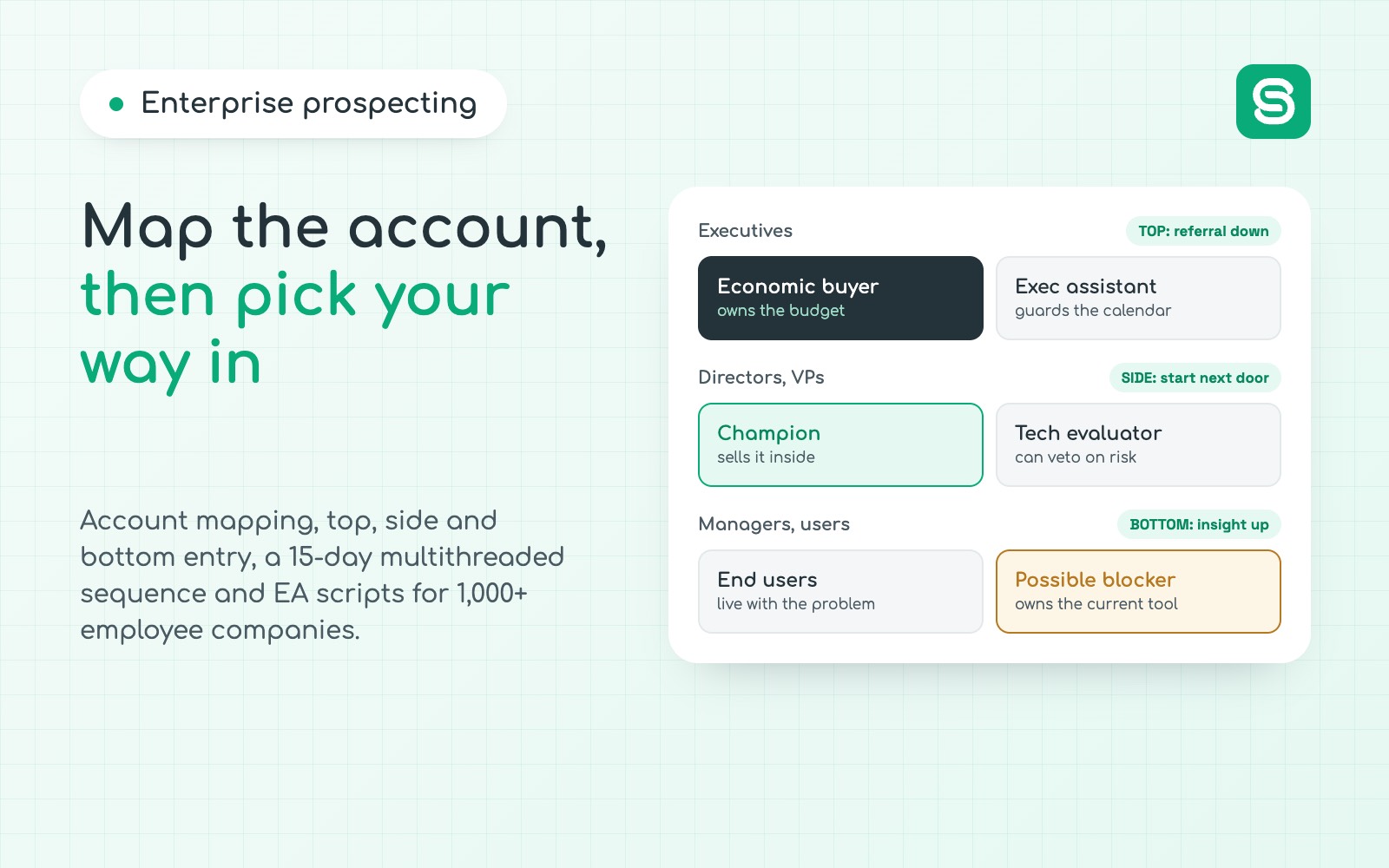
An account map is a written picture of the buying group: who holds which role, how they relate, how to reach them and where you stand with each. It’s the document that turns “Acme Logistics” into “call the regional operations manager in Memphis first, then the director of sales ops, then the CRO’s assistant.” You can enlarge or download the diagram below.
The roles to fill on every map
Where the information comes from
No database shows a buying group. You build it from five sources: LinkedIn (titles, reporting lines, tenure, recent posts), the company’s own website and investor materials (leadership pages, annual reports, earnings calls for public companies), job postings (what a team is hiring for tells you what it’s building), your CRM (past opportunities, churned contacts, closed-lost notes), and, most valuable, the calls themselves. LinkedIn gets the names in; the phone tells you which names matter.
Number type matters at this stage. Large companies route a lot of traffic through a main line and an auto-attendant, and a desk number can ring in an empty office. Our guide to direct dial, mobile or switchboard numbers explains what each actually connects, and the direct dial checker helps you sort a list before you dial.
A copy-ready account map template
Enterprise account map (one per tier-1 account)
Template written for this article. Paste into a CRM note or a doc, one block per person.
ACCOUNT: [Company] | HQ: [city, time zone] | Employees: [number]
Fiscal year starts: [month] | Trigger: [what changed, source, date]
Why us, why now (one sentence): [...]

PERSON 1
Name / title: [...]
Role in the buying group: [economic buyer / champion / tech evaluator / user / procurement / possible blocker]
Reports to: [...]
Phone: [direct / mobile / switchboard + extension] | Best time (local): [...]
What they care about (in their words): [...]
Status: [not contacted / spoke / meeting / champion confirmed]
Next step + date: [...]

(repeat for 4 to 8 people)

OPEN QUESTIONS
Who owns the budget for this? [...]
Who would run the evaluation? [...]
What did they try before, and why did it stop? [...]
The “open questions” block is the point. Every call in the first week should close one of them.
Where do you enter an enterprise account: top, side or bottom?
There are three ways in, and each trades authority against information. None is right every time. The best sequences use more than one, in a deliberate order.
Top entry: start with the executive
You call the VP or C-level who owns the problem, with a short, specific reason. Even if they don’t take the meeting, a referral down (“talk to Dana, she runs that”) gives you the best opener in sales: “Your CRO suggested I speak with you.” Our scripts for calling CFOs and VPs of Sales adapt the opener to each seat.
The risk: executives get the most calls and have the least patience. A generic pitch burns your one shot, and their assistant will remember your name.
Bottom entry: start with the people who feel the problem
You call managers or individual contributors who live with the issue every day. They take calls more readily, they talk more freely, and they give you what you need for later calls: their vocabulary, the numbers they track, the tool they use today, the name of the person who decides.
The risk: you can spend weeks with friendly people who can’t buy, and a user who likes you is not a champion.
Side entry: start next door
You call an adjacent function that touches the problem without owning it: sales ops when you sell to sales, finance ops when you sell to procurement, a regional director in another division. They know the landscape, they have no stake in defending the status quo, and they can introduce you across.
The risk: introductions take longer, and the adjacent team may not want to spend political capital on you.
| Entry point | Best when | What you ask for |
|---|---|---|
| Top | You have a strong trigger (new exec, initiative, public goal) and a sharp point of view | A meeting, or the name of the person who owns it |
| Bottom | You need to learn how the work is done and who decides | Ten minutes of insight, then a name above them |
| Side | The obvious owner is crowded by vendors, or you have a contact in another division | Context and a warm introduction |
The bottom of the account tells you what to say. The top of the account decides whether it matters.
A good default for a tier-1 account: one week bottom or side, then the top. By the time you call the executive, you can say something nobody else calling them can: what their own team told you, in their own words, without breaking anyone’s confidence. Our sibling article on multithreading in sales goes deeper on keeping several threads alive once the deal is open.
Scripts for each entry point
Three openers: top, bottom, side
Written for this article. Replace the brackets; keep each under 30 seconds.
TOP (executive, with a trigger)
"Hi [Name], it's [your name] from [company]. I'll be brief. You took over [sales / operations] in [month], and when leaders in your seat [specific change], the first thing that usually breaks is [problem]. I'm calling to see if that's on your list this year. If not, who on your team owns it?"

BOTTOM (manager or user)
"Hi [Name], [your name] from [company]. I'm not calling to sell you anything today. I'm trying to understand how teams like yours handle [process] at a company your size. Could I ask you two quick questions? ... Thank you. Who would normally look at changing that?"

SIDE (adjacent team)
"Hi [Name], [your name] from [company]. I work with [function] teams on [problem], and your colleagues in [team] are probably closest to it. Before I reach out to them, I'd value your view: is this a live topic, and who would you talk to first?"
Whichever opener you use, the goal of the first call is the same: one fact you didn’t have, and one name you didn’t know.
How do you get past the switchboard and executive assistants?
Large companies put two layers between you and the people you want: a main line (often an auto-attendant or a front desk) and, for executives, an assistant who manages the calendar. Both are part of the account. Treat them that way.
The switchboard
The main line is slower than a direct number, but it’s not useless. In a 100% anonymized sample of 86,168 calls placed on Skipcall between November 2025 and November 2026, mostly to French companies, lists of mobile numbers were picked up 18.7% of the time, against 13.9% for lists of business locations with no named contact, which are mostly switchboards. A pickup on a switchboard isn’t the person you want, but it can be a useful conversation.
The executive assistant
An executive assistant at a large company isn’t a front desk. They often control the calendar, triage email, and have their executive’s trust. Some decide which vendors get a meeting. Lying to them (“Dana is expecting my call”) is the fastest way to be blocked for good.
Be transparent
Your name, company and the one-sentence reason. “I’m calling because your CRO’s team is hiring 40 SDRs in Austin, and that usually creates a ramp problem we help with.”
Ask for help, not access
“What’s the best way to get fifteen minutes with her on this, or is there someone on her team who owns it?”
Give them something to forward
Offer a three-line email they can pass on. Write it so it stands on its own: problem, proof, ask.
Follow up through them
Call back on the day they suggested. Thank them by name. You’ll talk to them again when the deal opens.
Our cold call gatekeeper script has twelve techniques word for word, and works for front desks and assistants alike.
What does an enterprise prospecting sequence look like?
An enterprise sequence is not one cadence sent to six people. It’s several threads, timed so each one feeds the next. The diagram shows a 15-business-day plan for one tier-1 account.
- 01
Days 1 to 5: learn from users.
Call two or three managers who live with the problem. Ask how they do it today, what it costs them, who decides. Email a short thank-you that restates what you heard. Connect on LinkedIn. - 02
Days 3 to 13: build the champion thread.
Open with the director most likely to own a fix, using what users told you (without naming them unless they agreed). Aim for a 20-minute call to test the problem and the stakes. - 03
Days 8 to 14: bring in the technical side.
A short note to IT or security: what you’d connect to, where data lives, which reviews you’ve passed. Early transparency prevents a late veto. - 04
Days 11 to 15: go up.
Email, then call the economic buyer with a point of view: “Your regional teams are handling X with Y; here’s what that costs at your volume.” Leave a voicemail that refers to the email. - 05
Day 16 onward: recycle or advance.
No meeting? Pause the account for 30 to 60 days and restart when a signal appears. Meeting booked? Keep the other threads warm; they’re your multithreading later.
A few principles make this work. Space touches across people so the account doesn’t feel carpet-bombed: two people at the same company comparing notes about your third call this week is not the impression you want. Write every touch so it stands alone. And log every call outcome in the map, because the sequence changes based on what you learn. Our guide to B2B sales cadence covers touch counts by deal size, and the sales cadence generator builds a starting plan in a minute.
When is the best time to prospect enterprise accounts?
Timing in enterprise prospecting runs on three clocks: the calendar of the company, the calendar of the person and the clock on the wall.
Avoid the obvious dead zones: the last two weeks of a fiscal quarter for anyone in sales or finance, the two weeks around year-end holidays, and the week of a major earnings call for executives at public companies. And when a trigger fires (a press release, a leadership change, a hiring push), move fast. The value of a signal decays in days, not months.
Enterprise prospecting examples: three accounts, from logo to meeting
These three scenarios are illustrations built for this article. Company names are withheld because they’re composites, but the paths reflect how enterprise accounts usually open.
Notice what the three have in common. None started with a generic pitch to the top. Each used a trigger, each collected words and facts from inside the account before the executive call, and each ended with more than one person in the first meeting. When those meetings turn into an opportunity, a discovery call template keeps the first conversation structured, and our guide to sales cycle length explains why enterprise deals take as long as they do.
The most common enterprise prospecting mistakes
What tools does enterprise prospecting need?
You need less than vendors suggest, and you need it wired together.
- A CRM where the account map lives: roles, numbers, status, next steps.
- A source of names and titles: LinkedIn, plus a contact database if your market needs one.
- A phone setup that logs every call and outcome back to the CRM.
- A way to sequence calls, emails and LinkedIn touches per person.
- Call recording and transcripts, so what users tell you reaches the next call intact.
- High-volume dialing modes on tier-1 accounts: speed matters less than preparation.
- Intent data used alone: it says an account is researching, not who or why.
- Automated sequences with no human review on executives.
- Any tool that makes it easy to load 50 people from one company into the same cadence.
For the calling layer, Skipcall gives reps a power dialer for one-by-one calls with notes in front of them, plus call recording, AI transcription and summaries, voicemail detection and sync with HubSpot, Pipedrive, Salesforce and Attio. Its phone and email enrichment works on contacts you already have; it’s not a contact database. On tier-1 accounts, most teams dial one line at a time; the four-line parallel dialer fits tier-3 lists better, where volume matters more than preparation.
Key takeaways
Sources
- 6sense: 2024 Buyer Experience Report press release (BusinessWire, October 9, 2024)
- Demand Gen Report: 80% of B2B buyers initiate first contact once they’re 70% through their buying journey
- Gartner: press release on B2B sales interactions and the 17% of buying time spent with suppliers (September 15, 2020)
- The Bridge Group: 2025 SDR Models and Metrics report
- Skipcall: a 100% anonymized sample of 86,168 calls placed on Skipcall, November 2025 to November 2026, mostly to French companies